AcruxCore vs Agenta: built-in evaluators vs a gateway
Agenta is an open-source platform from Agentatech UG. Its README describes a workspace where you build agents by chatting with them. You then talk to those agents in Slack, Telegram or WhatsApp. Behind the agent pages, Agenta also ships a prompt registry, a playground, evaluation, annotation queues and tracing. Agenta documents those parts in its v1.0 docs, which it marks as no longer actively maintained. Those parts still ship in version 0.122.7, the version we ran. This post compares those parts with AcruxCore, because those are the parts the two products share.
We ran Agenta 0.122.7 on one machine with its own Docker Compose file. The prompt, the customer message and the model were the same on both sides. Each section below shows what we saw on Agenta, then what AcruxCore does with the same prompt.
Every paired screenshot comes from one prompt, vip-support-triage. The prompt changes its
tone for VIP customers and lists their open tickets with {% if %} and {% for %}. Both
sides ran openai/gpt-4o-mini through OpenRouter. The latency benchmark sends every leg to
the same OpenRouter model. Agenta's default web app opens on its agent pages, so we reached
the prompt, evaluation and observability pages through the classic view
(?view=desktop). License, pricing, team structure and community numbers are on the
compare page, not in this post.
At a glance
| Aspect | Agenta | AcruxCore | Winner |
|---|---|---|---|
| Evaluators | 15 built-in types, from exact match and regex to code, webhook and LLM judge, all set up in the UI | LLM judges on the server; code scorers run in your own process through the SDK | Agenta |
| Evaluation workflows | Auto, human, live and SDK evaluations, plus annotation queues | Server-side runs, local experiments and sampled rules on live traffic, with no annotation queue | Agenta |
| Prompt versions and deployment | Versions and variants, a diff in the commit dialog, and three environments by default | Immutable versions, aliases with any name, and a diff between any two versions | Depends |
| Jinja2 templates | Renders {% if %} and {% for %}. A variable that appears only inside these tags gets no input field | Renders the same tags and gives every variable an input field | AcruxCore |
| Where model calls run | Agenta's invoke service calls the model for a stored prompt, with no spend cap or cache | A gateway in the request path, with budgets, caching and virtual keys | AcruxCore |
| Latency overhead, measured | Invoke: −107 to +160 ms over 3 runs; every interval crosses zero | Gateway: +27 to +293 ms over 3 runs; every interval crosses zero | Tie |
| Tracing | Invoke calls trace themselves; SDK calls need OpenTelemetry setup and a store_refs call | Gateway calls trace themselves and link to the prompt version | Depends |
| Tools | Third-party actions through Composio and MCP servers for agents; tool schemas typed per prompt | A catalog of your own tools, versioned, run by the gateway, with per-tool analytics | AcruxCore |
Evaluation
Agenta's source defines 15 built-in evaluator types. Eleven of them are rules that need no model: exact match, starts with, ends with, contains, contains any, contains all, regex, contains JSON, JSON diff, Levenshtein distance and similarity match. Semantic similarity compares embeddings. A webhook test sends the output to your own URL for a score. A custom code evaluator runs your code inside Agenta. The fifteenth type is an LLM judge.
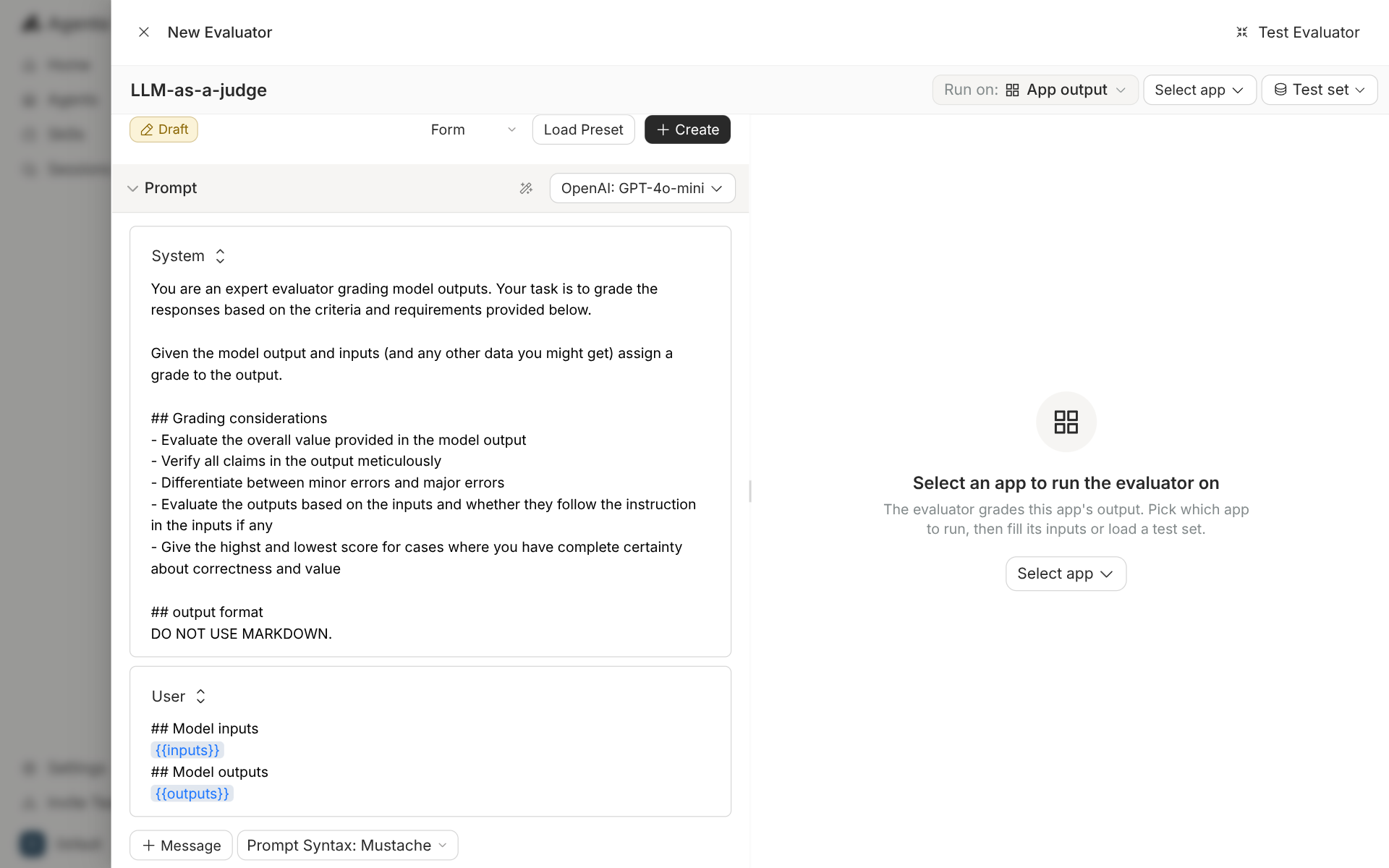
We created an LLM judge from the evaluators page. The judge prompt is editable and ships with a grading prompt already written. A test panel on the right runs the judge against an app before you save it.
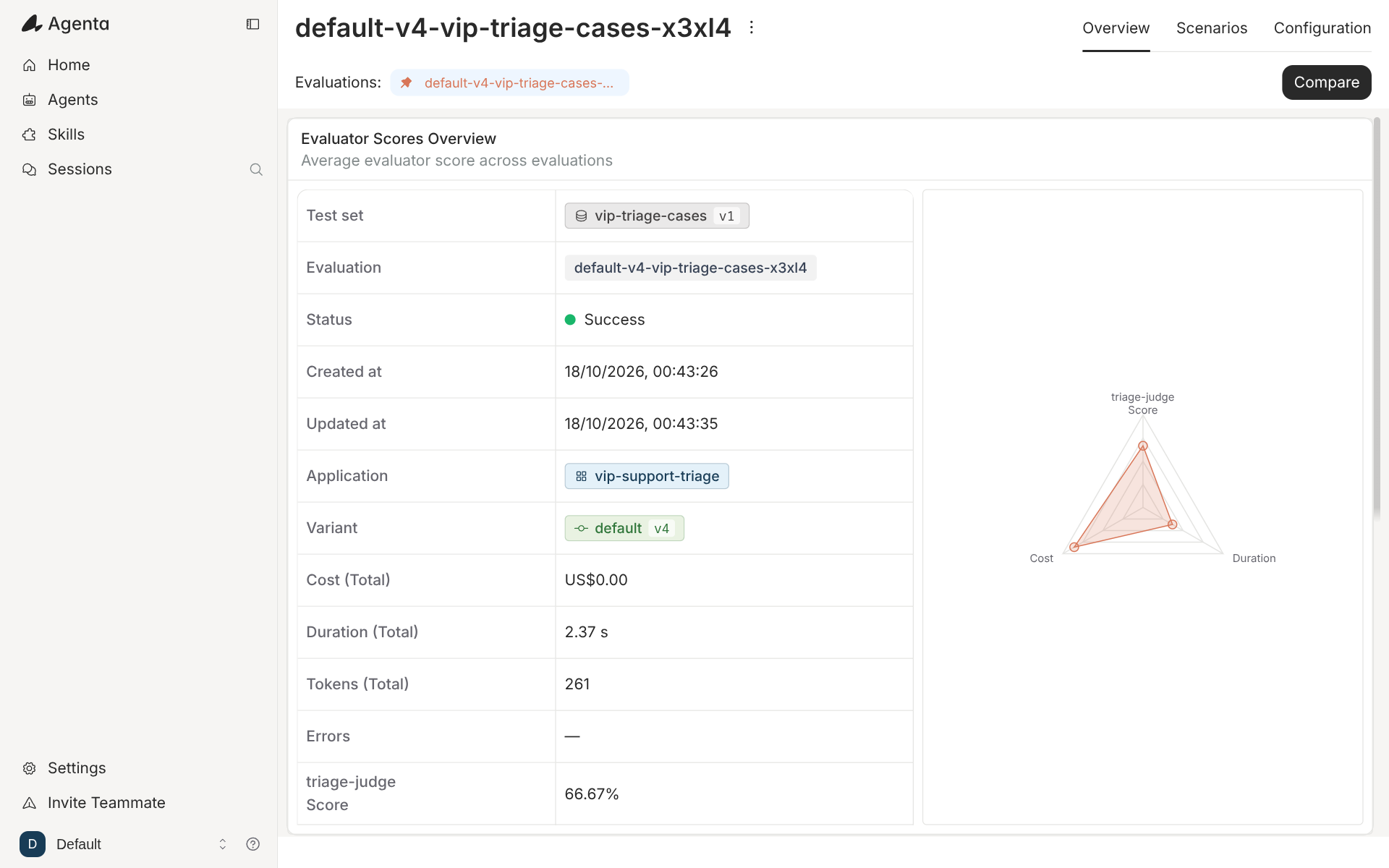
Then we started an auto evaluation from the evaluations page. The wizard took the app, the
revision, a test set and the evaluators. We picked revision v4 of vip-support-triage, a
three-row test set called vip-triage-cases, and the judge. The run finished in 2.37
seconds, and the judge's average score was 66.67%.
The same page offers four kinds of evaluation. Auto runs a test set through evaluators. Human collects ratings from people. Live scores production traffic. SDK runs an evaluation from your own code and reports it back.
AcruxCore covers three of the four. An experiment runs a stored prompt over a dataset on the server and scores each answer with an LLM judge. A local experiment runs your own app and your own code scorers through the SDK, and AcruxCore stores the scores. An evaluation rule samples live traces and scores them with a judge. The difference is the server-side rule library. AcruxCore scores on the server with an LLM judge only. A regex or an exact match has to be written as a code scorer in your own process.
| Feature | Agenta | AcruxCore |
|---|---|---|
| Built-in rule evaluators | 11 types, set up in the UI | None on the server; code scorers in your process |
| LLM judge | Yes, with an editable prompt and a test panel | Yes, with a custom judge prompt |
| Custom code evaluator | Runs in Agenta | Runs in your process, through the SDK |
| Scoring live traffic | Live evaluations | Evaluation rules, sampled |
| Human review | Human evaluations and annotation queues | Trace feedback, with no queue |
| Dataset from traces | "Add to testset" on a trace | A dataset from the feedback list |
Prompt versions and deployment
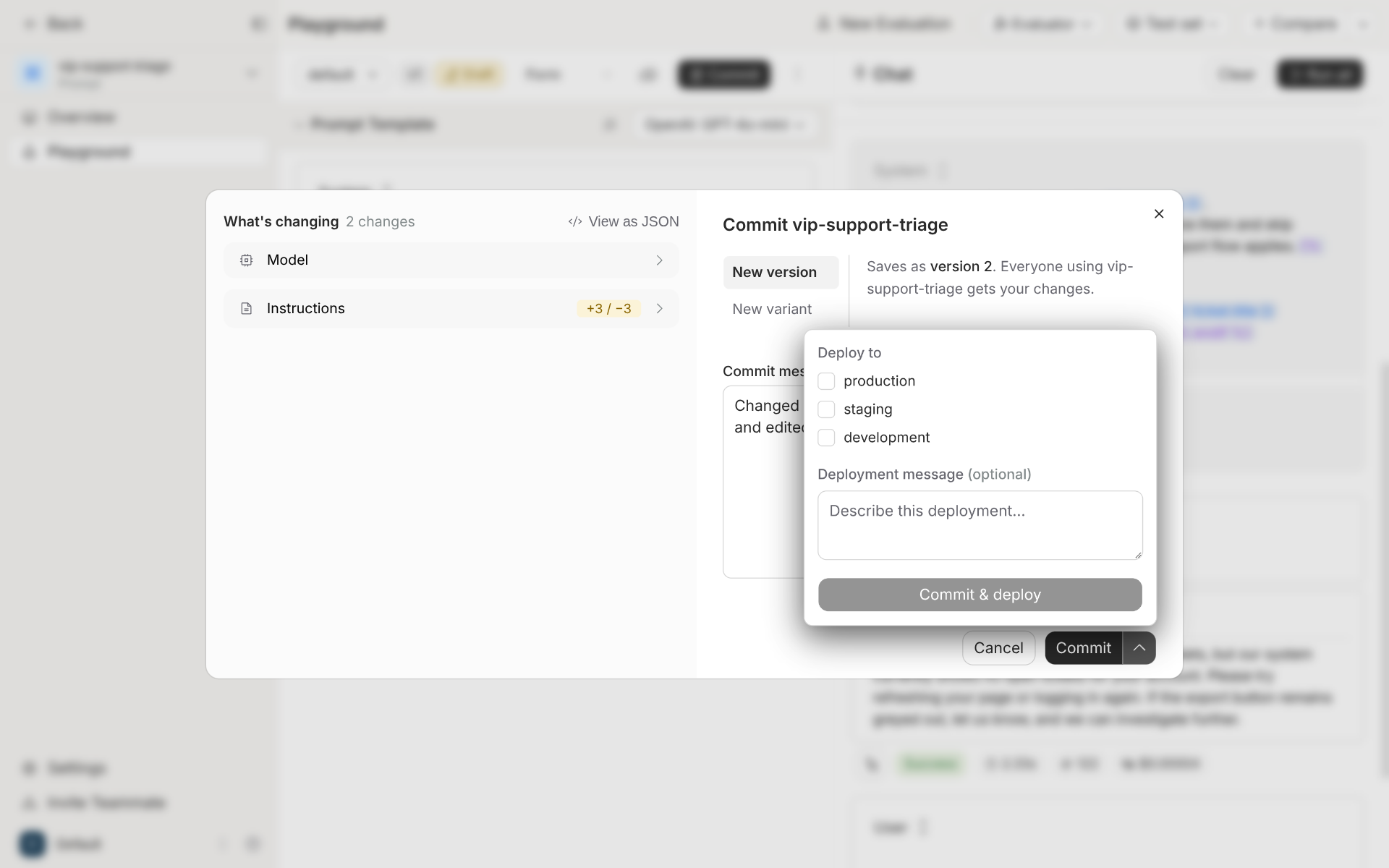
Agenta stores a prompt as an app with variants, and each variant has versions. The commit dialog shows what changed before you save. The dialog also lets you save as a new version or as a new variant, and deploy in the same step. The deploy list has three environments by default: production, staging and development.
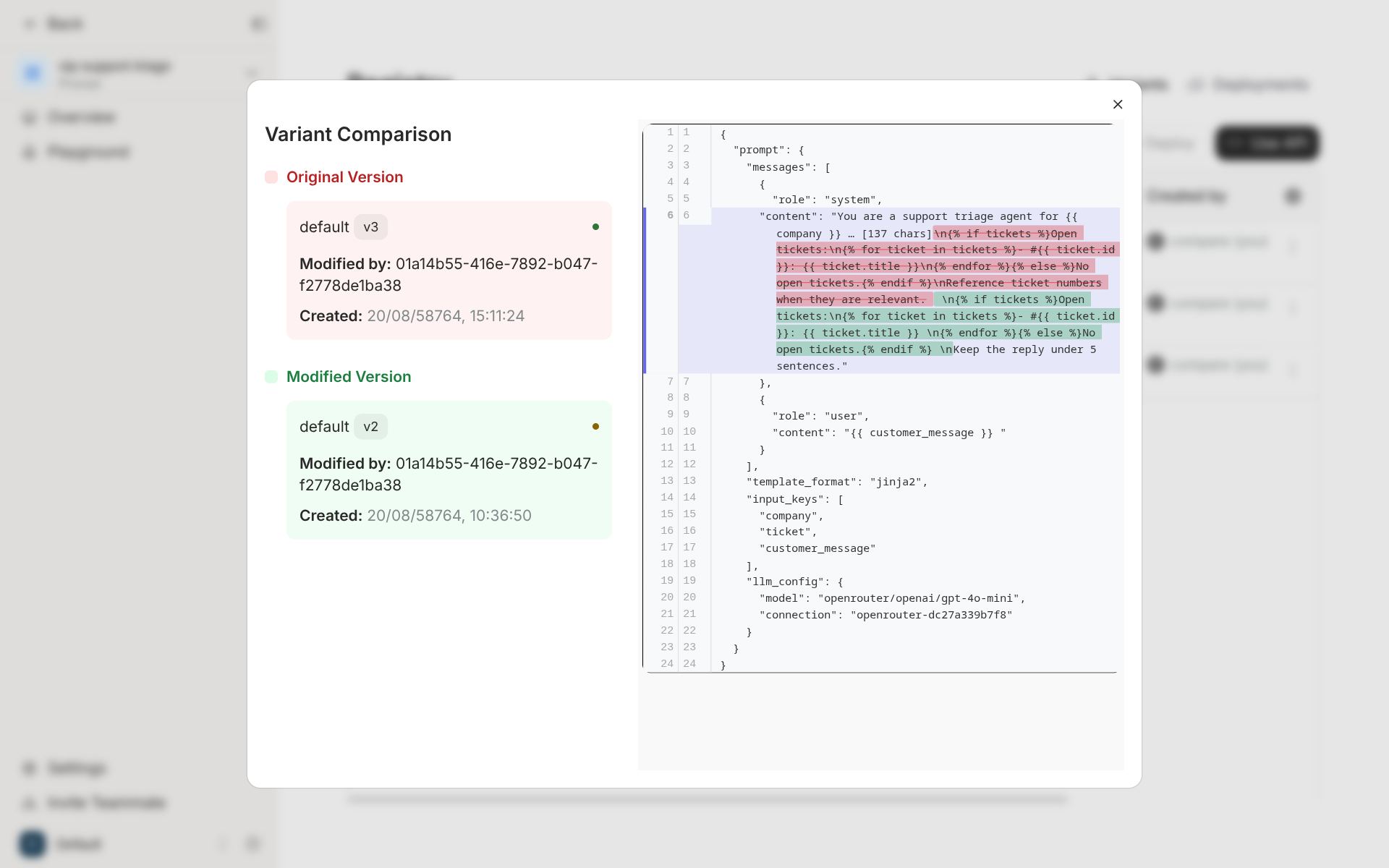
A registry page compares two versions as JSON. The diff covers the whole stored config: the messages, the template format, the list of input keys and the model settings.
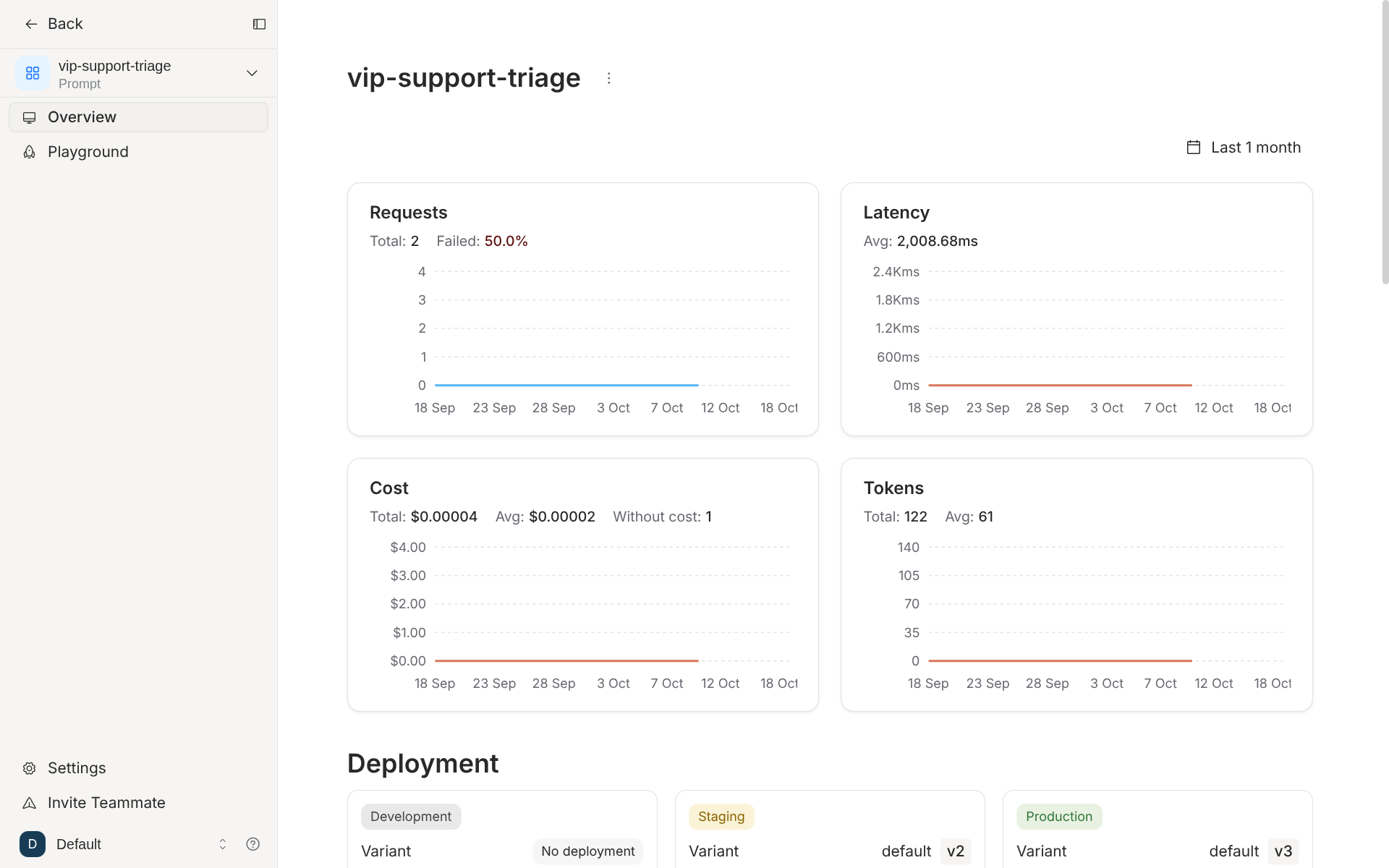
Each prompt also has an overview page. It charts requests, latency, cost and tokens for that prompt, and shows which version each environment runs.
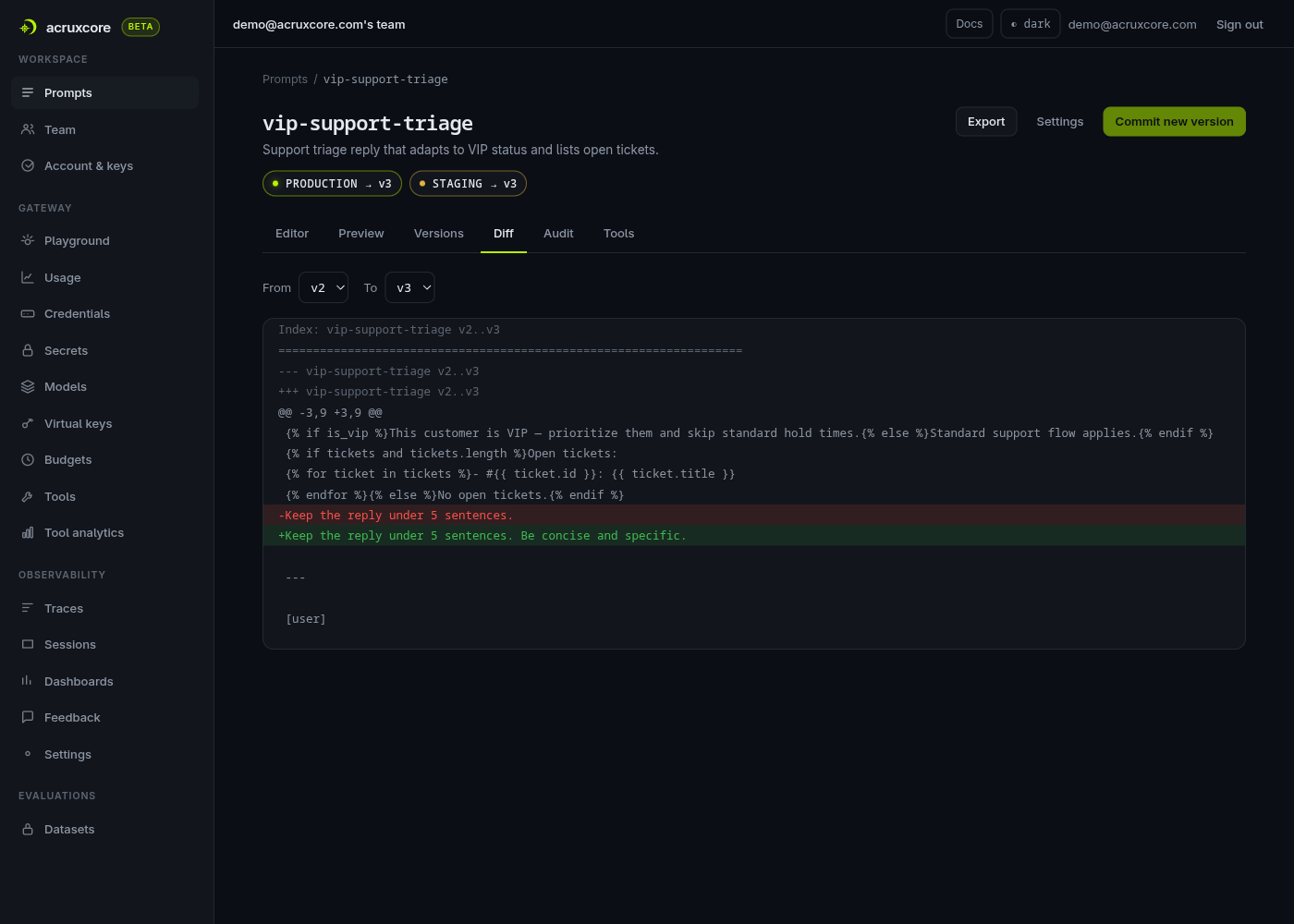
AcruxCore has one line of versions per prompt and no variants. Each version is immutable.
An alias points at a version, and an alias can have any name, so canary or eu-prod works
as well as production. The diff tab compares the template text of any two versions.
| Feature | Agenta | AcruxCore |
|---|---|---|
| Version history | Versions inside variants | One line of immutable versions |
| Branches of one prompt | Variants | None |
| Environments | Three by default | Aliases with any name |
| Diff | JSON diff of the whole config, plus a diff in the commit dialog | Diff of the template text, any two versions |
| Per-prompt usage charts | Requests, latency, cost and tokens | In trace analytics, grouped by prompt version |
Jinja2 templates
Both products render Jinja2. In Agenta you set the prompt syntax to Jinja2, and the services container renders it in a sandbox. In AcruxCore every prompt is a template.
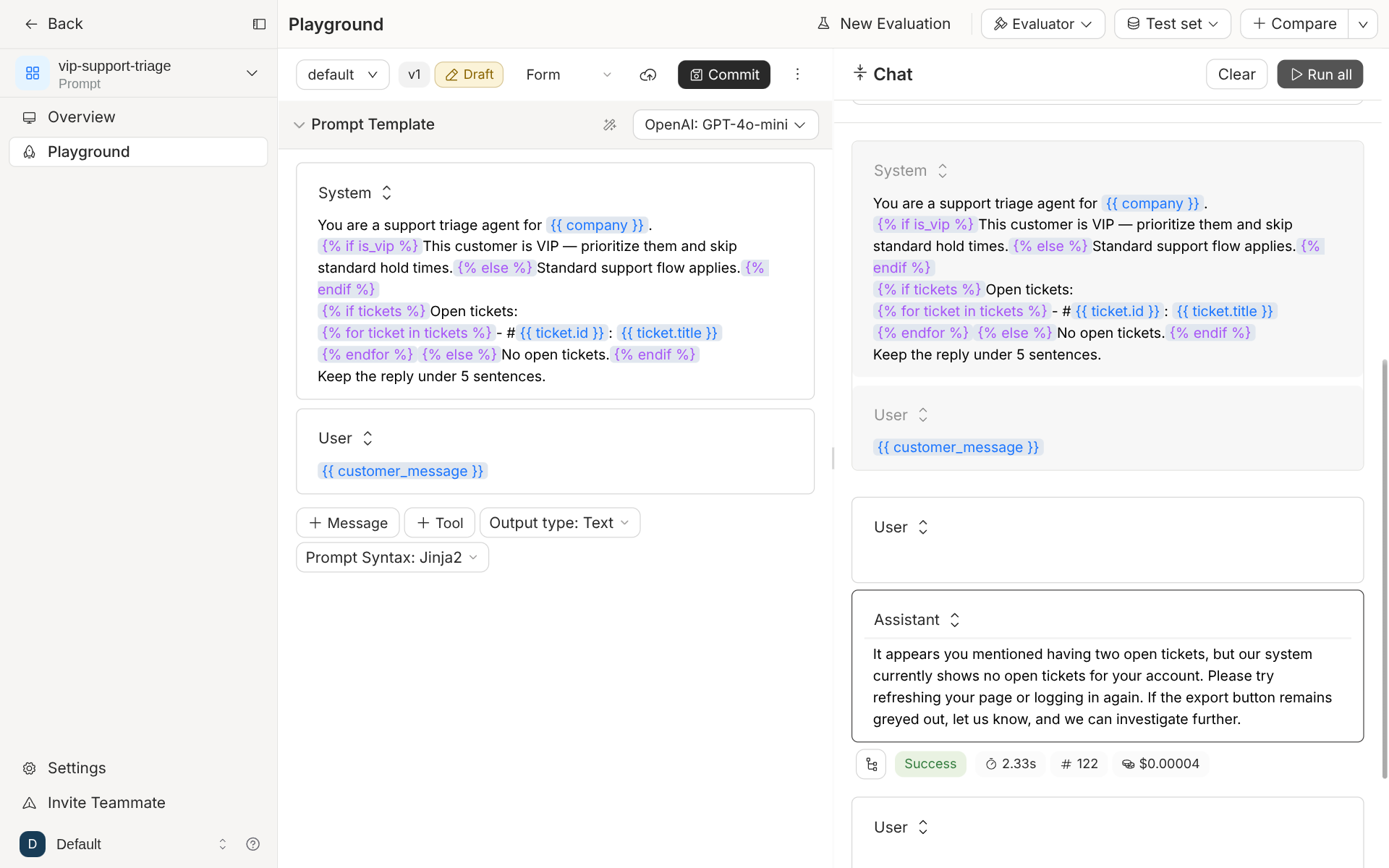
The difference is how each one finds the variables. Agenta's editor read our template and
listed two inputs: company, and an object called ticket with id and title fields.
The editor missed is_vip and tickets, the two variables that appear only inside
{% if %} and {% for %}. The editor also listed ticket, the loop variable that the
template sets itself.
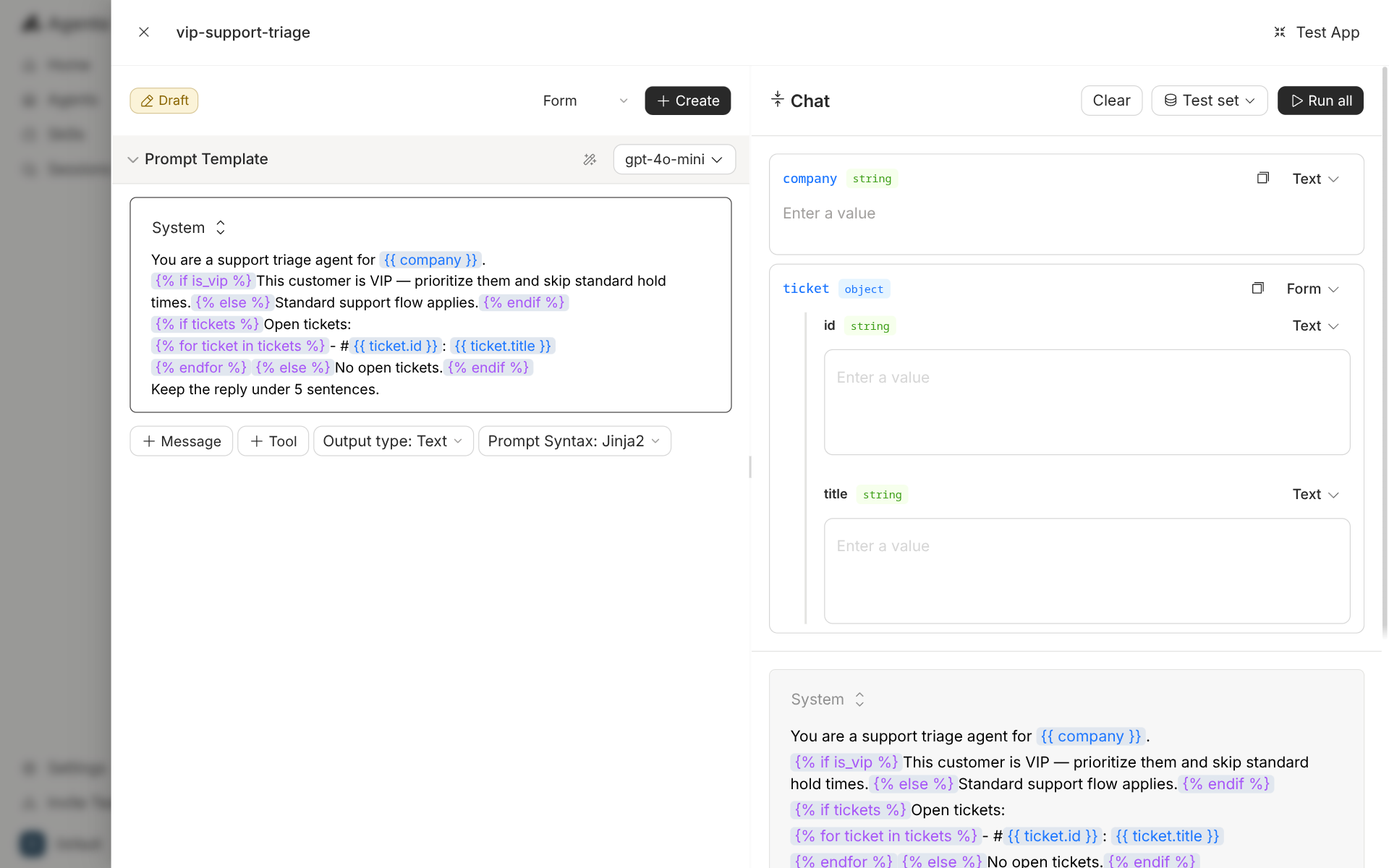
The playground has no field for the missing variables, so both {% else %} branches ran.
The model told a VIP customer with two open tickets that it could see no open tickets.
The stored list of input keys matters outside the playground too. Agenta's invoke endpoint
checks a request against that list. A call that sent is_vip and tickets came back with
HTTP 400 and "Invalid inputs: Expected '['company', 'customer_message', 'ticket']'". The
call worked after we edited input_keys by hand in the JSON view and committed a new
version.
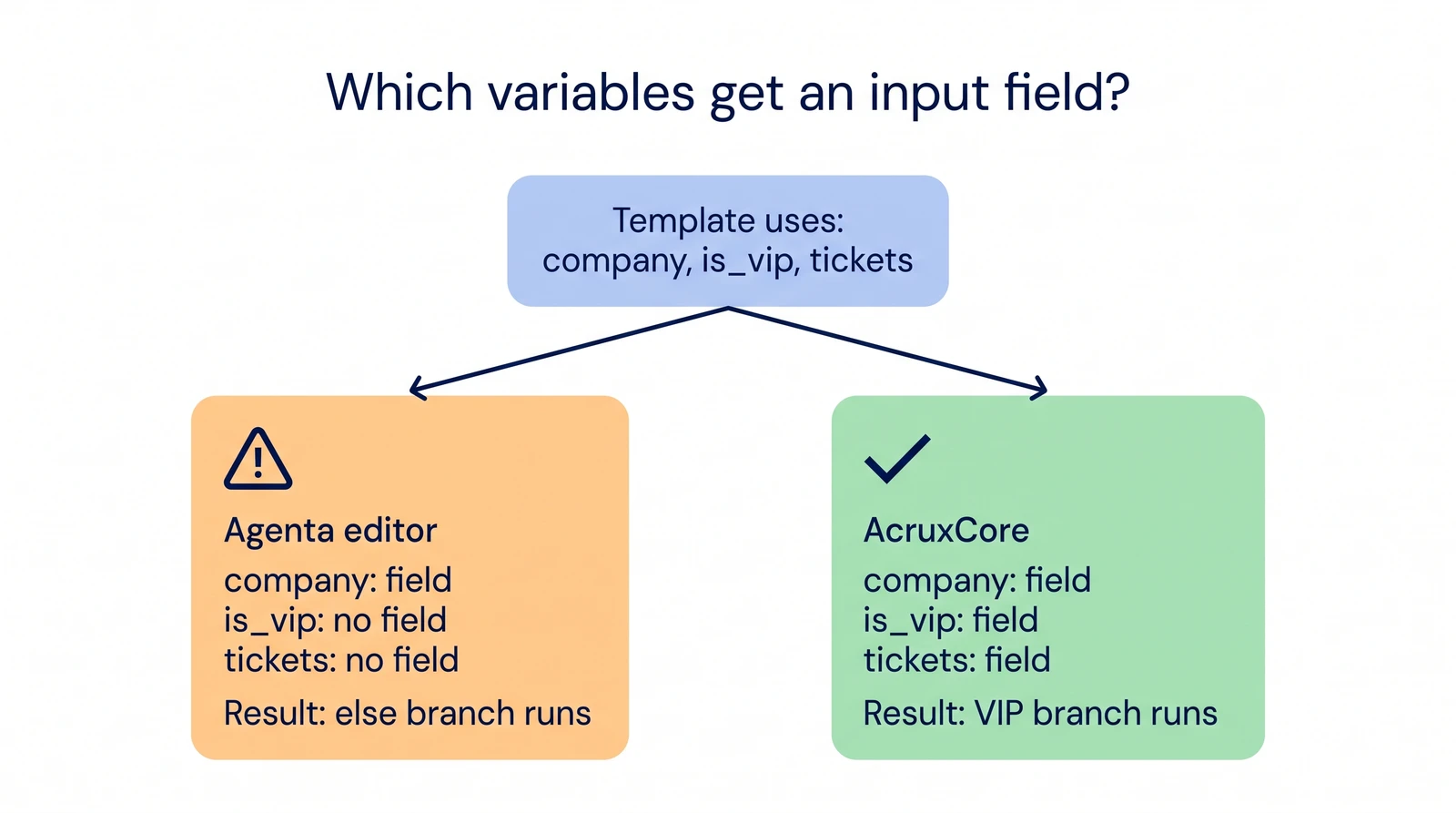
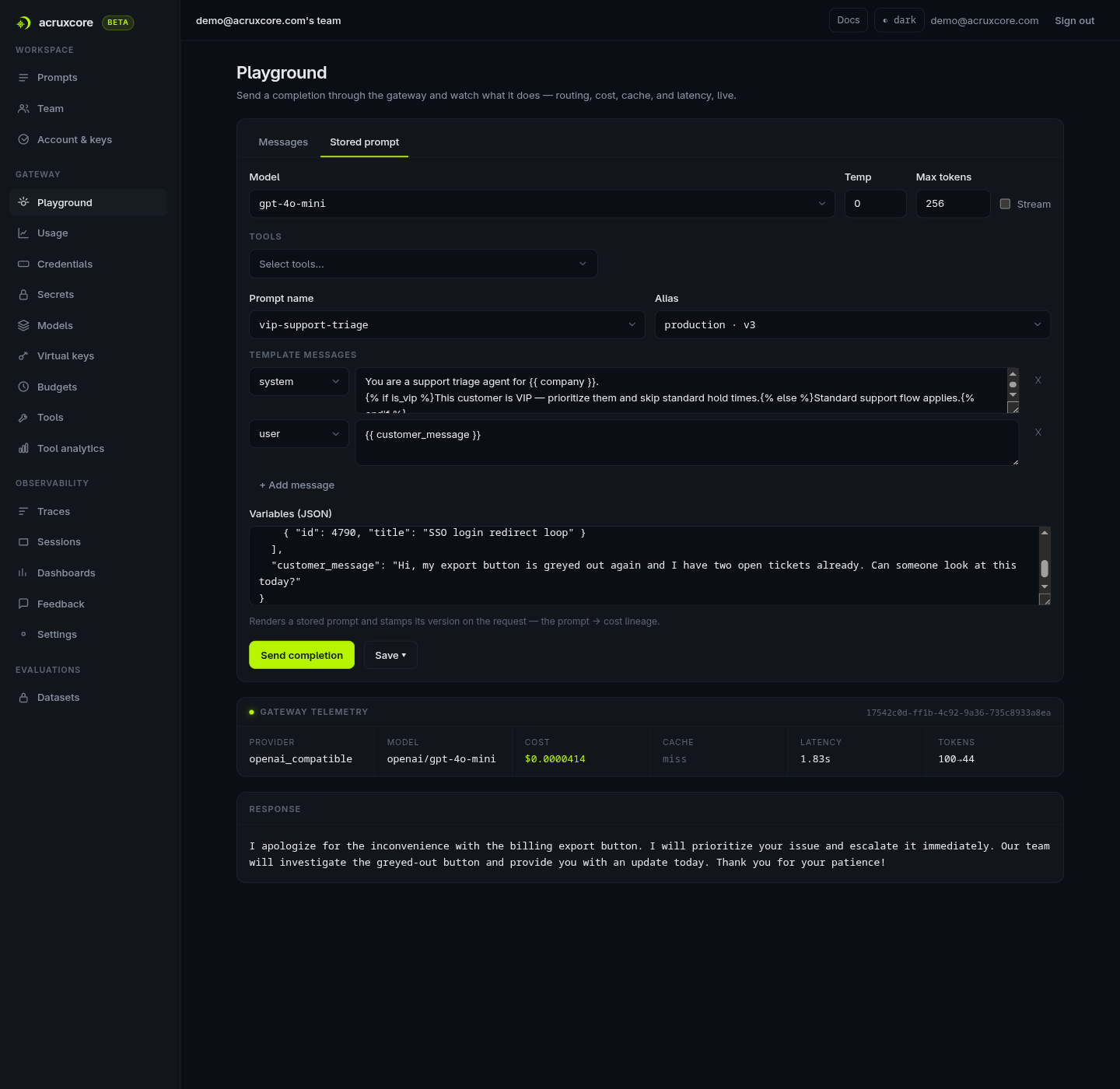
AcruxCore builds the variable list from the template on every commit. The list holds every name the template reads, inside a condition or a loop as well. A name that the template sets itself, such as a loop variable, stays off the list. The playground then shows a field for each variable, and the render endpoint checks a request against the same list.
| Feature | Agenta | AcruxCore |
|---|---|---|
{% if %} and {% for %} | Rendered, with the Jinja2 syntax option | Rendered, always on |
| Variable that appears only inside a tag | No input field | Input field |
| Loop variable | Listed as an input | Left out |
| Fix when the list is wrong | Edit input_keys by hand | Not needed |
Where model calls run
Agenta can serve a stored prompt as an API. A POST to /services/chat/v0/invoke names
the app and the environment. Agenta then renders the prompt, calls the model and returns the
answer. Each prompt can also set fallback models and a retry policy. So for calls through
the invoke endpoint, Agenta is in the request path.
The invoke service has no spend cap, no response cache and no virtual keys. We searched Agenta's source for each one. Budgets exist only as API rate limits. A cache exists only for tool-catalog search. Budget-capped keys exist only in the Enterprise credit system for Agenta Cloud. Agenta also has a separate LLM gateway. Its purpose is to keep provider keys out of the agent sandbox, and it is off by default.
AcruxCore's gateway is in the request path for every call. It checks a budget before it
calls the provider and returns 402 BUDGET_EXCEEDED when a call would go over it. It
rate-limits each virtual key and can answer from its cache. A gateway call can name a stored
prompt and its alias instead of sending messages, so AcruxCore also serves a stored prompt in one
call. Fallback models are set per gateway model rather than per prompt.
| Feature | Agenta | AcruxCore |
|---|---|---|
| Serve a stored prompt as an API | Yes, one invoke call | Yes, one gateway call that names the prompt |
| Spend cap before the call | No | Yes, 402 BUDGET_EXCEEDED |
| Rate limit per key | No | Yes, per virtual key |
| Response cache | No | Yes |
| Fallback models | Per prompt | Per gateway model |
| Cost shown in the playground | Yes | Yes |
Latency overhead, measured
We timed one fixed call five ways: "Reply with the single word: pong." on
openai/gpt-4o-mini, with max_tokens 5. Every path ends at OpenRouter, so the model's own
time is the same on each path. The baseline is a direct HTTPS call to OpenRouter. The other
four paths are these:
- Agenta traced SDK — the same call from the OpenAI client, traced by
ag.init()and the OpenTelemetry instrumentor. - Agenta invoke — one
POSTto/services/chat/v0/invoke. Agenta fetches the deployed prompt, renders it and calls the model. - AcruxCore gateway — one
POSTto the gateway, which calls OpenRouter and writes a trace. - AcruxCore render + gateway — a render call for the stored prompt, then the gateway call.
This is two HTTP calls; the gateway's
promptreference would make it one.
Each run is 100 rounds after 3 warm-up rounds. The order of the paths rotates every round, so a slow moment on the network lands on every path equally. We ran it three times. Both platforms ran on the same machine.
| Path | Gap vs. direct, run 1 | Run 2 | Run 3 |
|---|---|---|---|
| Agenta traced SDK | +38 ms [−397, +432] | +207 ms [−433, +532] | −138 ms [−533, +248] |
| Agenta invoke | −107 ms [−651, +391] | +160 ms [−365, +337] | −25 ms [−415, +299] |
| AcruxCore gateway | +293 ms [−163, +788] | +207 ms [−324, +410] | +27 ms [−271, +350] |
| AcruxCore render + gateway | +169 ms [−223, +523] | +315 ms [−210, +630] | +110 ms [−185, +406] |
The brackets are 95% bootstrap intervals for the gap in medians. All 12 intervals cross zero, so this benchmark cannot tell any path apart from a direct call, or from another path. OpenRouter's own variation decided the result. The direct call's median moved between 1,018 and 1,166 ms across the three runs, and its p95 reached 5.8 seconds in run 2. Every one of the 1,500 measured calls succeeded.
The AcruxCore gateway's point gap was positive in all three runs. Its overhead against a direct OpenAI call, measured on a quieter baseline, is in the gateway overhead post.
The raw samples for all three runs are committed, and
summarize.py
recomputes every number in the table from them.
Full script:
latency_bench.py.
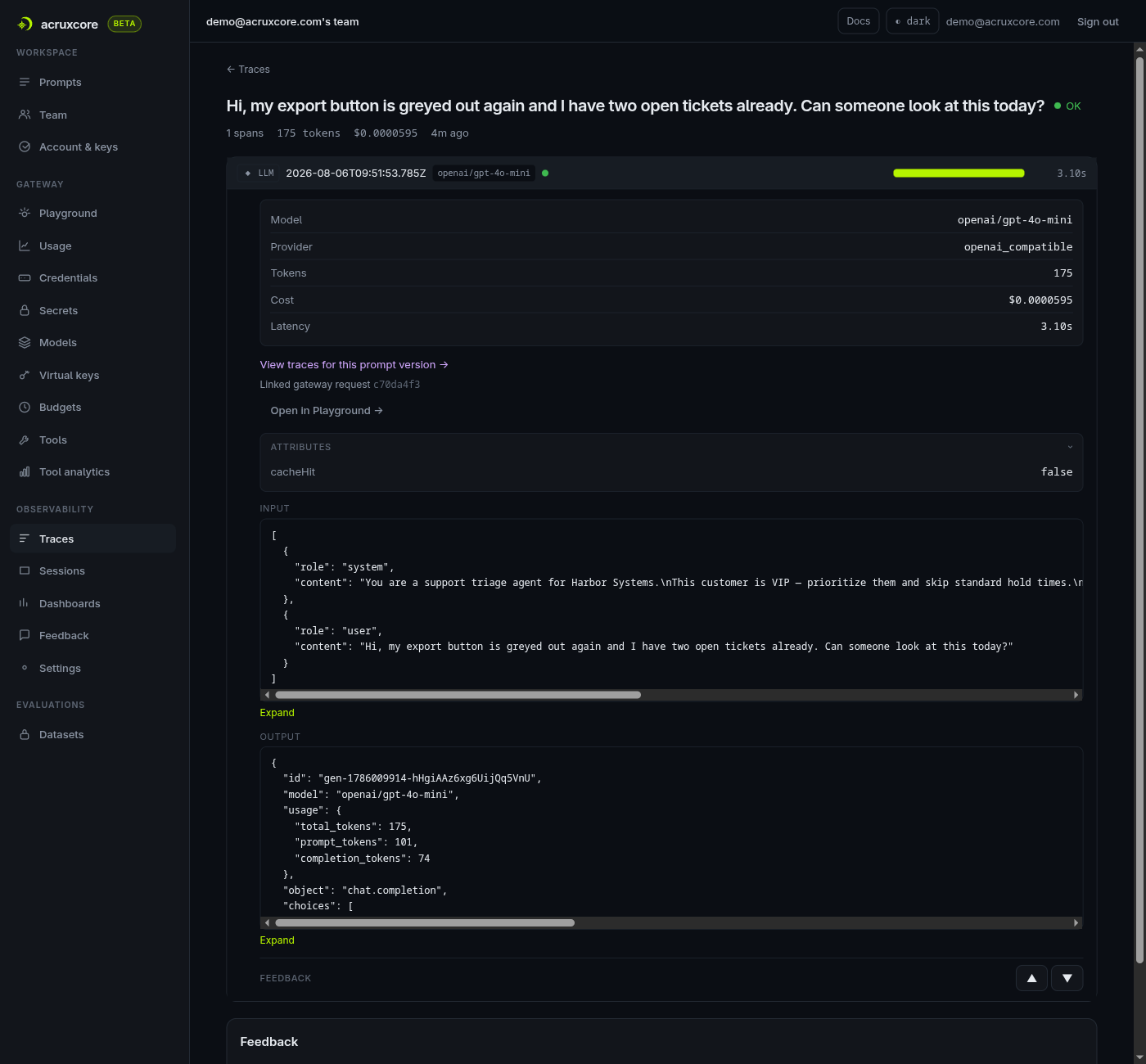
Tracing
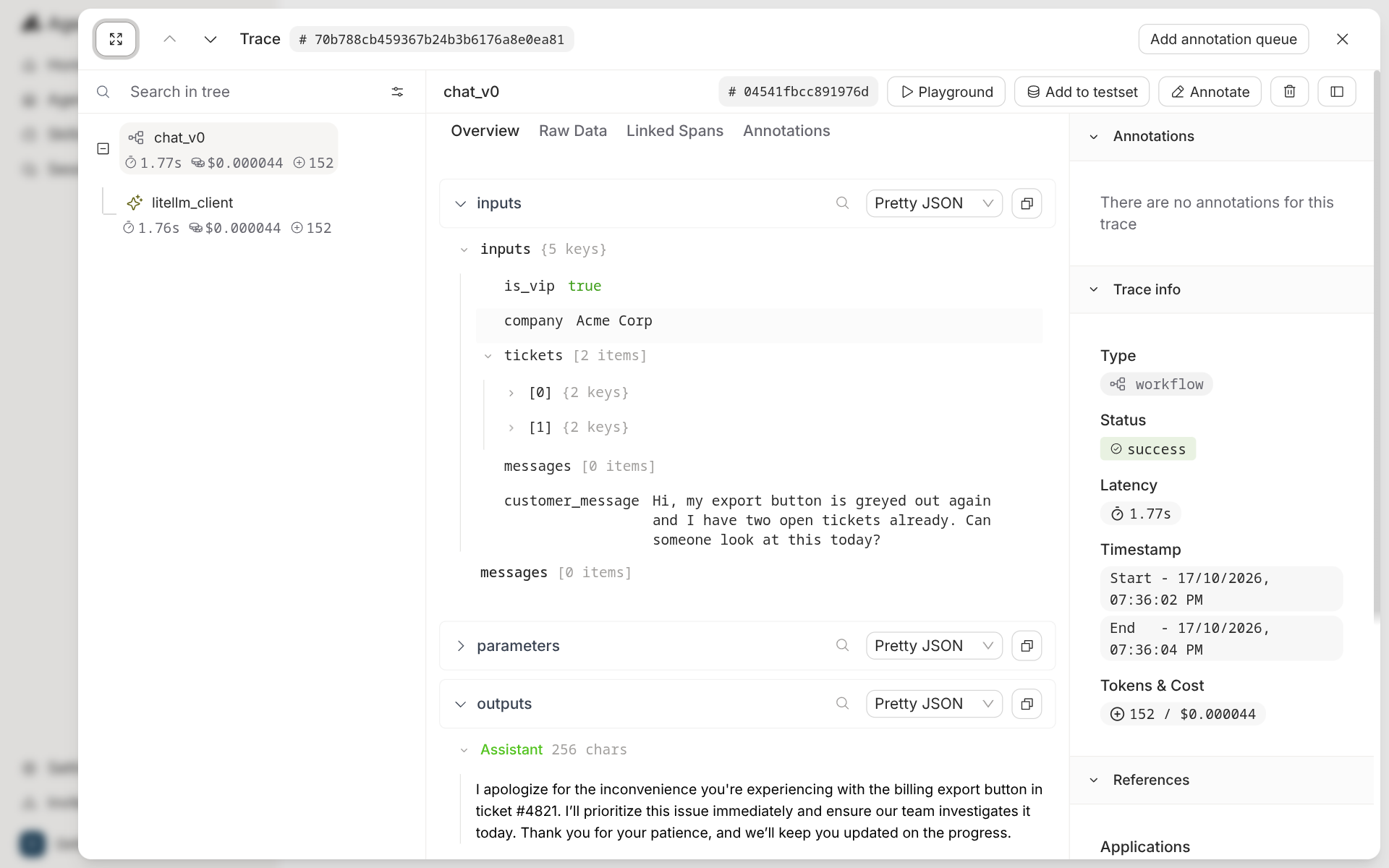
A call through Agenta's invoke endpoint traces itself. The trace has a chat_v0 workflow
span with a litellm_client child, and shows inputs, outputs, tokens and cost. Buttons on
the trace open it in the playground, add it to a test set, annotate it, or send it to an
annotation queue.
A call from your own code needs more setup. Agenta's Python SDK traces through OpenTelemetry.
You call ag.init(), instrument the OpenAI client, and decorate your function. The trace is
linked to the prompt only after a store_refs call. Without it, the trace page showed "No
references found".
ag.init()
OpenAIInstrumentor().instrument()

@ag.instrument()
def triage(variables):
    config = ag.ConfigManager.get_from_registry(app_slug=APP_SLUG, environment_slug="production")
    prompt = PromptTemplate(**config["prompt"]).format(**variables)
    response = client.chat.completions.create(**prompt.to_openai_kwargs())
    ag.tracing.store_refs({"application.slug": APP_SLUG, "environment.slug": "production"})
    return response.choices[0].message.content
In AcruxCore the gateway writes the trace on the server, so the script has no tracing code. The trace links to the prompt version that produced it.
async with AcruxCore(api_key=KEY, base_url=BASE_URL) as hub:
    rendered = await hub.prompts.render("vip-support-triage", "production", VARIABLES)
    result = await hub.gateway.chat(rendered.model, rendered.messages, prompt_version_id=rendered.version_id)
Both scripts are committed and were run before this post linked them:
ag_trace_run.py
and
acx_sdk_run.py.
| Feature | Agenta | AcruxCore |
|---|---|---|
| Trace for a platform call | Automatic, through invoke | Automatic, through the gateway |
| Trace from your own code | OpenTelemetry setup plus a decorator | No code for a gateway call |
| Link from trace to prompt | Automatic for invoke; store_refs for SDK calls | Automatic |
| Cost and tokens on the trace | Yes | Yes |
Tools
Agenta has two kinds of tool. A prompt can carry tool schemas, typed in the playground with the "+ Tool" button and saved with the prompt version. Agents get a tool catalog of third-party actions from Composio, plus MCP servers that you connect by URL. Agenta runs those actions on the server, and a self-hosted install needs a Composio API key for them. There is no page where you define your own tool and keep versions of it.
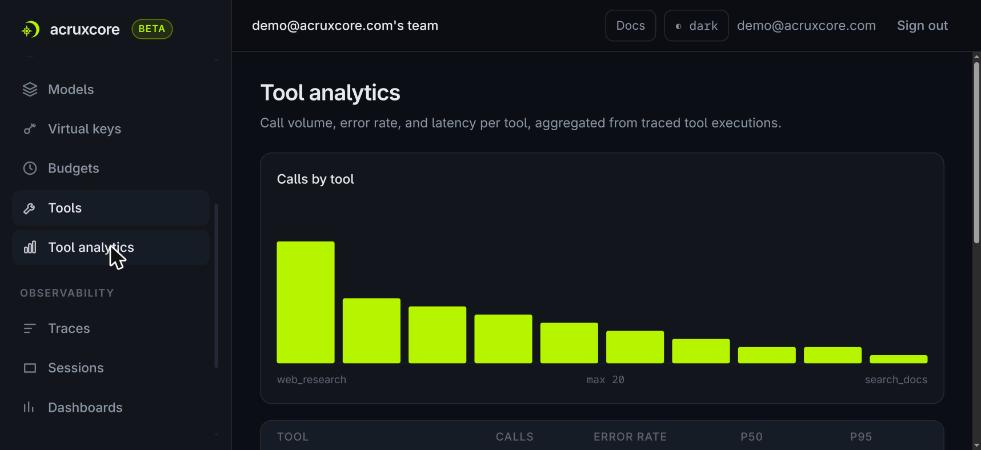
AcruxCore's Tool Catalog holds your own tools. Each tool has versions. The gateway runs the tool, and a page measures call volume, error rate and latency per tool.
| Feature | Agenta | AcruxCore |
|---|---|---|
| Define your own tool | As a schema inside one prompt | In a catalog shared by all prompts |
| Versions of a tool | No | Yes |
| Third-party actions | Composio catalog, for agents | No |
| Connect an outside MCP server | Yes, for agents | No |
| Per-tool analytics | No | Yes |
| Own MCP server for coding agents | 3 tools that search Agenta's docs | 28 tools for prompts, the gateway, traces, tools and evaluations |
Both products also ship their own MCP server, for a coding agent such as Claude Code. Agenta's server searches Agenta's documentation, and none of its tools reads your prompts, traces or evaluations. AcruxCore's server can commit a prompt version, promote it, run it through the gateway and read the resulting trace.
What Agenta does that AcruxCore doesn't
The built-in evaluators have their own section above. Four more Agenta features have no match in AcruxCore.
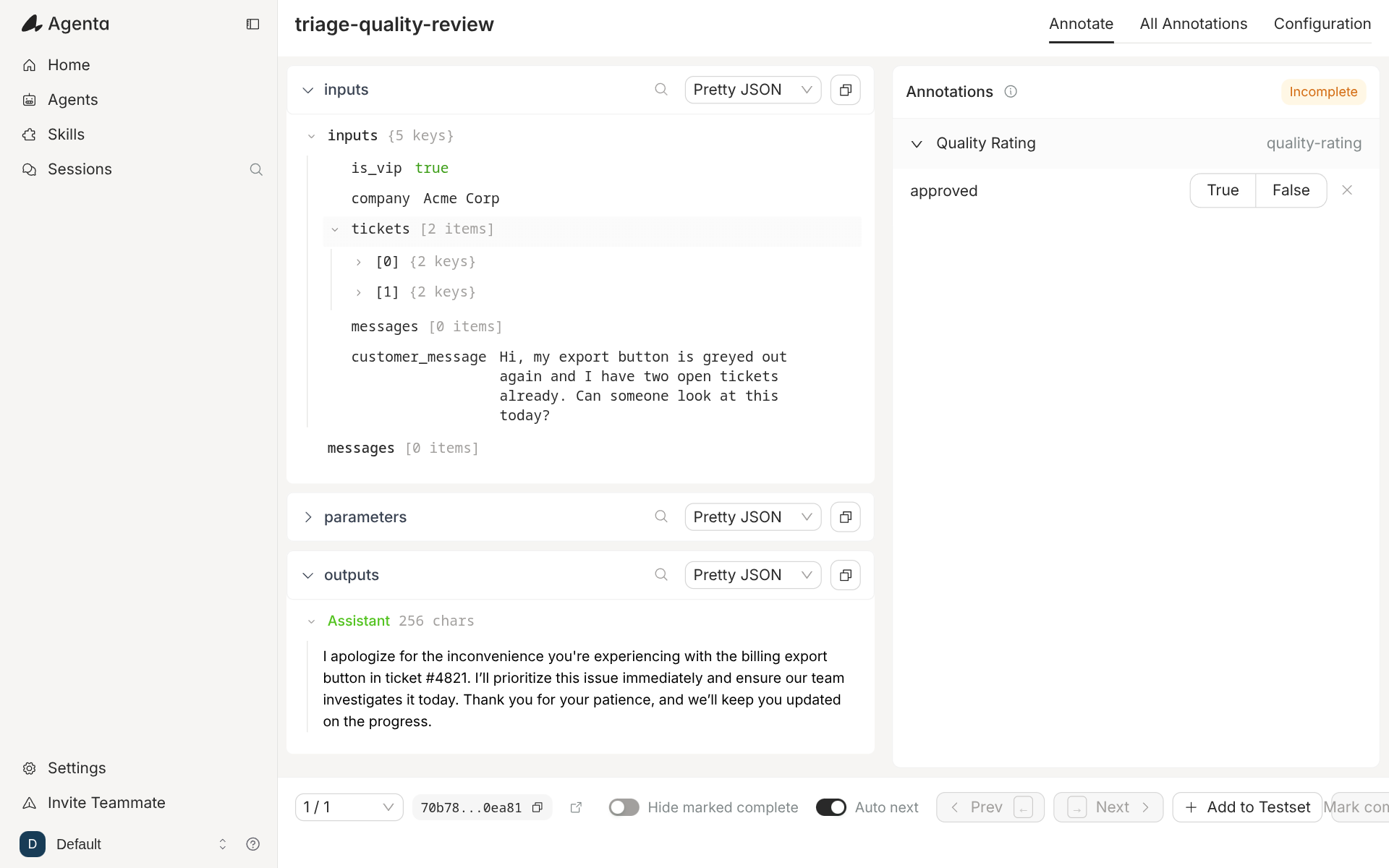
Annotation queues. A trace can go into a named queue. A reviewer works through the queue one item at a time, answers the questions the queue defines, and moves to the next item. AcruxCore lets a person score a trace, but it has no queue, no assignment and no progress tracking.
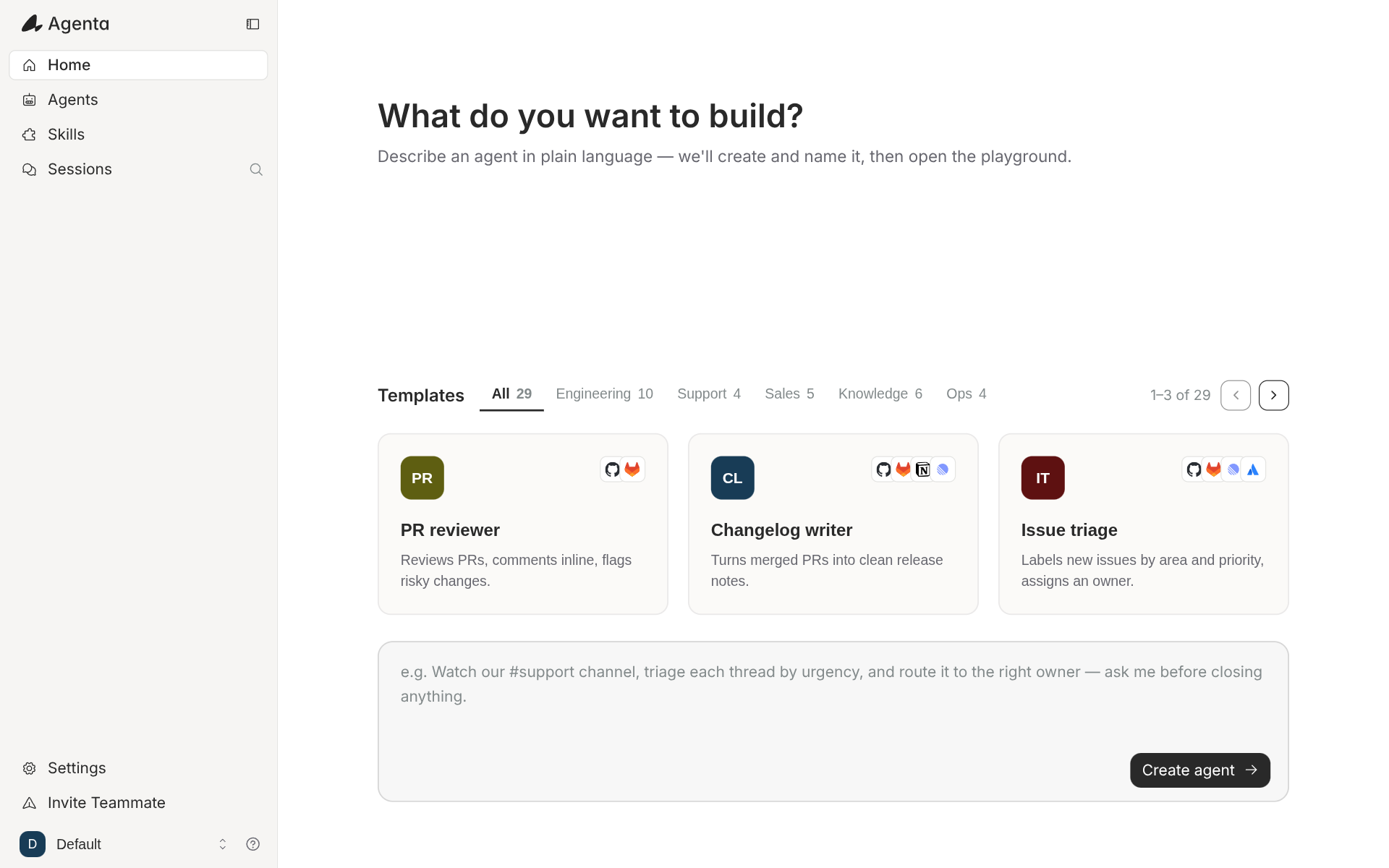
An agent builder. The home page asks "What do you want to build?" and turns a plain-language description into an agent. It offers 29 templates across engineering, support, sales, knowledge and ops. Agents run on a schedule or on an event, and can answer in Slack. AcruxCore has no agent builder, no schedules and no chat channels.
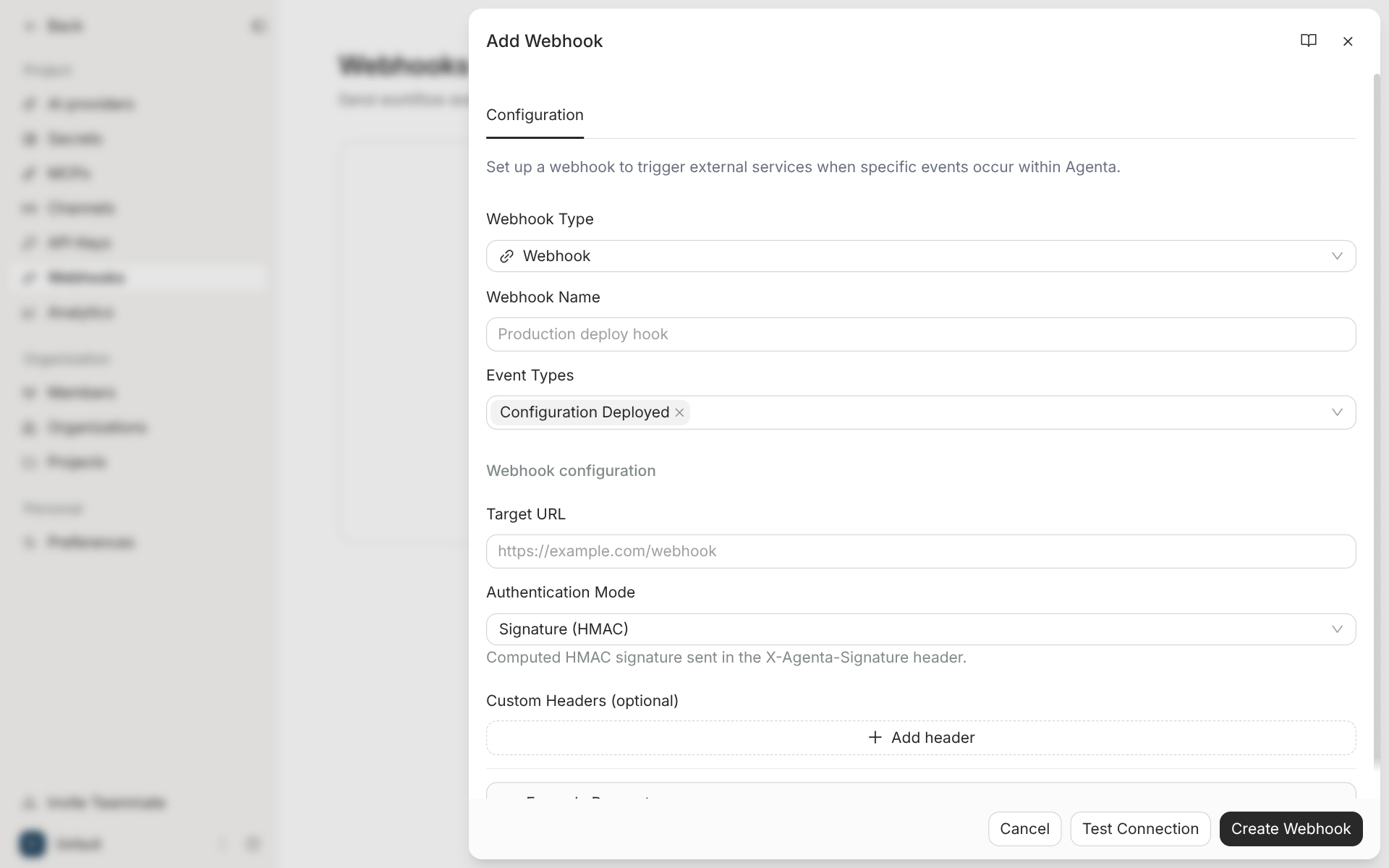
Webhooks on deploy. A webhook fires when a configuration is deployed. It can post to your own URL with an HMAC signature, or start a GitHub Actions workflow through a repository or workflow dispatch. AcruxCore sends alerts by email only.
Variants. Agenta keeps several branches of one prompt side by side, and each branch has its own versions. AcruxCore keeps one line of versions per prompt.
Is AcruxCore an Agenta alternative?
For Agenta's agent workspace, no. AcruxCore has no agent builder, no schedules and no chat channels. For evaluation, only in part. AcruxCore runs LLM judges on the server and code scorers in your own process, but it has no rule library on the server and no annotation queue.
For prompts that run in production, yes. AcruxCore finds every variable in a Jinja2 template without manual edits. It keeps versions of your own tools and runs them. Its gateway checks a budget and a rate limit before a call reaches the provider. Agenta's invoke endpoint has no spend cap and no cache, and Agenta has no catalog for your own tools.
Verdict
| Agenta | AcruxCore | |
|---|---|---|
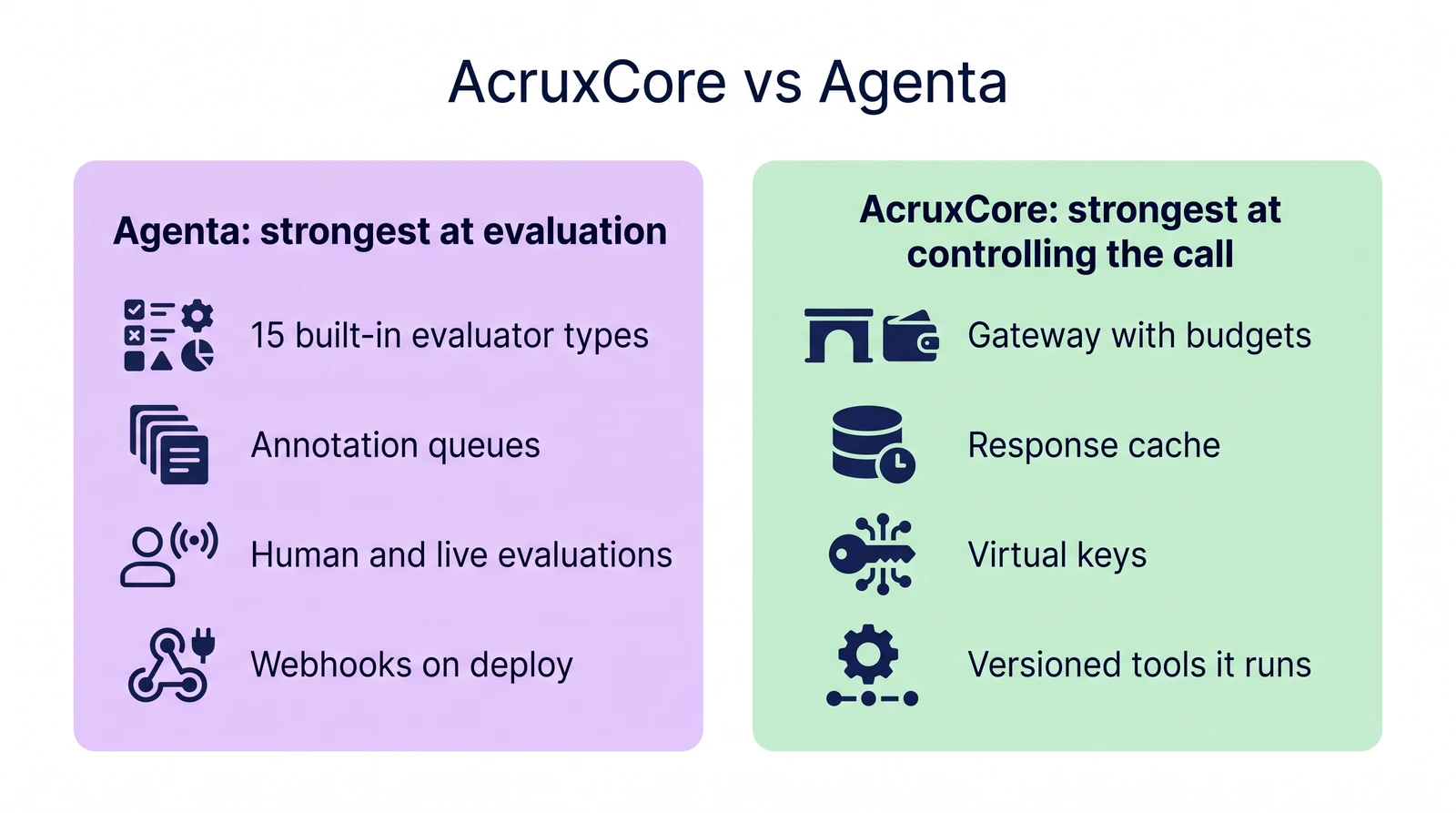
| Strongest at | Evaluation: 15 evaluator types, four kinds of evaluation and annotation queues | Controlling the call: a gateway with budgets, caching and virtual keys, and versioned tools it runs |
| Weakest at | Templates whose variables sit inside {% if %} or {% for %}, which need a hand-edited input list | Evaluation breadth: an LLM judge on the server, no rule library and no annotation queue |
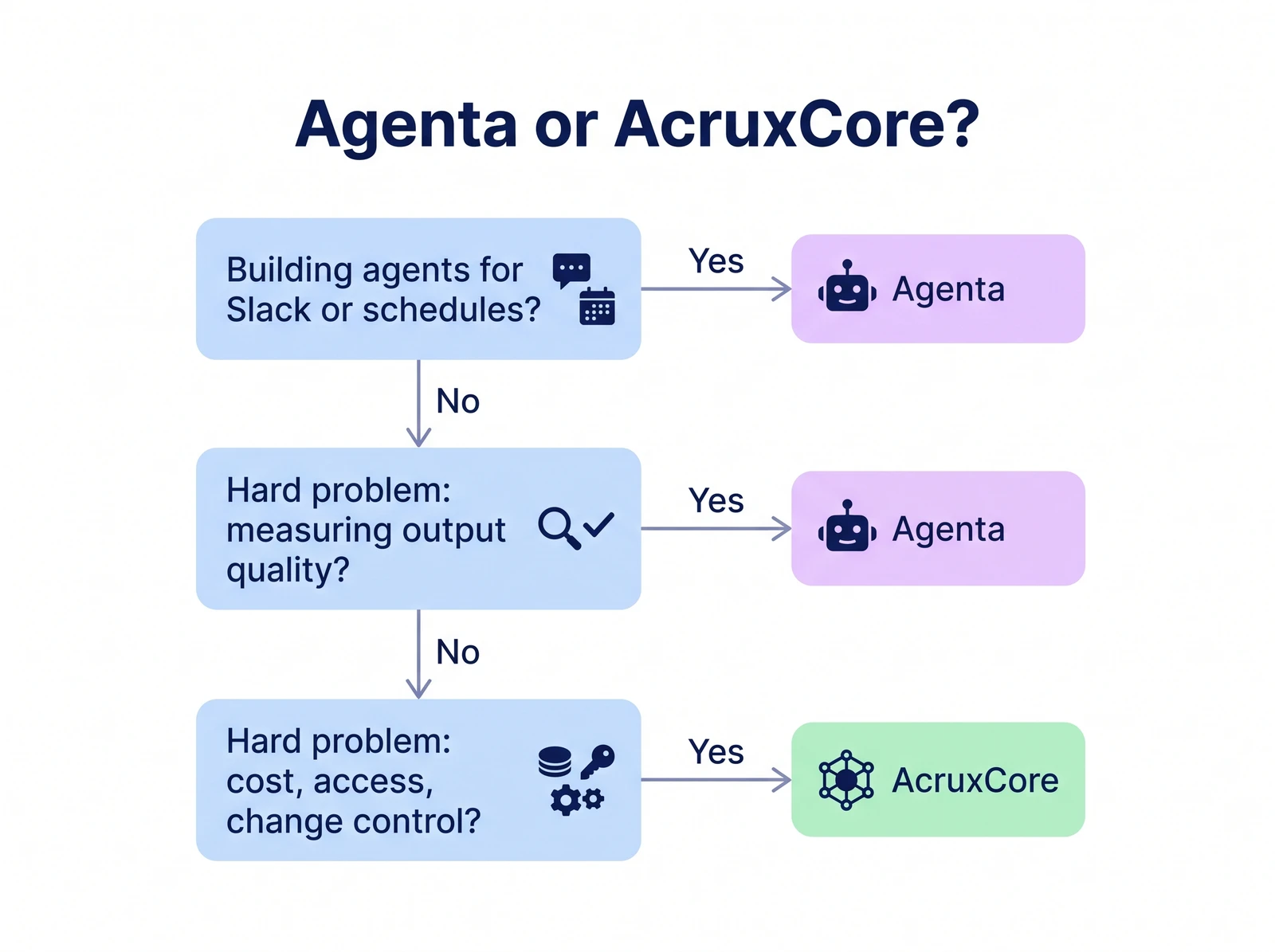
| Pick it if | Your hard problem is measuring output quality, with people and rules in the loop | Your hard problem is cost, access and change control for prompts and tools in production |
Agenta wins the evaluation rows. Its evaluators, annotation queues and webhooks on deploy have no equivalent in AcruxCore. AcruxCore wins the rows about the call itself: a gateway that can refuse a call over budget, a cache, templates whose variables are found without manual edits, and tools that are versioned and run by the platform. The latency benchmark could not tell the two apart: on OpenRouter, every interval crossed zero.
To choose, start at the top and stop at the first question you answer yes to.
License, pricing, team model and community numbers for both, each with a source link and a checked-on date, are on the compare page. Memory, disk and container counts for a self-hosted Agenta are in Self-hosting LLM observability: seven open-source tools measured.
To compare more tools, see 10 LLM observability tools tested hands-on, 8 LangSmith alternatives and 8 Langfuse alternatives.
To try AcruxCore, start with the Quickstart.