Braintrust alternative: what changes when the platform runs your tool code
Braintrust is the first hosted-only platform in this series, and the first that runs your tool code instead of only storing the tool's schema. Six platforms have been compared here before Braintrust: Langfuse, Phoenix, Opik, Helicone, MLflow and Laminar. Every one of them stores a tool's JSON Schema at most. Braintrust takes your Python, bundles it, and runs it on its own infrastructure. That one decision sets the Python version you may use, sets whether your handler can open a file, and sets where your data has to live. This comparison is built around that decision.
Braintrust is not open source, and self-hosting needs the Enterprise plan. There is no free self-hosted install to test against, so everything below ran on their hosted Starter tier.
Every paired screenshot below comes from the same prompt and the same customer message. The
prompt is vip-support-triage: a support agent that changes tone for VIP customers and lists
their open tickets.
The tool sections use one more shared example: search_flights, from the
travel-planner tutorial. That tool reads a
committed JSON file of flights and needs no API key.
Licence, self-hosting, plans and access control are in this post, not on the compare page, which covers open-source alternatives only.
At a glance
| Aspect | Braintrust | AcruxCore | Winner |
|---|---|---|---|
| Evaluation and datasets | Eval() declares data, task and scorers; the CLI runs it and auto-compares against the previous experiment, with per-row deltas | Server-side runs, LLM judges, plus sampled rules that score live production spans | Braintrust |
| How tools are handled | Braintrust stores the handler and runs it, in a sandbox, on a Python version Braintrust chooses | AcruxCore stores the contract; a client executor keeps code and data in your process, an http executor calls upstream | Depends |
| Prompt authoring and versioning | Real nunjucks in the web UI, and a whole-object YAML diff across any two versions. The Python SDK then renders with a different engine | Immutable versions, production/staging aliases, a diff tab, one renderer server-side | Depends |
| Sending a live call | Playground runs the stored prompt with variables; telemetry is one click away, not inline | Cost, cache and latency shown inline on the run | AcruxCore |
| Tracing and observability | Explicit init_logger() plus wrap_openai(); a manual parent span records only the fields you write to it | The gateway writes the span server-side, with prompt-version lineage, and no tracing code in the script | AcruxCore |
| Where the platform sits | An AI proxy you can opt into, and an ingest path that works without the proxy | Always in the request path, so routing, caching, budgets and virtual keys apply before the provider | Depends |
| SDK and developer experience | braintrust push bundles and uploads code; braintrust eval runs experiments; two SDKs disagree on templating | Fetch a stored prompt and send it through the gateway with no tracing code | Depends |
| Querying your own data | A SQL sandbox over experiments, logs and datasets | Fixed analytics pages, no query editor | Braintrust |
| Spend and rate controls | Spend alerts on the invoice, informational only; the proxy caches and load balances | Budgets that refuse the call at the cap, plus per-key RPM and TPM limits | AcruxCore |
| Self-hosting | Enterprise plan only; the Docker data plane runs but cannot be connected | Apache 2.0, docker compose up | AcruxCore |
Full breakdown, screenshots, and the verdict below.
Evaluation and datasets
Evaluation is what Braintrust is built for, and it shows most clearly here.
An evaluation declares the data, the task and the scorers in one place, and the CLI runs it:
Eval(
    "My Project",
    data=lambda: DATASET,
    task=task,
    scores=[mentions_every_ticket, Factuality],
)
mentions_every_ticket is ordinary Python that checks whether the reply names each of the row's
open ticket numbers. Factuality is an LLM judge from autoevals, Braintrust's own scorer
library. Both kinds of scorer are declared the same way in the same list, so the cheap check
costs no more effort to add than the paid judge does.
Running braintrust eval prints a summary that compares the run against the previous experiment.
You do not ask for the comparison; it is the default output:
vip-support-triage-a64bd2f5 compared to vip-support-triage-55989b5e:
100.00% (+53.33%) 'Factuality'            score	(2 improvements, 0 regressions)
100.00% (+66.67%) 'mentions_every_ticket' score	(2 improvements, 0 regressions)
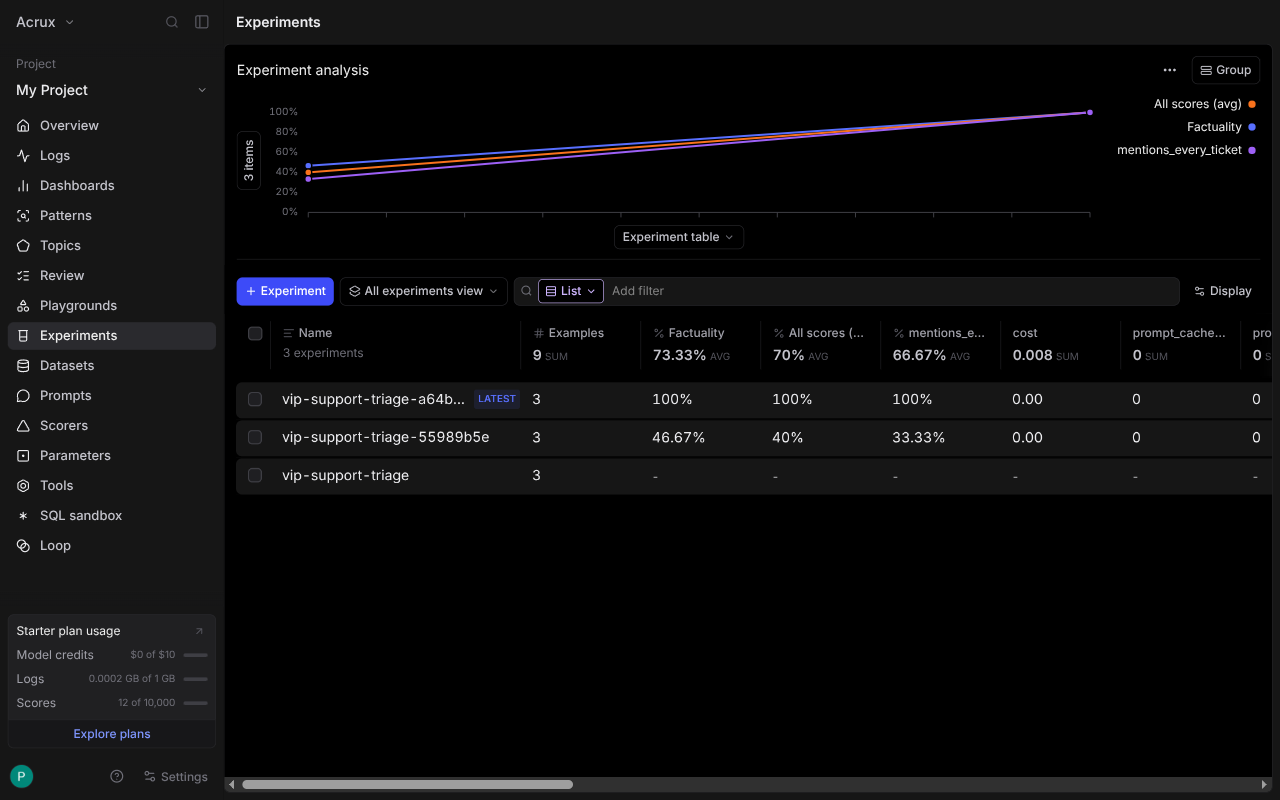
In the dashboard every run of this eval appears on one trend line, and the table below it carries every scorer as its own column.
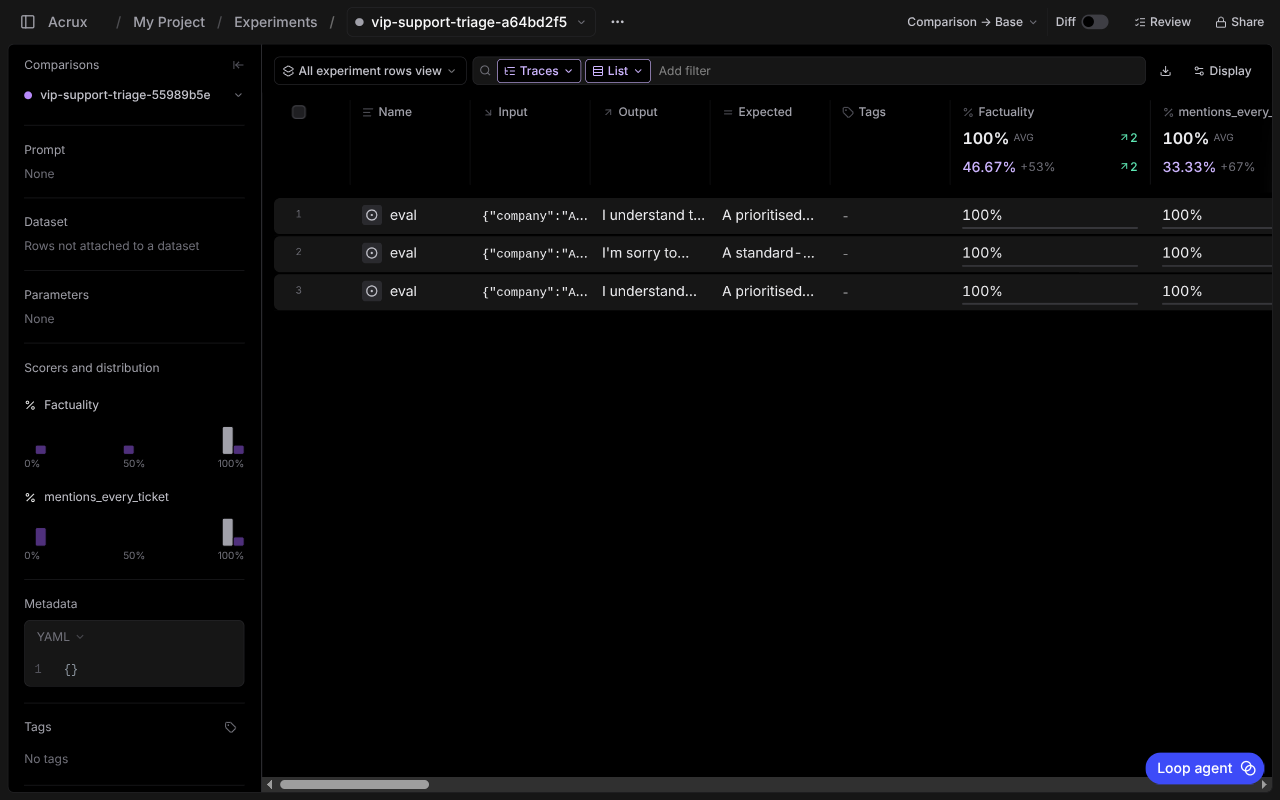
Opening a run shows the per-row scores beside a score distribution for each scorer. The column
header carries the delta against the base experiment, +53% and +67% here.
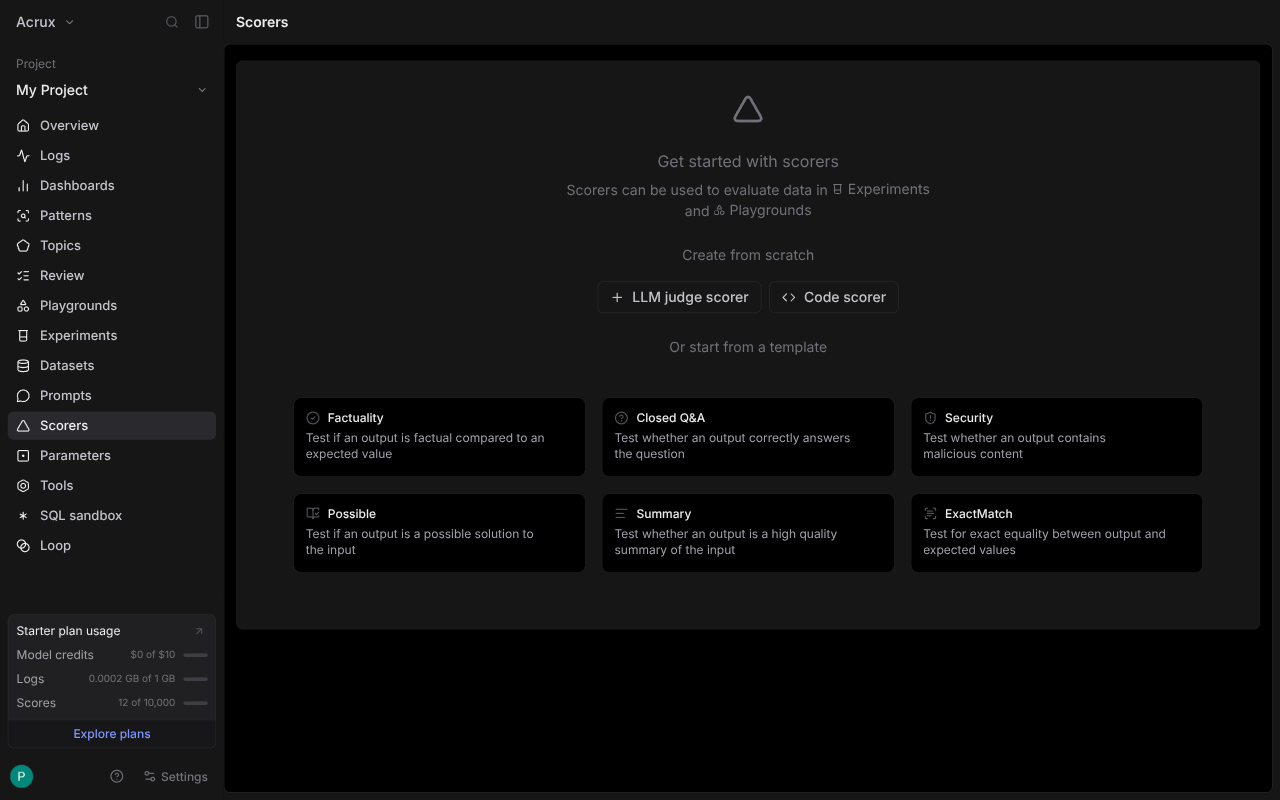
Scorers are also a resource with their own page, and a scorer can be created in the UI, either as an LLM judge or as code, with six templates ready to use. Tools cannot, as the next section shows.
AcruxCore runs evaluations server-side against a stored dataset, not from a CLI on your machine. AcruxCore also covers one case Braintrust's experiment model does not: online rules score a sample of live production traffic instead of a fixed dataset. Scoring live traffic and iterating on a dataset are two different jobs.
| Feature | Braintrust | AcruxCore |
|---|---|---|
| Declaring an eval | Eval(data, task, scores), run by CLI | Dataset plus judge configured in the dashboard, run server-side |
| Auto-compare to previous run | Yes, in the CLI output and the UI | Run history, compared manually |
| Scorer as its own resource | Yes, versioned, UI or code | Judge config lives inside the run |
| Scoring live production traffic | Not in the experiment model | Sampled online rules |
| Score distribution per scorer | Yes | Aggregates per run |
How tools are handled
The Tools page answers one question before you have created anything, which is where a tool can be written:
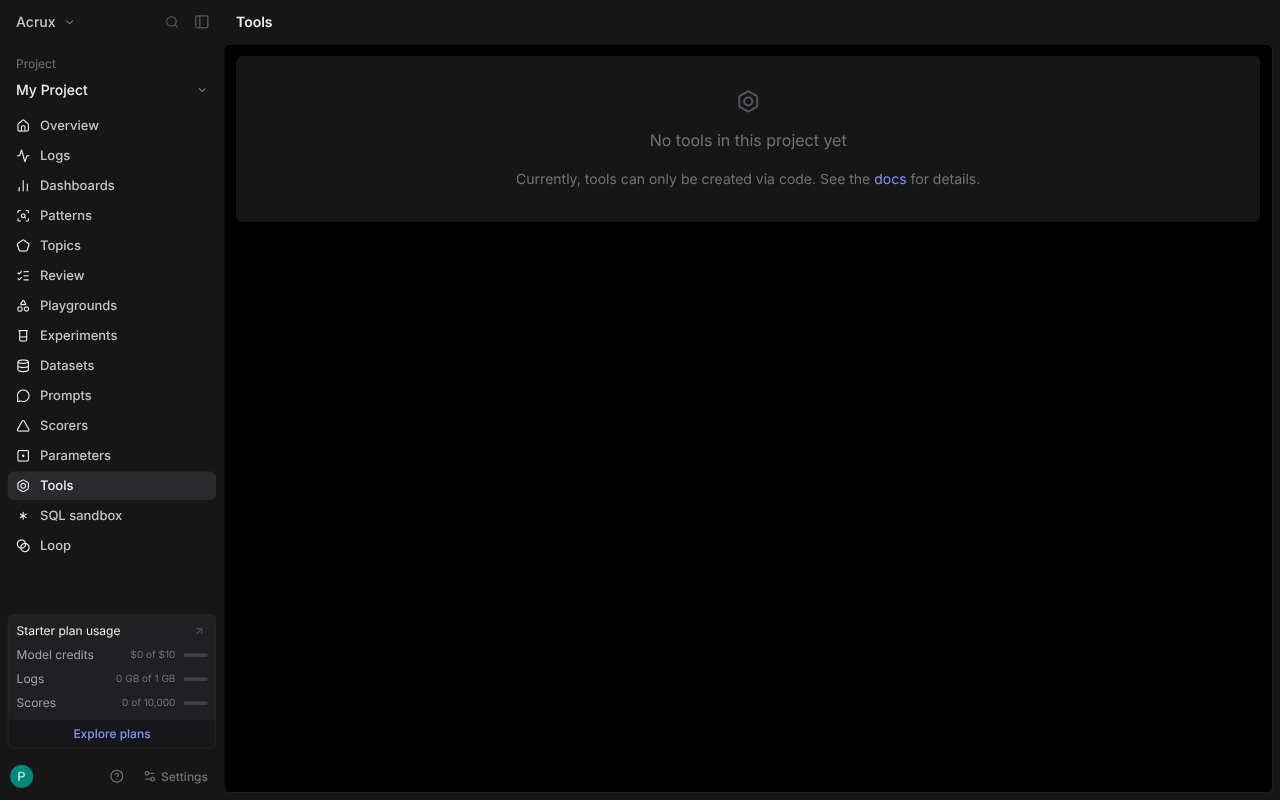
So the tool is declared in a file and pushed:
project.tools.create(
    handler=search_flights,
    name="search_flights",
    slug="search-flights",
    parameters=SearchFlightsArgs,   # a pydantic model
    if_exists="replace",
)
braintrust push bundles the module and uploads it. What lands is not a schema pointing at your
service, but the code itself:
"function_data": {
  "data": {
    "type": "bundle",
    "runtime_context": { "runtime": "python", "version": "3.13" }
  }
}
And the code executes. POST /v1/function/<id>/invoke with the schema's fields runs the handler
on Braintrust's infrastructure and returns the rows:
{ "origin": "Amsterdam", "destination": "Lisbon", "count": 3,
  "flights": [ { "flight_no": "KL1693", "airline": "KLM", "price_eur": 189 }, … ] }
The tool page shows the uploaded source. Two lines on that page say what running on someone else's infrastructure costs you.
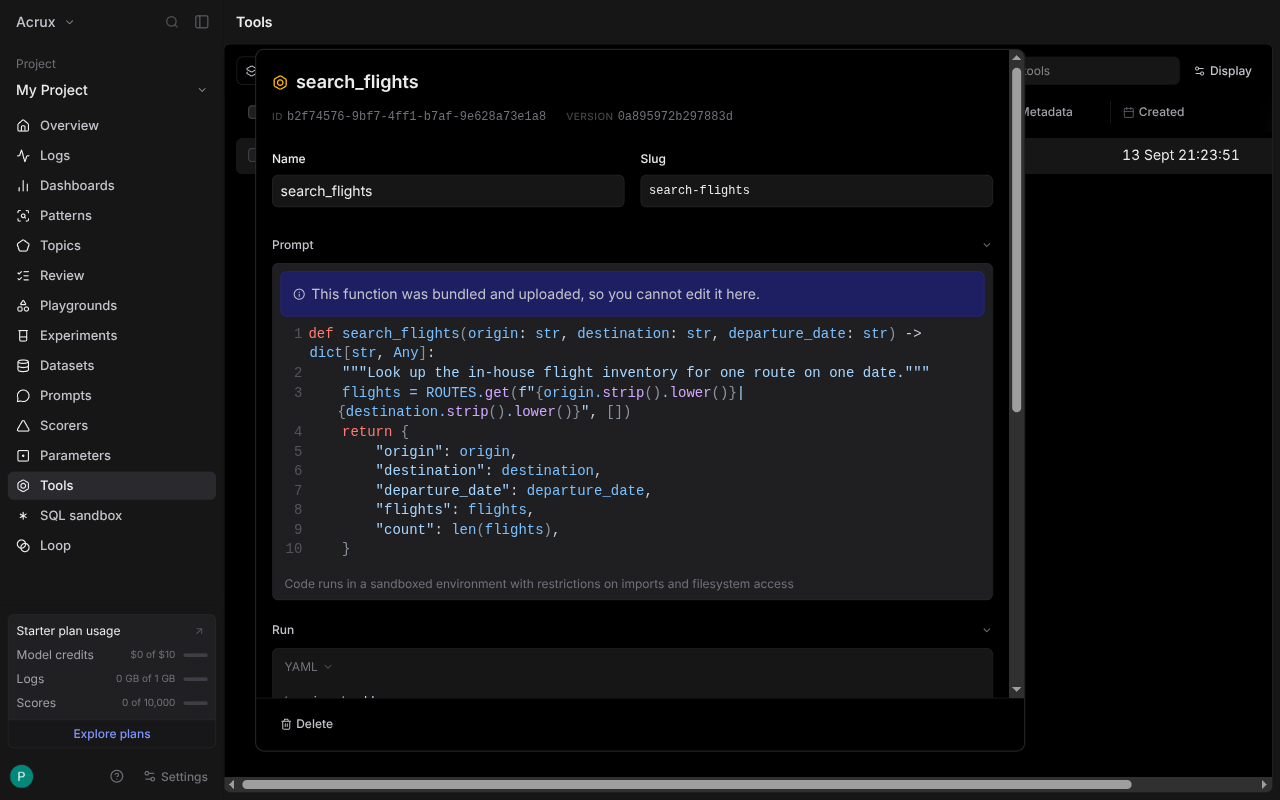
This function was bundled and uploaded, so you cannot edit it here.
Code runs in a sandboxed environment with restrictions on imports and filesystem access
That sandbox has two consequences. The first is that the flight inventory had to be inlined
into the pushed file instead of read from ../data/flights.json, because the handler does not
run where the data is. In the tutorial version, the same function reads that file without trouble,
because the function runs in your process.
The second consequence is the pinned runtime, and the push is refused outright:
Unsupported python version "3.14". Supported versions: 3.8, 3.9, 3.10, 3.11, 3.12, 3.13
The refusal is not a bug: if Braintrust runs the code, Braintrust picks the interpreter.
One thing did not work. The tool page has a Run panel with a Test button, and that button could
not call search_flights at all. Two different YAML shapes for the arguments were tried, both
returned the same error, and the REST API accepted the identical payload and returned the three
flights.
search_flights() missing 2 required positional arguments: 'destination' and 'departure_date'
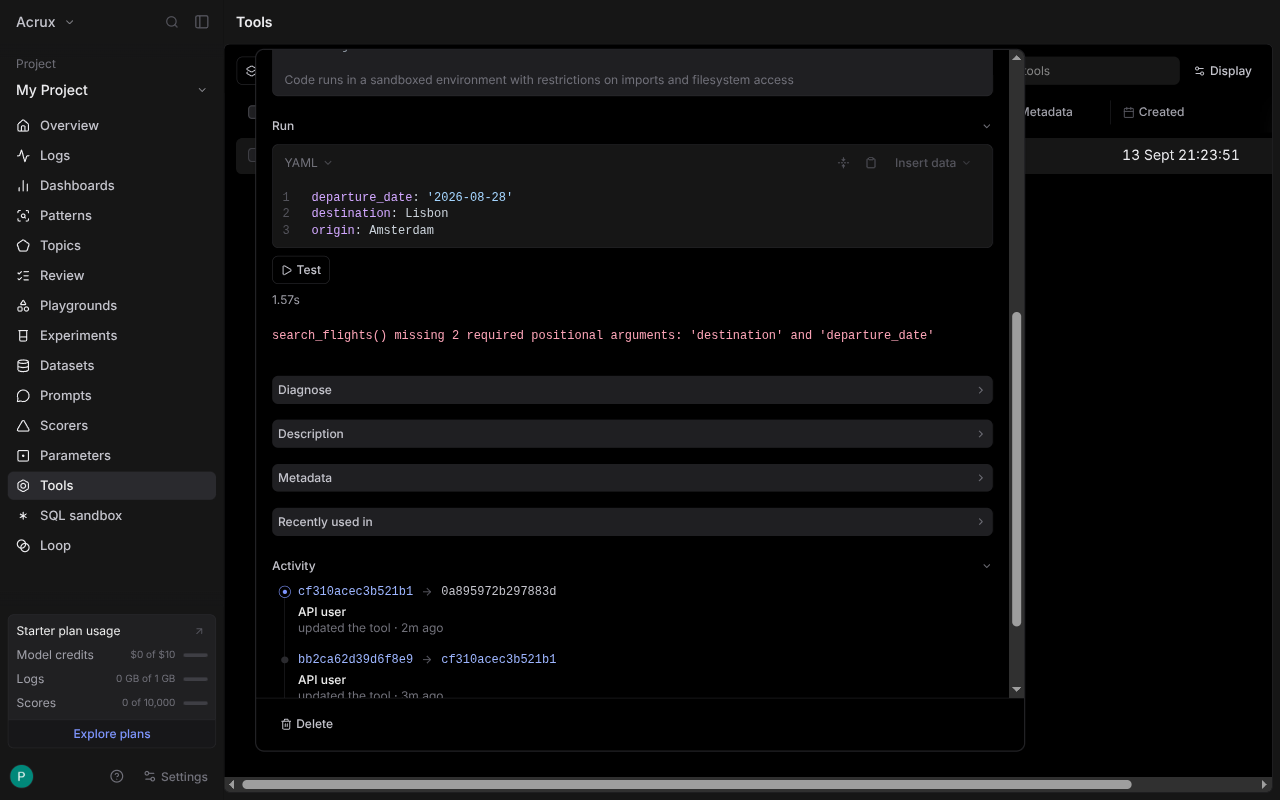
The panel passes the whole input object as one positional argument. The API spreads that same object into keyword arguments. A test button that calls the handler differently from the real path is worse than no test button, because a green result would prove nothing.
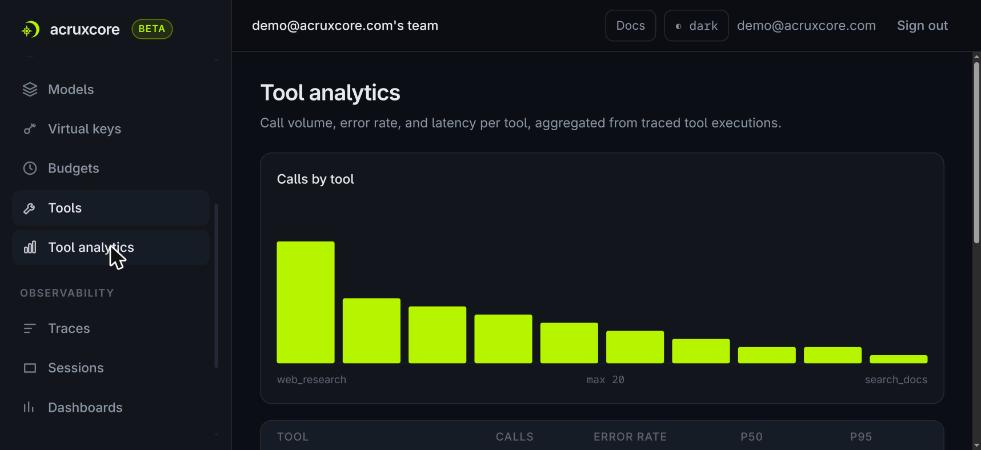
AcruxCore stores the contract and leaves the choice of runner to you. A client executor keeps
both the code and the data in your process, and the platform holds only the name, description and
schema. An http executor calls an upstream service server-side instead. The catalog then
reports per-tool volume, error rate and latency.
Neither choice is wrong. Braintrust's choice is better when you want a tool to be callable by anything that can reach the platform, with nothing of yours deployed. AcruxCore's choice is better when the tool needs your database, your filesystem, your VPC or your Python version, which is the usual case for a tool built in-house.
| Feature | Braintrust | AcruxCore |
|---|---|---|
| Create a tool in the UI | No — "tools can only be created via code" | Yes, or by code |
| Who runs the handler | Braintrust, in a sandbox | Your process (client) or an upstream service (http) |
| Where the tool's data lives | Must travel with the code | Stays wherever it already is |
| Runtime version | Braintrust's — 3.13 max at time of writing | Yours |
| Filesystem and imports | Restricted | Unrestricted |
| Per-tool analytics | Not found | Volume, error rate, P50/P95 |
Prompt authoring and versioning
Braintrust's authoring UI is ahead of ours. Braintrust's Python SDK then renders the result with a different engine from the one the prompt declares.
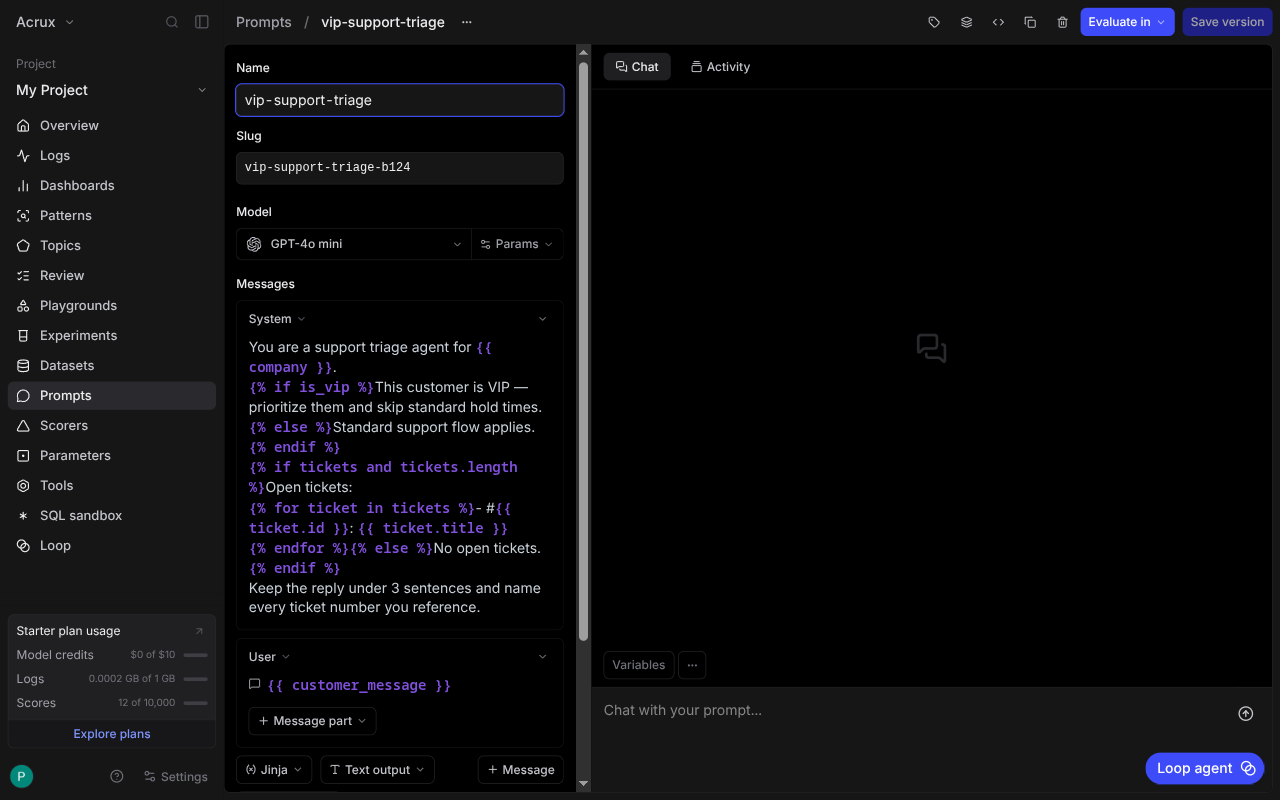
Each prompt picks its own template engine: Mustache, Jinja, or no templating at all. The editor notes that the web runtime uses nunjucks wherever a prompt says Jinja. The "no templating" option is one we do not have. In AcruxCore, a prompt full of JSON examples or LaTeX has to have its braces escaped by hand.
Because the engine is real nunjucks, the vip-support-triage prompt went in verbatim: the
conditionals and the {% for %} loop over tickets, unchanged. No competitor in this series has
taken that prompt unchanged before. Every previous one forced the template to be flattened into
plain text first.
The version history is better than ours in two specific ways. The diff covers the entire prompt
object: the model, the params, endpoint_name and template_format all appear in it, not only
the message text. And you can compare any two versions, not only adjacent ones, then restore
one with "Set as editor contents".
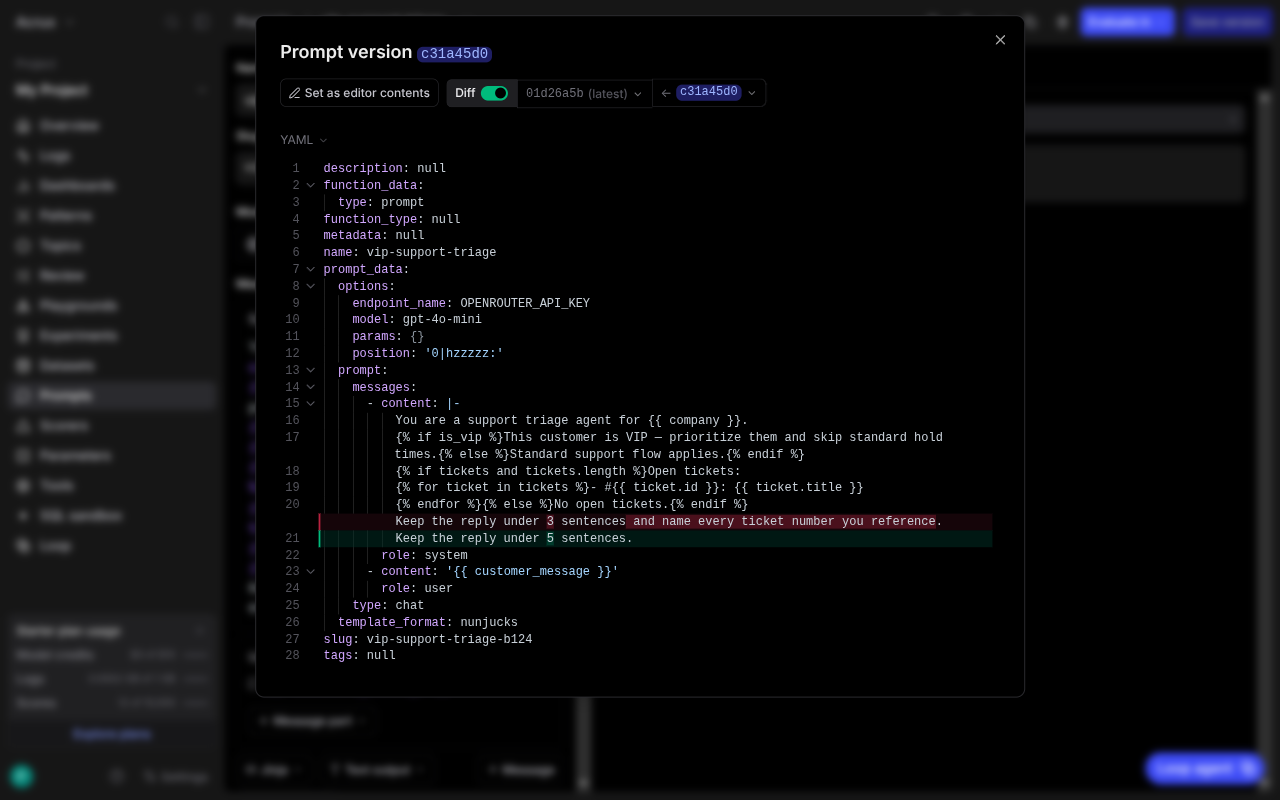
A model change alters behaviour without changing a word of the message, so our message-text diff would miss that edit. The whole-object diff and the any-two-versions comparison are both on the list of things to borrow from Braintrust.
Then the Python SDK renders that prompt with a different engine. Loading the same stored
prompt through the Python SDK and calling build() produces this:
You are a support triage agent for Acme Corp.
{% if is_vip %}This customer is VIP — prioritize them…{% else %}…{% endif %}
{% if tickets and tickets.length %}Open tickets:
{% for ticket in tickets %}- #:
{% endfor %}{% else %}No open tickets.{% endif %}
{{ company }} resolved, because mustache and nunjucks agree on that syntax. Every {% %} block
passed through as literal text, so the model received both branches of every conditional. And
{{ ticket.id }} and {{ ticket.title }} became empty strings, so the ticket numbers and
titles vanished while the "Open tickets:" heading above them stayed. Braintrust raised no
exception and printed no warning, and the model answered plausibly.
The cause is in the source. In braintrust==0.39.0, template_format appears only inside
generated type stubs, and Prompt.build() calls render_mustache() unconditionally.
Their Node SDK reads the same field and refuses to render rather than guessing:
Error: Nunjucks templating requires @braintrust/template-nunjucks.
Install and import it to enable templateFormat: 'nunjucks'.
Refusing is better than rendering with an engine the prompt never asked for. The package that message names currently 404s on npm, so the instruction it gives cannot be followed today.
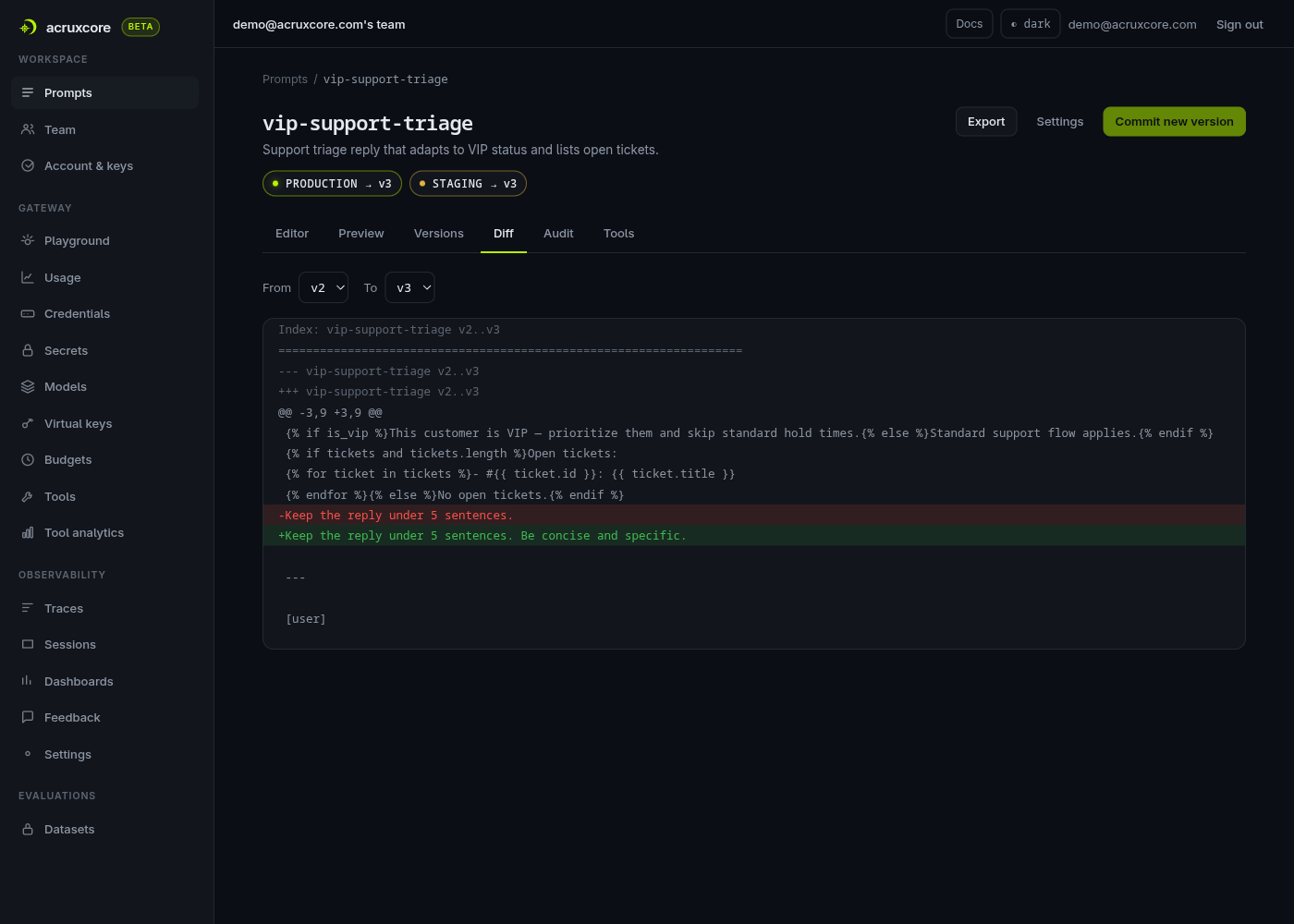
AcruxCore renders nunjucks server-side in prompts.render(), so there is one renderer and no
client-side engine that can disagree with it. The diff is narrower than Braintrust's, covering
message text between adjacent versions.
| Feature | Braintrust | AcruxCore |
|---|---|---|
| Conditionals and loops in the UI | Yes, real nunjucks | Yes, real nunjucks |
| "No templating" mode | Yes | No |
| Diff scope | Whole prompt object, any two versions | Message text, adjacent versions |
| Restore an old version | One click | Promote by alias |
| SDK renders the stored format | Python no, Node refuses | Yes — rendered server-side |
Sending a live call
The prompt page runs the stored prompt with values taken from a variables panel, and Braintrust
builds that panel from the template itself. The panel inferred tickets.0.id, tickets.0.title
and tickets.length without being told. Filling the panel in and sending produces a real
completion, and in this screenshot the web runtime renders the nunjucks correctly, naming both
tickets:
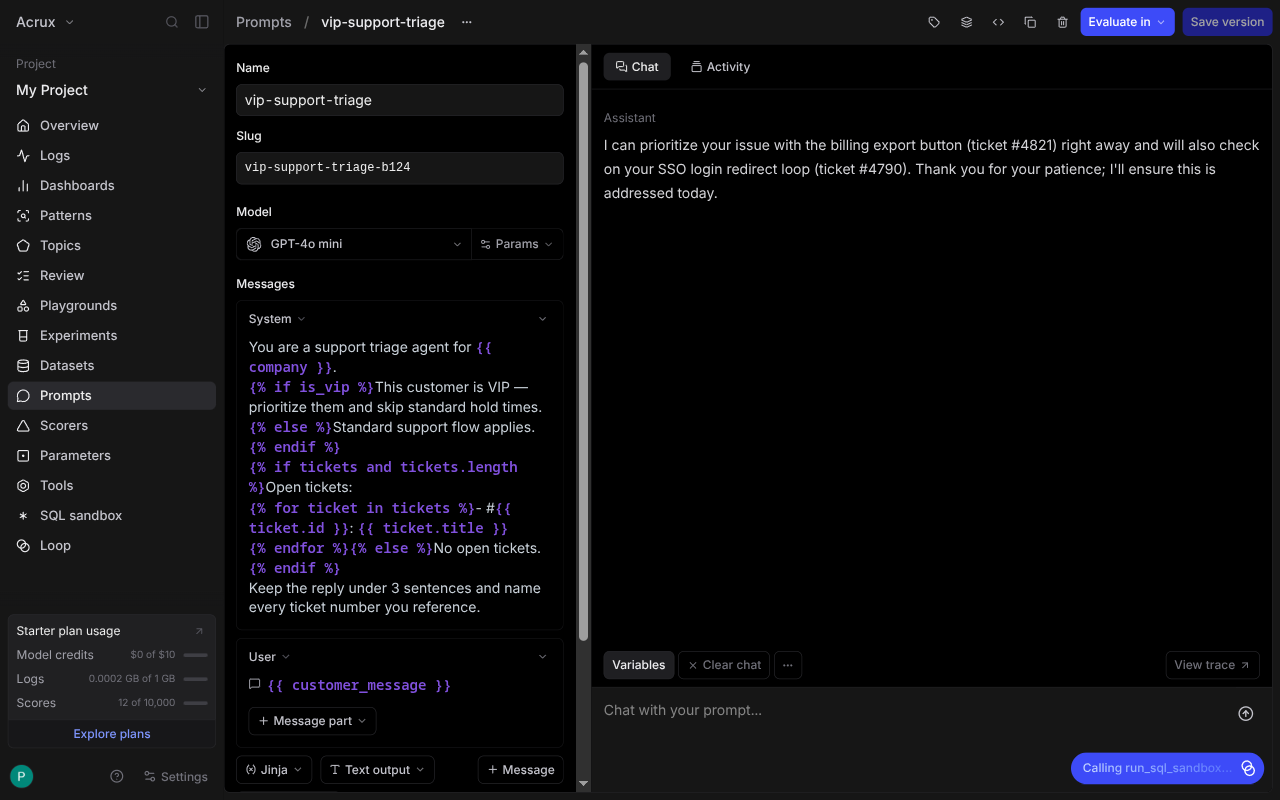
That reply and the SDK output above came from the same stored prompt with the same variables.
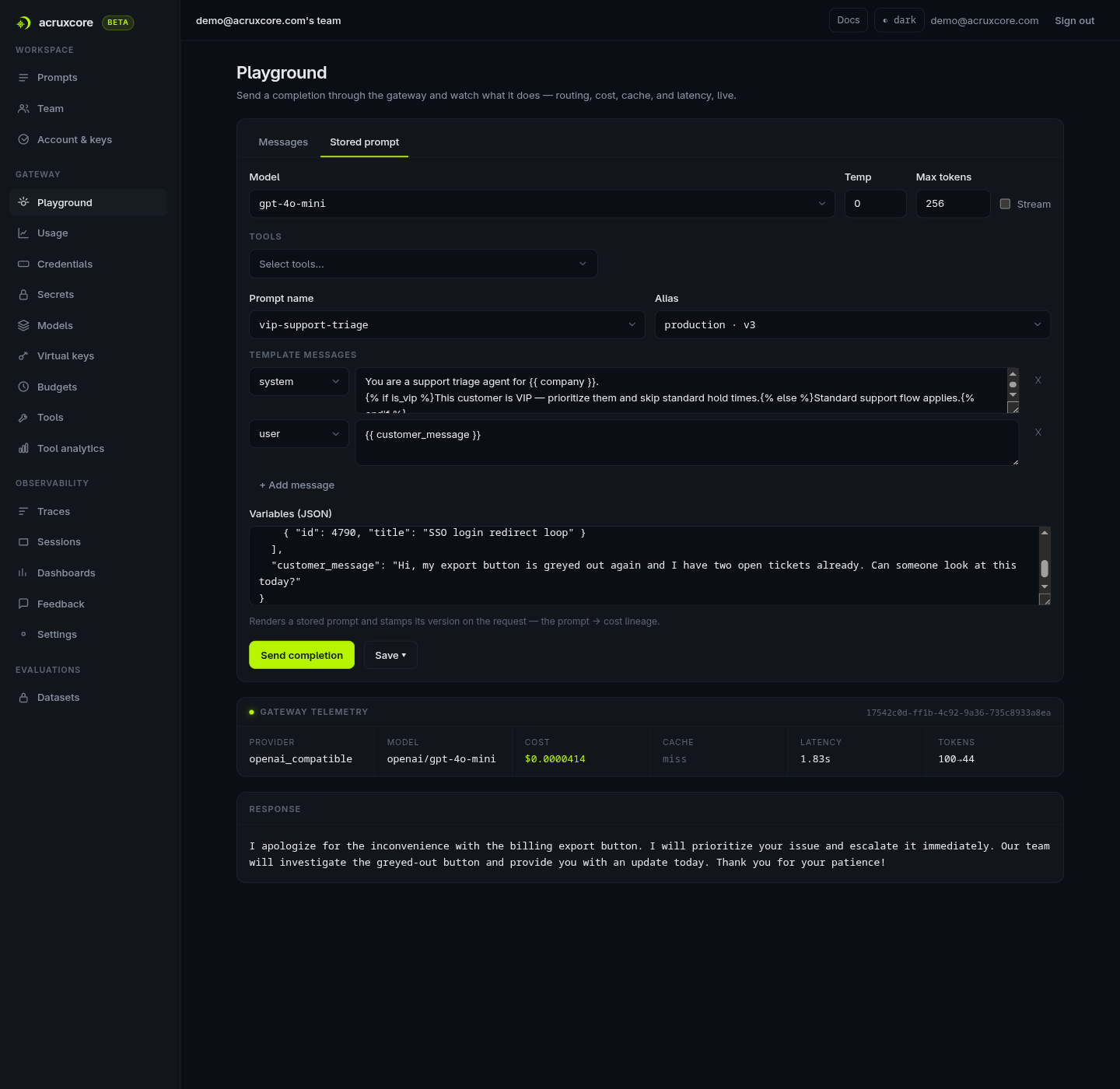
The playground does not show what the call cost. Tokens, cost and duration are one click away behind "View trace". AcruxCore shows all three on the run itself.
| Feature | Braintrust | AcruxCore |
|---|---|---|
| Run a stored prompt with variables | Yes, variables scaffolded from the template | Yes |
| Cost and latency inline | No — one click to the trace | Yes |
| Renders the stored template correctly | Yes, in the web UI | Yes |
Tracing and observability
Braintrust's tracing is explicit. Nothing is recorded until you both name a destination and instrument the client:
logger = init_logger(project="My Project")
client = wrap_openai(OpenAI(base_url="https://api.braintrust.dev/v1/proxy", api_key=KEY))
With those two lines the model call is captured in full: the system message, the user message, the tokens, the cost and the duration.
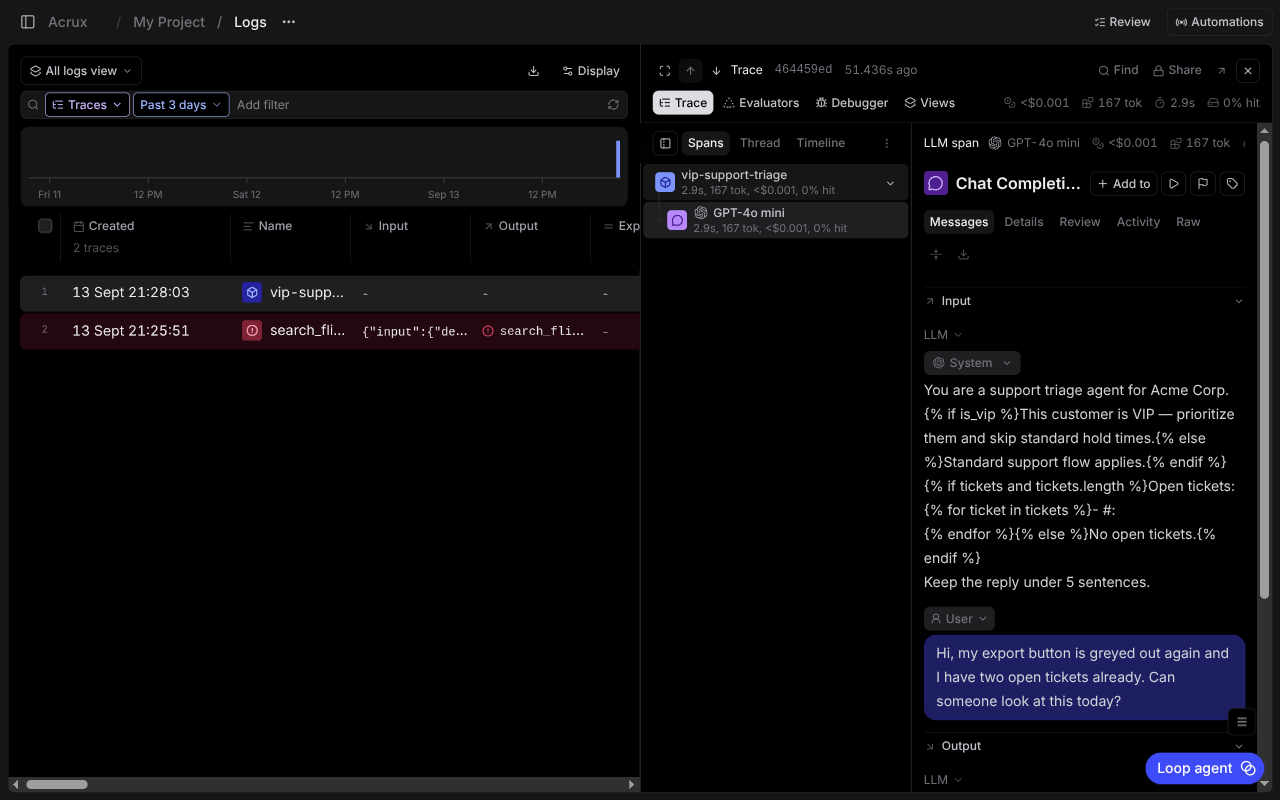
A parent span you create yourself behaves differently. Wrapping the call in
logger.start_span() produces a root span whose input reads null, because a manual span records
only the fields you write to it. The child LLM span is complete; the root span above it carries
nothing but a name.
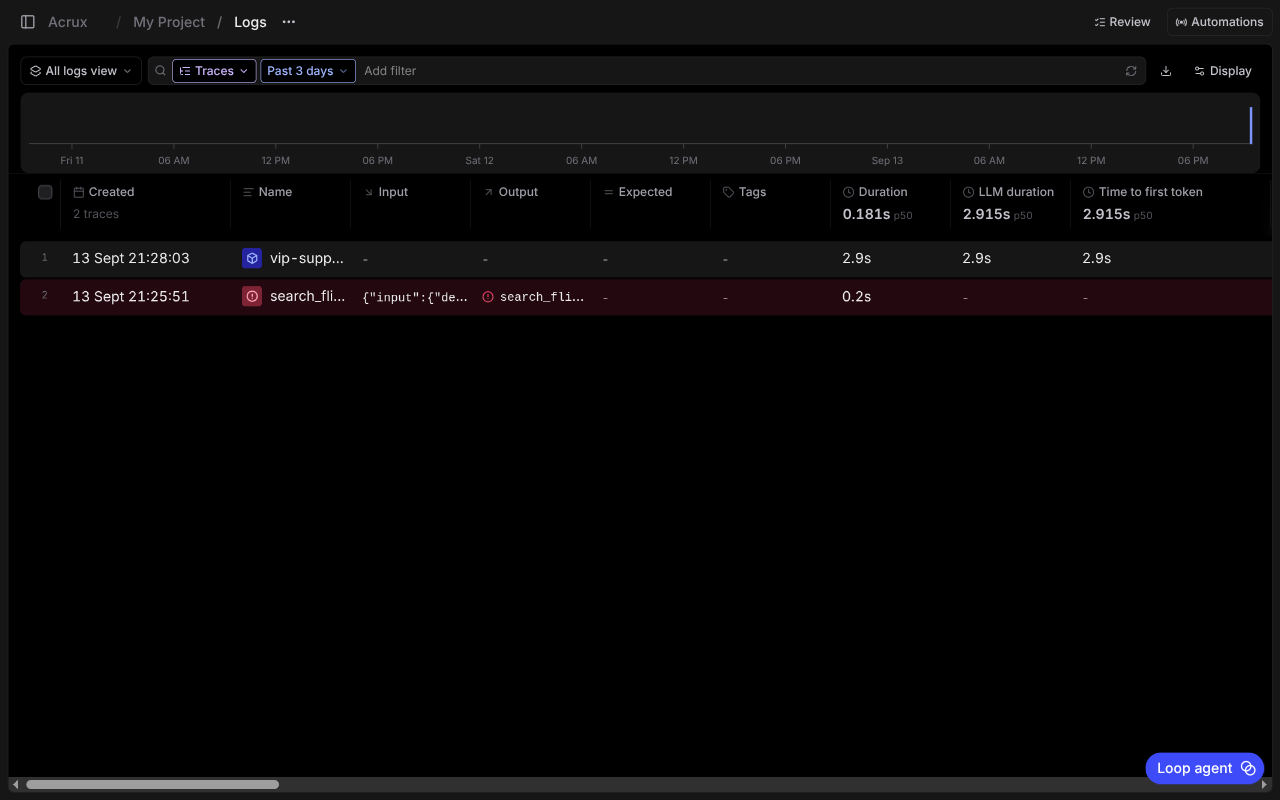
The log view carries a duration histogram over time, p50 columns for duration, LLM duration and
time to first token, and failures highlighted in red. The failed search_flights test from
earlier appears in the log list as a trace of its own.
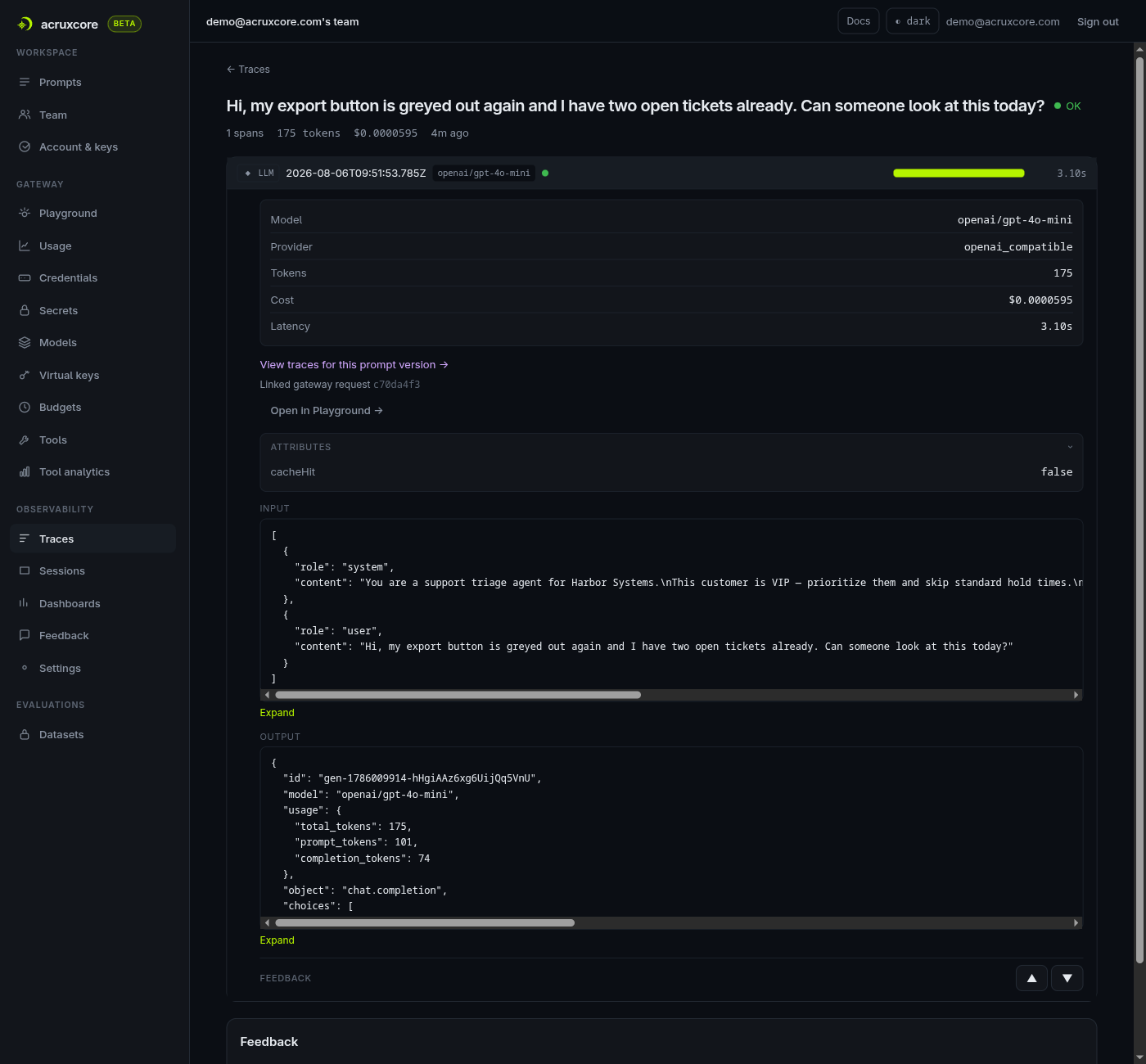
AcruxCore writes the span from the gateway, server-side, so the script contains no tracing code. The span also carries a link back to the prompt version that produced it.
| Feature | Braintrust | AcruxCore |
|---|---|---|
| Tracing code required | init_logger() plus wrap_openai() | None on the gateway path |
| Manual parent span captures input | Only what you log to it | N/A — gateway writes the span |
| Prompt-version lineage on the span | Not on this path | Yes |
| Failures surfaced in the log list | Yes, highlighted | Yes |
Where the platform sits
A platform can sit in the request path, or beside it and only receive what the application
reports. Braintrust offers both and makes you choose. Its AI proxy at
api.braintrust.dev/v1/proxy sits in the request path, and that proxy resolved gpt-4o-mini
against the org's OpenRouter credential while the script never knew which provider would serve the
call. But wrap_openai() around a direct client works too, and then Braintrust only receives.
AcruxCore is always in the request path, and for completions there is no beside-it option. Routing, caching, budgets and virtual keys apply because the call goes through the gateway. The cost of always being in the path is a hop you cannot skip. The benefit is that those controls apply whether or not the application remembered to ask for them.
| Feature | Braintrust | AcruxCore |
|---|---|---|
| Sits in the request path | Optional, via their AI proxy | Always |
| Works without the proxy | Yes, wrap_openai() ingests only | No, for completions |
| Routing, caching, budgets, virtual keys | Not on the ingest-only path | Apply to every call |
SDK and developer experience
Both platforms' Python SDKs completed every task in this post. The Braintrust CLI does more:
braintrust push bundles Python and uploads it, and braintrust eval runs experiments and prints
a comparison. Those two commands are also where the friction was.
braintrust push needs the [cli] extra for uv. The same command refuses to run from a path
whose folder names contain hyphens, because it turns that path into a dotted module name. And it
refuses Python 3.14. Each of those three is small, and together they cost about twenty minutes.
The templating mismatch above is the larger cost, and it is a developer-experience problem as much as a rendering one: the surface you author on and the surface you deploy from disagree.
The AcruxCore script is shorter, because rendering and tracing both happen server-side:
rendered = await hub.prompts.render("vip-support-triage", "production", VARIABLES)
result = await hub.gateway.chat(rendered.model, rendered.messages, prompt_version_id=rendered.version_id)
All four scripts are committed and runnable:
bt_sdk_run.py,
bt_eval_run.py,
bt_tool_push.py
and
acx_sdk_run.py.
| Feature | Braintrust | AcruxCore |
|---|---|---|
| Push runnable code to the platform | Yes, braintrust push | No |
| Run experiments from the CLI | Yes, braintrust eval | Run server-side from the dashboard |
| Tracing code in the script | init_logger() plus wrap_openai() | None |
| SDKs agree on template rendering | No — Python renders mustache, Node refuses | One renderer, server-side |
Latency overhead
There is no benchmark number in this post.
Every previous benchmark in this series compared a self-hosted competitor on localhost against AcruxCore on localhost. Braintrust cannot be self-hosted on a Starter account, so any timing would measure the round trip to their datacenter against a loopback call. Such a timing measures the distance between the two machines, not either product's overhead. Interleaving the runs does not remove that distance; it only spreads it evenly.
Their Docker data plane does run locally, but it cannot be attached to a Starter organization. The next section shows the setting that would attach it. So a Starter reader could not reproduce a benchmark here even if this post published one.
Licence, self-hosting and plans
Braintrust is not open source. Parts of the tooling around it are published: the JavaScript
SDK is Apache-2.0 and autoevals is MIT. The hosted platform itself is not something you can read
or fork. AcruxCore is Apache-2.0 in full.
Self-hosting is Enterprise-only, and the product says so itself. The containers are not the
obstacle. braintrustdata/braintrust-deployment brings up Redis, Postgres and a standalone-api
container, all healthy in about 25 seconds, with no licence key and no S3 bucket, and
GET :8000/status returns a real Braintrust ForbiddenError, so the API is live.
The deployment is still unusable, because those containers are only the data plane. The UI, authentication and metadata stay on braintrust.dev. The only way to attach your own data plane is to set a custom API URL on the organization, and on a Starter account that setting is not a field at all:
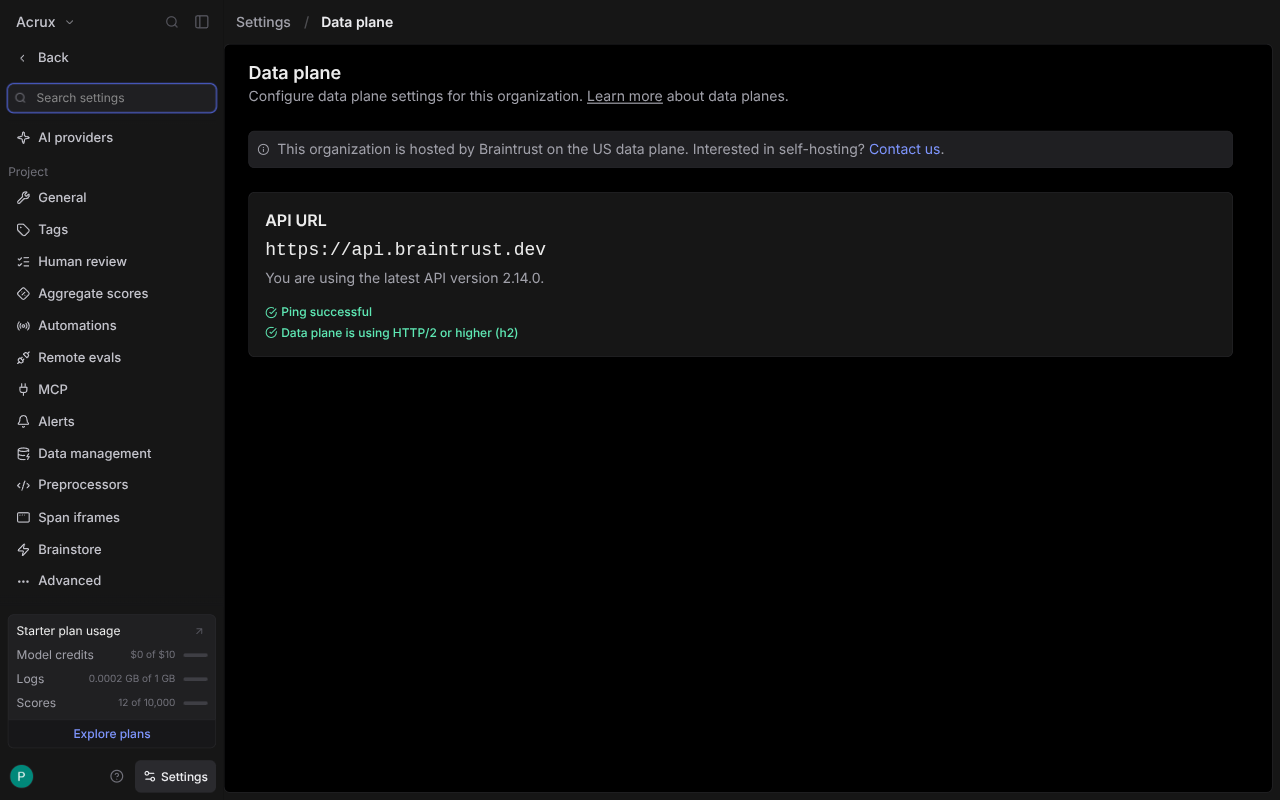
Their docs state the restriction twice more: "Self-hosting is only available on the Enterprise plan" and "Configuring custom data plane URLs is only available on the Enterprise plan."
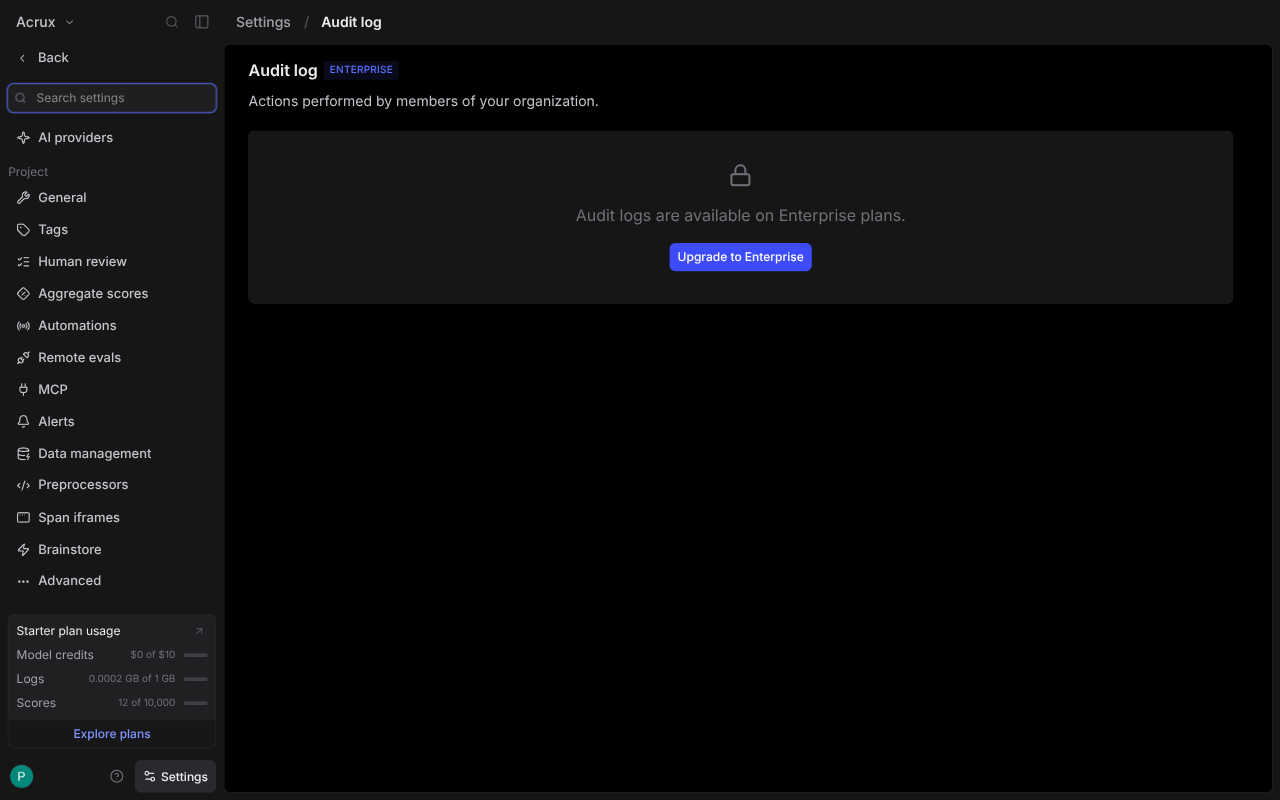
Access control starts at $249/month. The Starter tier has no roles at all. RBAC appears as "Basic roles" on Pro, and as custom roles on Enterprise. Audit logs are Enterprise-only, which the dashboard states plainly:
Environments is Pro and above. Environments lets you tag a prompt version as production,
staging or development and then pull it by name, which is the same job AcruxCore's production
and staging aliases do. Our aliases are in the free self-hosted product.
| Braintrust | AcruxCore | |
|---|---|---|
| Licence | Proprietary. JS SDK Apache-2.0, autoevals MIT | Apache-2.0, all of it |
| Self-host | Enterprise plan only; the Docker data plane runs but cannot be attached | docker compose up |
| Free tier | $0: 1 GB processed data, 10k scores, $10 model credits, 14-day retention, unlimited users | Self-host, no limits |
| Next tier | Pro, $249/mo: 5 GB, 50k scores, 30-day retention, RBAC, environments, custom charts | — |
| Roles | None on Starter; basic roles on Pro; custom on Enterprise | One role per member, free |
| Audit log | Enterprise only | Per-prompt audit tab, free |
| Prompt environments/aliases | Pro and above | Free |
Sources: braintrust.dev/pricing and the organization settings pages above, all checked 2026-09-13.
What Braintrust does that AcruxCore doesn't
A SQL sandbox over your own data
Braintrust ships a query editor over experiments, logs and datasets. This is real SQL against the experiment created earlier, returning in 0.41s:
SELECT input.customer_message AS message, scores.mentions_every_ticket AS ticket_score,
       scores.Factuality AS factuality
FROM experiment('a14e0c95-5d81-411b-b2d6-b3856df5bcf7')
WHERE scores.Factuality IS NOT NULL
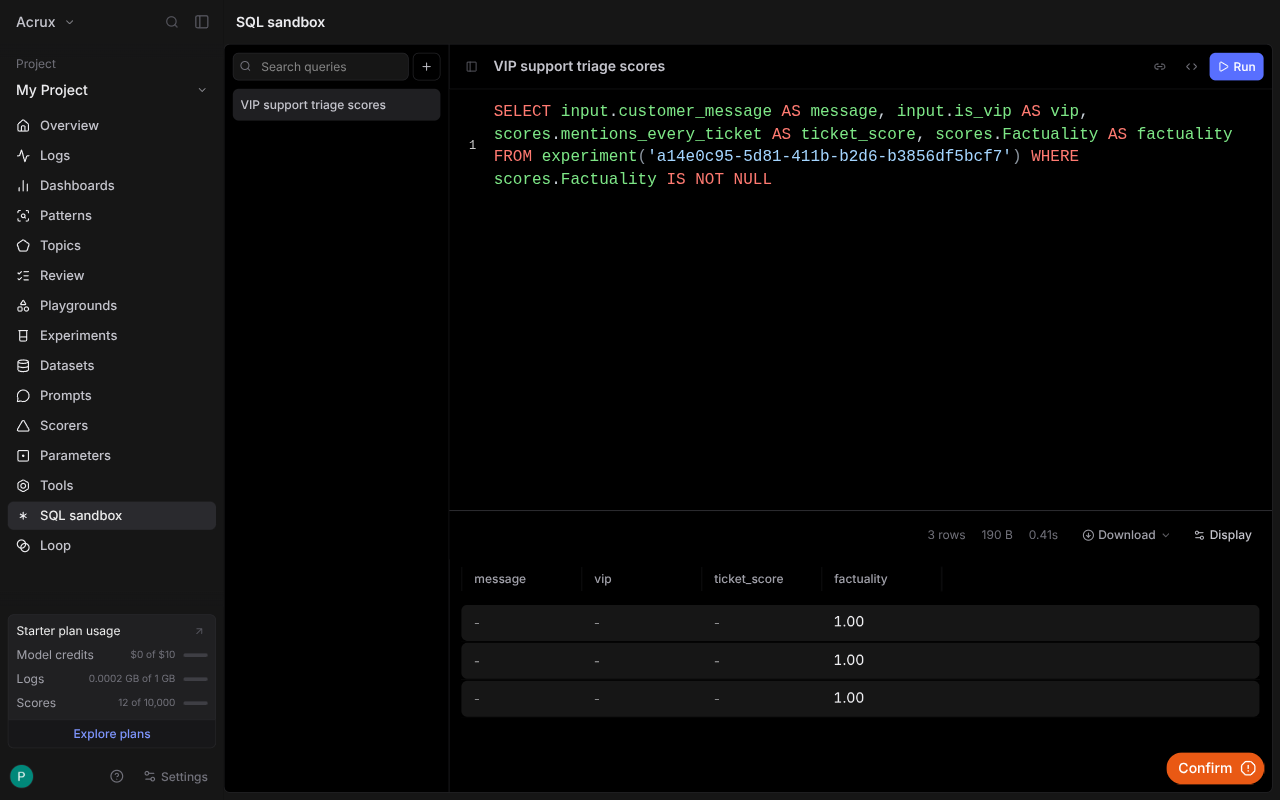
Our analytics pages answer a fixed set of questions, and you cannot write your own query against the underlying data. Braintrust's schema does take learning, though. Scores and inputs sit on different rows of the same experiment, so a query that selects both at once returns half-empty columns until you know that.
Loop, an agent inside the dashboard
An earlier attempt at that query failed, and the error came with a Fix with Loop button. Loop took the broken query as context and said what it intended to do. Loop then called its own tools to inspect the project and proposed a rewrite as a red/green diff, with Accept, Skip and an auto-accept toggle.
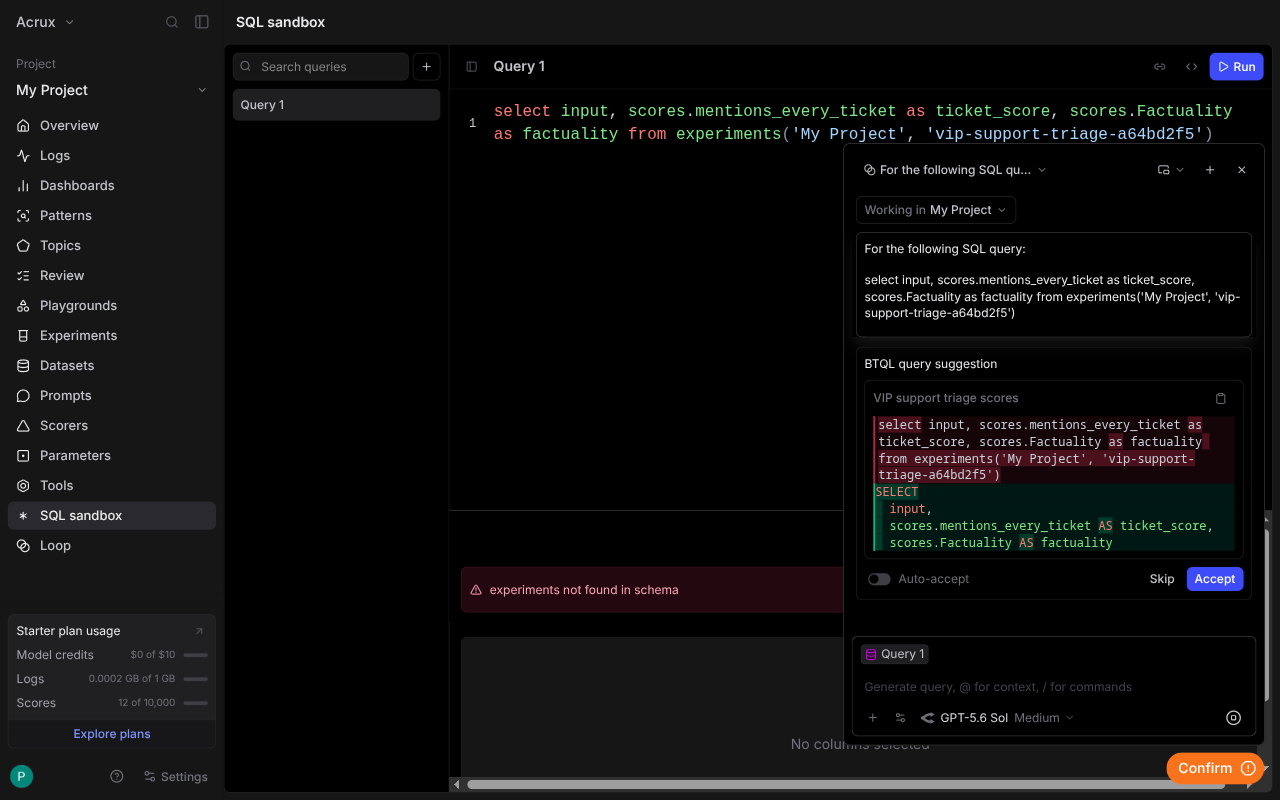
The answer was wrong. Loop's rewrite dropped the FROM clause, and the query it produced failed
in a new way. Braintrust's own error message then named the BTQL syntax the query needed, which
made the error more useful than the agent. The interaction is still worth copying: propose,
show a diff, ask before applying. AcruxCore has nothing that works that way.
And several more, not driven here
Their project sidebar also carries Patterns, Topics, a human Review queue, Automations, Remote evals, Preprocessors, Span iframes and a project-level MCP page. AcruxCore has no equivalent for any of them except Automations, which overlaps our online evaluation rules. All eight are listed rather than described, because none of them was driven hands-on for this post.
What AcruxCore does that Braintrust doesn't
Braintrust's proxy and AcruxCore's gateway both sit in the request path, so the fair question is what each one is allowed to do while it is there. Two controls are in AcruxCore and not in Braintrust. Both were checked against Braintrust's own documentation rather than against our feature list, which would have turned up only what we already build.
Budgets that stop the call
An AcruxCore budget is a cap in dollars, set per virtual key and per period. The gateway reserves
the estimated cost of a call before the provider is contacted, and a request that would cross the
cap is refused with 402 BUDGET_EXCEEDED rather than sent.
Braintrust has spend alerts, and their documentation says plainly what those do:
Spend alerts are informational-only and do not interrupt or limit your usage.
Their alerts also watch a different number. They fire on the Braintrust invoice for the whole organization, at up to three thresholds, by email or Slack. An AcruxCore budget caps model spend on one key.
Per-key request and token limits
A virtual key in AcruxCore carries an optional requests-per-minute and tokens-per-minute limit,
and the gateway checks both against a trailing 60-second window before the call goes out. A caller
over either limit gets a 429 with Retry-After. That window lives in the API process today, so a
deployment running several API instances enforces the limit per instance rather than across all of
them.
Braintrust rate-limits its own API endpoints per organization, which protects their service rather than your spend. Their organization settings expose no rate limit you can set on model calls.
What was checked and ruled out
Four controls that look like ours alone are not. Braintrust's AI proxy caches responses, and their documentation puts it as "The proxy automatically caches results and reuses them when possible". The same proxy issues temporary credentials that do the job virtual keys do, and it load balances across several keys for one model. Braintrust organizations hold provider credentials and per-function environment variables. None of those four belongs in this section.
Sources: the AI proxy guide, spend alerts and organization settings, all checked 2026-09-13.
Verdict
| Braintrust | AcruxCore | |
|---|---|---|
| Strongest at | Evaluation: declarative evals, auto-comparison against the last run, scorers as a real resource, SQL over the results | Controls in the request path: budgets that refuse the call, per-key rate limits, and tool code that stays in your process |
| Weakest at | The gap between its own surfaces: a prompt the UI authors correctly, the Python SDK renders differently | No query editor, and no SQL over your own trace data |
| Pick it if | Your bottleneck is measuring quality, you want tools callable with nothing of yours deployed, and hosted-only is fine | You need self-hosting, tools that reach your own data, or gateway controls that apply whether or not the caller asks |
If the job is to iterate on prompt quality against a dataset, Braintrust does it better than we do. Braintrust's evaluation model is the part of this comparison we learned most from, and its prompt authoring UI is ahead of ours as well.
One thing holds that authoring win back. Most calls reach a platform through its SDK, and
Braintrust's Python SDK renders a stored prompt with an engine the prompt does not declare,
deleting data as it goes and raising no error. Until the SDK reads template_format, the better
editor only helps on the screen where the prompt was written.
Tools are the row where the two products differ most and neither is behind. Braintrust's answer costs you a sandbox, a chosen interpreter and a copy of your data, and buys a tool anything can call with nothing of yours deployed. Ours costs you the work of running the tool, and buys a tool that still reaches your own database and filesystem.
For the six open-source alternatives we have compared against, see the compare page.
Start here if you want to try AcruxCore: Quickstart.