Call your provider directly with your own key (BYO)
What you'll build: one SDK call to each of OpenAI, Anthropic, Gemini and OpenRouter, made with your own provider key, with each call recorded as a trace in AcruxCore.
call-your-provider-directly — a standalone script that runs a chat, a stream and a tool loop on each provider, in Python and TypeScript.
Gateway or direct
An AcruxCore app can reach its model in two ways.
- Through the gateway. You store the provider key in AcruxCore, and your app sends each call to the gateway with an AcruxCore key. See Route calls through the gateway.
- Directly (BYO, "bring your own"). Your app keeps the provider key. The SDK calls the provider itself, then sends the trace to AcruxCore in the background. The provider key never reaches AcruxCore.
Choose the direct path when your provider key must stay in your own systems, or when you want no extra network hop in front of the provider. Prompts, the tool catalog, traces, sessions and feedback work the same way on both paths.
You do not need the OpenAI SDK or any provider SDK. The AcruxCore SDK makes the HTTP call itself.
1. Create an AcruxCore API key
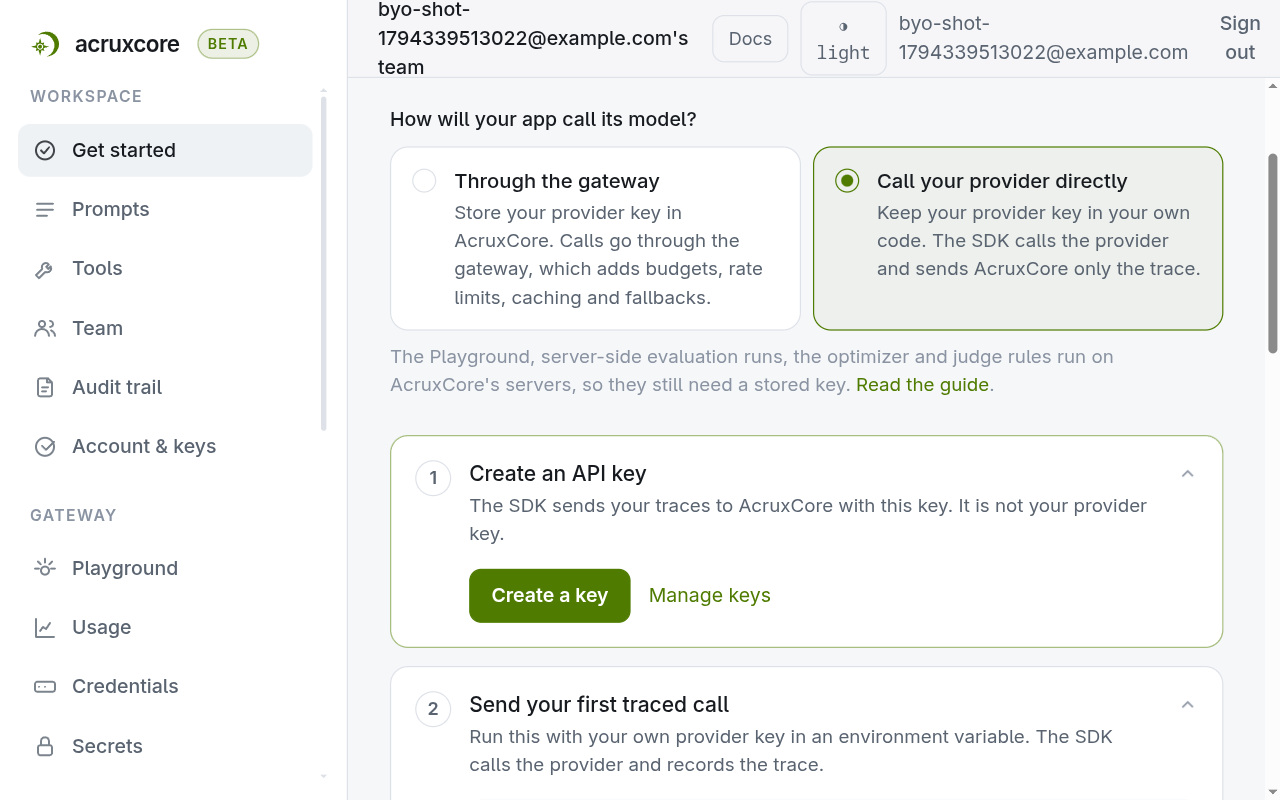
The SDK sends traces with an AcruxCore key. Create one under Account & keys, or on the Get started page: pick Call your provider directly, then Create a key.
2. Tell the SDK where your provider is
Pass a provider setting, on one call or once on the client. It holds your provider key
and says which API to speak.
| Provider | kind | base_url | API the SDK calls |
|---|---|---|---|
| OpenAI | leave out | https://api.openai.com/v1 | Chat Completions |
| Anthropic | anthropic | leave out (defaults to https://api.anthropic.com/v1) | Messages API |
| Gemini | gemini | leave out (defaults to https://generativelanguage.googleapis.com/v1beta) | generateContent |
| OpenRouter, Groq, vLLM and other OpenAI-compatible hosts | leave out | the host's URL, e.g. https://openrouter.ai/api/v1 | Chat Completions |
For Anthropic and Gemini, the SDK calls each provider's own API rather than its
OpenAI-compatible endpoint. It translates the request and the reply, so your code sends
and gets back the same messages for every provider. Without kind, the host decides:
api.anthropic.com means Anthropic, and Google's generativelanguage host means Gemini.
Pick your provider. Each tab shows the same call in Python and Node.
- Anthropic
- Gemini
- OpenAI
- OpenRouter
Set kind: "anthropic". The SDK calls the Anthropic Messages API.
- Python
- Node
import os
from acruxcore import AcruxCore

hub = AcruxCore(
    api_key=os.environ["ACRUXCORE_API_KEY"],
    provider={"kind": "anthropic", "api_key": os.environ["ANTHROPIC_API_KEY"]},
)
reply = await hub.gateway.chat("claude-haiku-4-5", [{"role": "user", "content": "Say hello in five words."}])
import AcruxCore from '@acruxcoreai/sdk';

const hub = new AcruxCore({
  apiKey: process.env.ACRUXCORE_API_KEY!,
  provider: { kind: 'anthropic', apiKey: process.env.ANTHROPIC_API_KEY! },
});
const reply = await hub.gateway.chat({
  model: 'claude-haiku-4-5',
  messages: [{ role: 'user', content: 'Say hello in five words.' }],
});
Set kind: "gemini". The SDK calls the Gemini generateContent API.
- Python
- Node
import os
from acruxcore import AcruxCore

hub = AcruxCore(
    api_key=os.environ["ACRUXCORE_API_KEY"],
    provider={"kind": "gemini", "api_key": os.environ["GEMINI_API_KEY"]},
)
reply = await hub.gateway.chat("gemini-3-flash-preview", [{"role": "user", "content": "Say hello in five words."}])
import AcruxCore from '@acruxcoreai/sdk';

const hub = new AcruxCore({
  apiKey: process.env.ACRUXCORE_API_KEY!,
  provider: { kind: 'gemini', apiKey: process.env.GEMINI_API_KEY! },
});
const reply = await hub.gateway.chat({
  model: 'gemini-3-flash-preview',
  messages: [{ role: 'user', content: 'Say hello in five words.' }],
});
Leave out kind and set base_url. The SDK calls OpenAI Chat Completions.
- Python
- Node
import os
from acruxcore import AcruxCore

hub = AcruxCore(
    api_key=os.environ["ACRUXCORE_API_KEY"],
    provider={"base_url": "https://api.openai.com/v1", "api_key": os.environ["OPENAI_API_KEY"]},
)
reply = await hub.gateway.chat("gpt-4o-mini", [{"role": "user", "content": "Say hello in five words."}])
import AcruxCore from '@acruxcoreai/sdk';

const hub = new AcruxCore({
  apiKey: process.env.ACRUXCORE_API_KEY!,
  provider: { baseUrl: 'https://api.openai.com/v1', apiKey: process.env.OPENAI_API_KEY! },
});
const reply = await hub.gateway.chat({
  model: 'gpt-4o-mini',
  messages: [{ role: 'user', content: 'Say hello in five words.' }],
});
Leave out kind and set base_url to OpenRouter. The SDK calls its OpenAI-compatible
Chat Completions endpoint.
- Python
- Node
import os
from acruxcore import AcruxCore

hub = AcruxCore(
    api_key=os.environ["ACRUXCORE_API_KEY"],
    provider={"base_url": "https://openrouter.ai/api/v1", "api_key": os.environ["OPENROUTER_API_KEY"]},
)
reply = await hub.gateway.chat("openai/gpt-4o-mini", [{"role": "user", "content": "Say hello in five words."}])
import AcruxCore from '@acruxcoreai/sdk';

const hub = new AcruxCore({
  apiKey: process.env.ACRUXCORE_API_KEY!,
  provider: { baseUrl: 'https://openrouter.ai/api/v1', apiKey: process.env.OPENROUTER_API_KEY! },
});
const reply = await hub.gateway.chat({
  model: 'openai/gpt-4o-mini',
  messages: [{ role: 'user', content: 'Say hello in five words.' }],
});
The model is the provider's own model name. No model needs to be registered in
AcruxCore.
3. Run it
The script holds the four provider settings from step 2, each with the model to call,
and runs the same calls with each one:
PROVIDERS = {
    "anthropic": {
        "provider": {"kind": "anthropic", "api_key": os.environ.get("ANTHROPIC_API_KEY")},
        "model": "claude-haiku-4-5",
    },
    "gemini": {
        "provider": {"kind": "gemini", "api_key": os.environ.get("GEMINI_API_KEY")},
        "model": "gemini-3-flash-preview",
    },
    # "openai" and "openrouter" follow the same shape, with base_url instead of kind
}

for name, entry in PROVIDERS.items():
    reply = await hub.gateway.chat(entry["model"], HELLO, provider=entry["provider"])
Set ACRUXCORE_API_KEY and the keys of the providers you use, then run it. A provider
without a key is skipped.
pip install acruxcore
python call_providers.py
Output, from a real run:
== openai (gpt-4o-mini)
  chat:   'Hello! How are you today?'  (13+7 tokens)
  stream: 'Hello! How are you today?'
  tools:  'The weather is 18°C in Paris and 24°C in Rome.'  (2 tool calls, 2 model turns)
== anthropic (claude-haiku-4-5)
  chat:   'Hello, how are you today?'  (13+10 tokens)
  stream: 'Hello, how are you today?'
  tools:  'Paris is currently 18°C while Rome is warmer at 24°C.'  (2 tool calls, 2 model turns)
== gemini (gemini-3-flash-preview)
  chat:   'Hello, how are you today?'  (7+251 tokens)
  stream: 'Hello, how are you doing?'
  tools:  'It is currently 18°C in Paris and 24°C in Rome.'  (2 tool calls, 2 model turns)
== openrouter (openai/gpt-4o-mini)
  chat:   'Hello there, how are you?'  (13+7 tokens)
  stream: 'Hello! How are you today?'
  tools:  'The weather is 18°C in Paris and 24°C in Rome.'  (2 tool calls, 2 model turns)
Done. Each call is a trace under Traces in the dashboard.
Each call is now one trace in Traces, with the model, the provider's host and the
token counts on its llm span. A tool loop's trace also holds one tool span per call.
Tool calls and streaming
stream=True, run_tool_loop and run_prompt_with_tools take the same provider
setting, and they behave the same on all four providers. The script's tool loop asks for
the weather in two cities, so the model makes two tool calls in one turn.
The script defines the tool in code. The SDK builds the definition the model reads from
the function, and runs the function when the model calls it. hub is the client from
step 2, which already holds the provider setting:
- Python
- Node
from acruxcore import acrux

TEMPERATURES = {"Paris": 18, "Rome": 24}

@acrux.tool
async def get_weather(city: str) -> dict:
    """Current weather for one city.

    Args:
        city: City name, e.g. 'Paris'.
    """
    return {"city": city, "temp_c": TEMPERATURES.get(city, 20)}

question = [{"role": "user", "content": "What is the weather in Paris and in Rome?"}]
loop = await hub.gateway.run_tool_loop("claude-haiku-4-5", question, tools=[get_weather])
print(loop.content)
import { acrux } from '@acruxcoreai/sdk';
import { z } from 'zod/v4';

const TEMPERATURES: Record<string, number> = { Paris: 18, Rome: 24 };

const getWeather = acrux.tool(
  {
    name: 'get_weather',
    description: 'Current weather for one city.',
    parameters: z.object({ city: z.string().describe("City name, e.g. 'Paris'.") }),
  },
  ({ city }) => ({ city, temp_c: TEMPERATURES[city] ?? 20 }),
);

const loop = await hub.gateway.runToolLoop({
  model: 'claude-haiku-4-5',
  messages: [{ role: 'user', content: 'What is the weather in Paris and in Rome?' }],
  tools: [getWeather],
});
console.log(loop.content);
A tool passed in tools is also saved to your team's tool catalog, so it shows under
Tools in the dashboard. The Node version needs zod installed next to the SDK.
On Gemini 3 models, a tool call carries a thought signature in
tool_calls[].extra_content. Gemini refuses the next turn if the signature is missing.
The tool loops send it back for you. If you run the loop yourself, keep each assistant
message exactly as you received it.
On Gemini, the thinking tokens count toward max_tokens. A small limit can end the
answer before any text appears, with finish_reason set to length.
Turn on thinking
reasoning_effort is an OpenAI field, so the SDK does not send it to Anthropic or Gemini.
Pass the provider's own thinking setting in extra_body instead. chat() and both tool
loops send it on every request, and the loops send each turn's thinking back to the
provider for you. This loop turns on Anthropic's extended thinking:
- Python
- Node
loop = await hub.gateway.run_tool_loop(
    "claude-haiku-4-5", question, tools=[get_weather],
    max_tokens=4000,
    extra_body={"thinking": {"type": "enabled", "budget_tokens": 1024}},
)
const loop = await hub.gateway.runToolLoop({
  model: 'claude-haiku-4-5',
  messages: [{ role: 'user', content: 'What is the weather in Paris and in Rome?' }],
  tools: [getWeather],
  maxTokens: 4000,
  extraBody: { thinking: { type: 'enabled', budget_tokens: 1024 } },
});
Anthropic requires max_tokens to be larger than budget_tokens. For Gemini, pass
{"generationConfig": {"thinkingConfig": {"thinkingLevel": "low"}}}.
On Anthropic, the SDK sends response_format as a forced tool, and Anthropic refuses a
forced tool with thinking on. So a request that carries response_format leaves
thinking out. A loop with tools sends response_format only on one extra request at
the end, which shapes the answer, so its earlier requests still think.
What needs a stored key
These features call a model from AcruxCore's servers, with no request from your app in progress, so they cannot use a key your app holds:
- the Playground
- server-side evaluation runs, where a stored prompt is run and graded on AcruxCore's servers
- the optimizer (improve a prompt from feedback)
- online judge rules
- the live model list from a provider
Each of these pages says so and links to Gateway → Credentials when your team has no model to run on. To evaluate a dataset without a stored key, use a local experiment: the SDK runs your app and your scorers on your machine and uploads the results as an ordinary run.
Budgets, rate limits, caching and fallback routing are applied by the gateway, so they apply only to calls that go through it.
How a stored key is protected
When you do store a key, AcruxCore encrypts it with AES-256-GCM. The master key comes from the server's environment and is never kept in the database. The API returns only the last four characters of a stored key.