Create a tool
What you'll build: the same weather tool twice — once defined by a decorated function in your own code, once defined in the catalog and only implemented in your code — and a rule for which one a project should use.
Every tool has two halves. The definition is what the model reads to decide whether and how to call the tool. The implementation is the code that runs when it does. Both have to live somewhere, and they do not have to live in the same place. AcruxCore lets your code own the definition, or lets the catalog own it while your code supplies only the body.
This page stops once the tool exists in the catalog. Connect a tool to a prompt is the next step, and Call a prompt's tools from the SDK is the one after that.
Prefer a notebook? define_a_tool.ipynb — this whole page as one runnable notebook.
1. What "the definition" actually means
It is more than the name. The definition is exactly the object sent to the model on every call, plus two facts that travel with it:
| Part | Who reads it | Why it matters |
|---|---|---|
name | the model | how the model refers to the tool |
description | the model | whether the model picks this tool at all |
parameters (JSON Schema) | the model | which arguments it may send, and which are required |
executor | the platform | whether your process runs the tool, or the gateway calls a URL |
| version identity | the platform | which build ran, and what gets stamped on the trace |
The parameter schema is the one with teeth. Name and description only influence whether the tool gets picked; the schema decides the shape of the call. So "who owns the definition" is really "who decides the call shape, and who has to fit it".
A client executor means your app runs the tool. An http executor means the
gateway calls a URL, and your process does nothing. A decorator wraps a function
in your process, so it can only ever produce client. Only a catalog-defined tool
can be http.
2. Path A — your code owns the definition
acrux.tool puts the four things a tool needs in one place: its name, the
description the model reads, the arguments it takes, and the code that runs. The
decorator attaches that definition to your function and returns the function
unchanged, so you can still call it directly in a test. No network call happens at
import time.
- Python
- Node
from acruxcore import AcruxCore, acrux

@acrux.tool
async def get_weather_code(city: str) -> dict:
    """Get today's weather for a city.

    Args:
        city: City name, e.g. 'Lahore'.
    """
    return {"city": city, "temp_c": 34, "sky": "hazy sun"}
The decorator reads the function: the name is get_weather_code, the description
is the docstring's first paragraph, and the Args: block describes each parameter.
import AcruxCore, { acrux } from '@acruxcoreai/sdk';
import { z } from 'zod/v4';

const getWeatherCode = acrux.tool(
  {
    name: 'get_weather_code',
    description: "Get today's weather for a city.",
    parameters: z.object({ city: z.string().describe("City name, e.g. 'Lahore'") }),
  },
  async ({ city }) => ({ city, tempC: 34, sky: 'hazy sun' }),
);
TypeScript has no runtime types, so the schema is passed as a value rather than
read from the signature. city inside the handler is a string, not unknown —
the type comes from the schema, so renaming the field in the z.object stops the
handler compiling, which is the drift this shape exists to prevent. parameters
also accepts a plain JSON Schema object, so zod is optional.
That decorator produced this, with nothing else written by hand:
{
  "name": "get_weather_code",
  "description": "Get today's weather for a city.",
  "parameters": {
    "type": "object",
    "properties": { "city": { "type": "string", "description": "City name, e.g. 'Lahore'." } },
    "required": ["city"]
  }
}
Publish it to the catalog
The definition is still only in your process. tools.sync publishes it: it creates
the catalog entry because the name is new, commits version 1, and points
production at it.
- Python
- Node
async with AcruxCore() as hub:
    result = (await hub.tools.sync([get_weather_code]))[0]
    print(result.tool_id, result.version_number, result.alias, result.committed)
const hub = new AcruxCore();
const [result] = await hub.tools.sync([getWeatherCode]);
console.log(result.toolId, result.versionNumber, result.alias, result.committed);
A sync commits a version only when the definition changed. Run it a second time and
nothing is committed, because the definition is unchanged. Change the description or add a parameter and
the next run commits version 2 and moves production to it.
You can also let the first run do it. Passing the decorated function to the tool
loop syncs it before the first model call, because sync defaults to True:
- Python
- Node
run = await hub.gateway.run_tool_loop(
    "support-model",
    [{"role": "user", "content": "What is the weather in Karachi?"}],
    tools=[get_weather_code],
)
print(run.content)     # the model's answer, based on what the tool returned
print(run.iterations)  # 2 — one tool round-trip, then the final answer
const run = await hub.gateway.runToolLoop({
  model: 'support-model',
  messages: [{ role: 'user', content: 'What is the weather in Karachi?' }],
  tools: [getWeatherCode],
});
console.log(run.content);    // the model's answer, based on what the tool returned
console.log(run.iterations); // 2 — one tool round-trip, then the final answer
Pass sync=False (Node: sync: false) when you have already published the
definitions in a deploy step and the run should not write to the catalog.
What the catalog shows afterwards
Open Tools → get_weather_code. The tool your code created is there, with a
Defined in code badge and one version whose source is code.
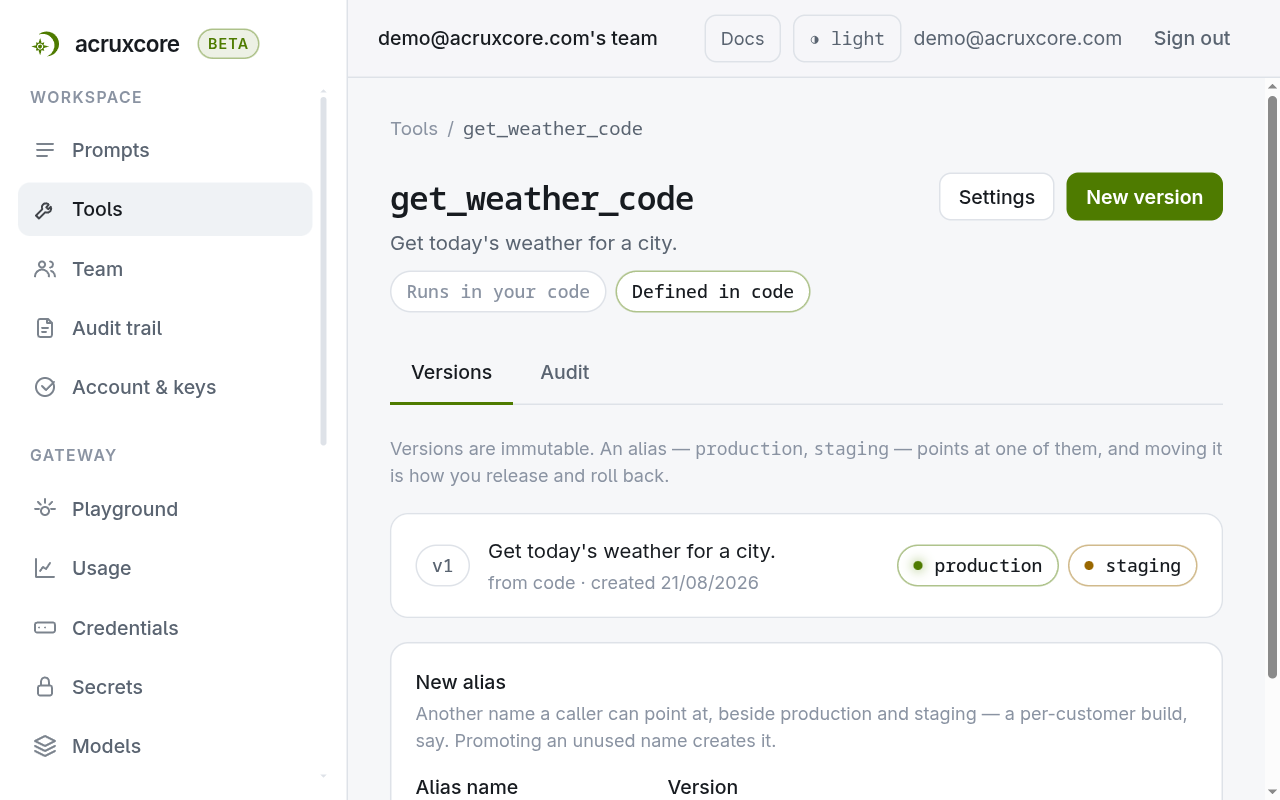
The badge and the code tag are not decoration. They record that this version was
written by tools.sync, and that editing the function is how you change it.
Sync compares the definition your code sends against the live version, so a version committed here by hand stops being live the next time sync runs. The version you edited is not lost — it stays in the version list and can be promoted back — but treat the dashboard as read-only for tools your code owns.
One exception is worth knowing. A function with no docstring in Python, or no
description in Node, sends no description at all, which hands the model-facing
wording to whoever writes it in the dashboard. Supply a description in code and code
owns it. Pick per tool which side owns the words.
code_defined_tool.py — the full script for Path A.
3. Path B — the catalog owns the definition
Here nothing in your code defines a tool, so the definition has to exist in the platform before the run. Underneath, a tool is a shell carrying the name plus a version carrying the schema and the executor — but the dashboard writes both from one form, because a shell on its own resolves to nothing.
Open Tools → New tool. The description is the text the model reads, each parameter is one row, and the executor decides who runs the call.
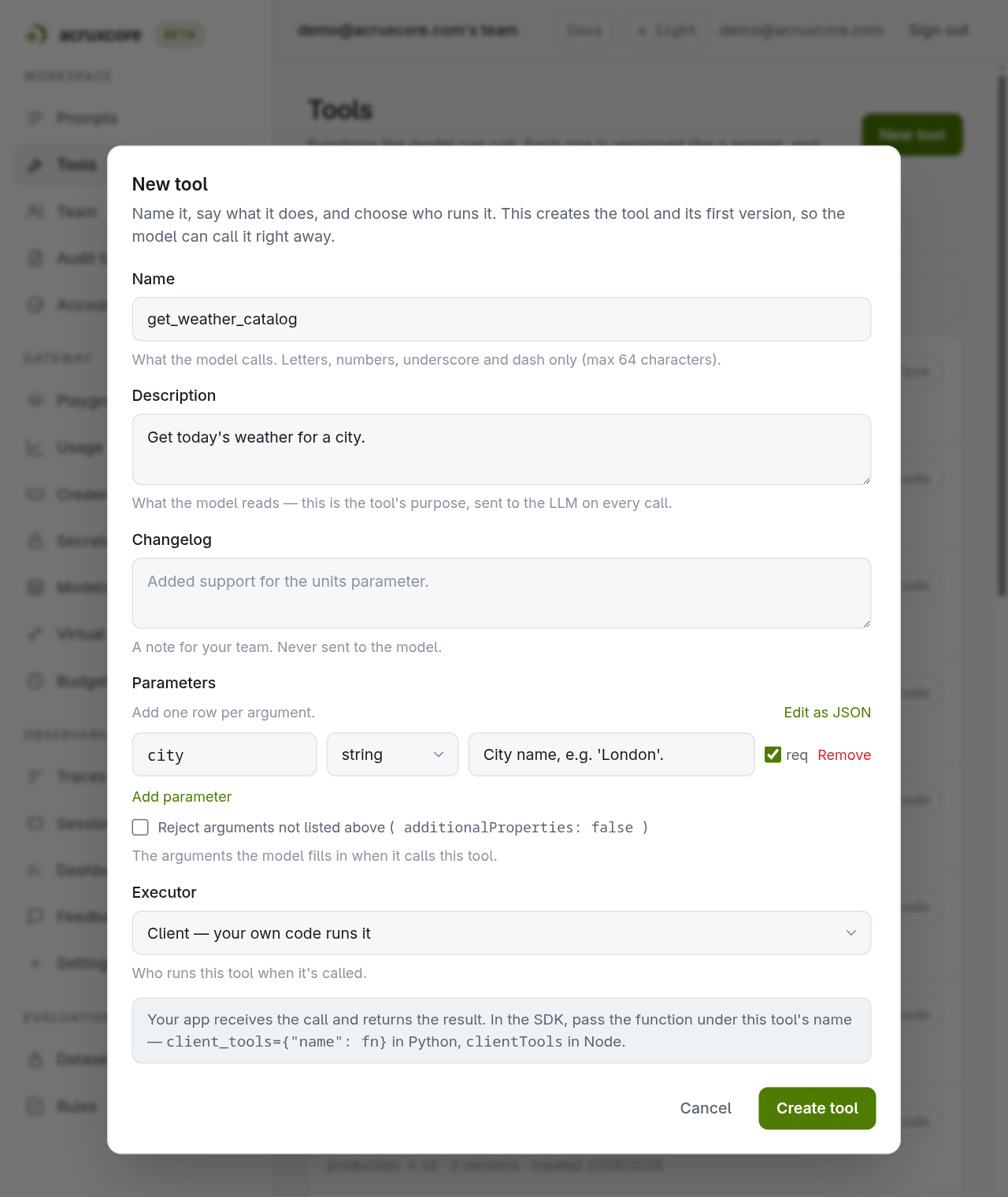
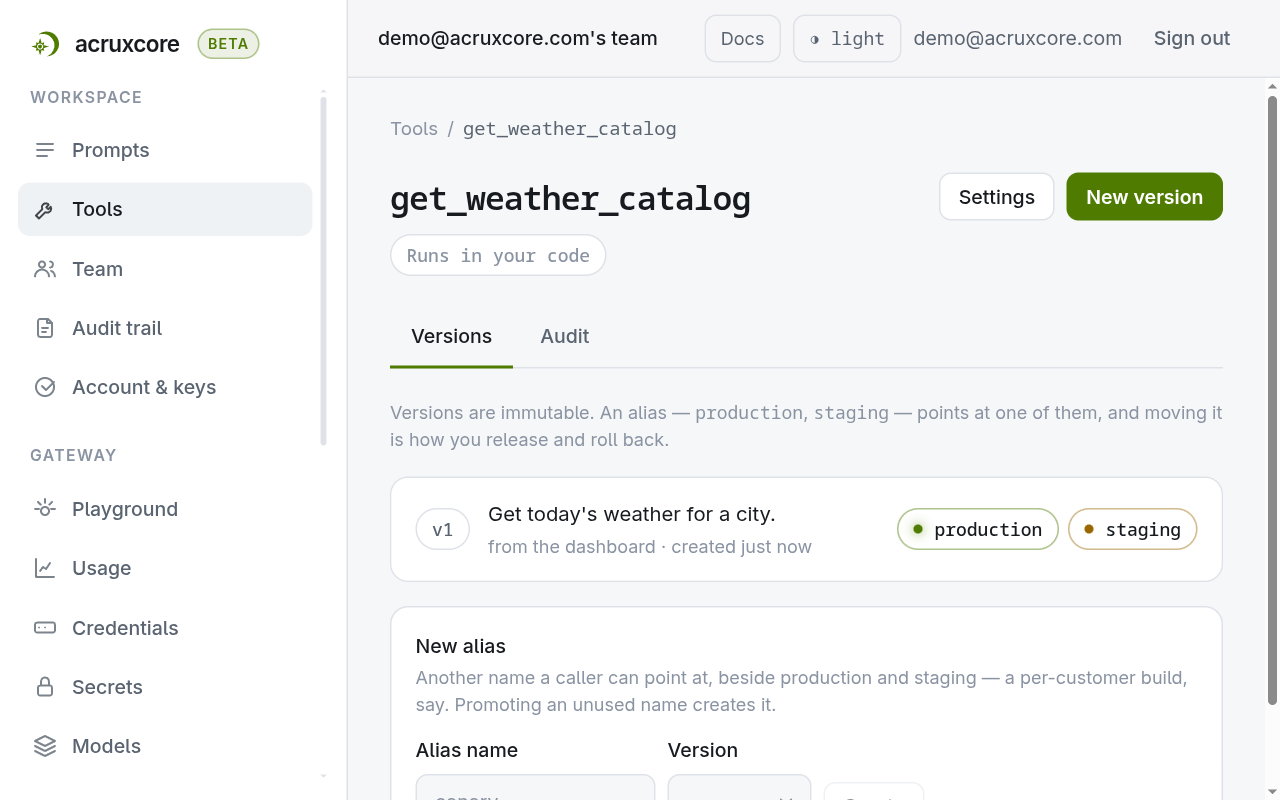
Compare that page with the one in path A. Same tool, same schema, no "Defined in
code" badge, and the version is tagged dashboard instead of code. The tag
records who wrote the version — dashboard, api, or code.
Choose the executor
Client — your own code runs it. The platform sends the model the definition, the model asks for the tool, and the SDK looks the name up in a map you supply. Use it when the tool touches something only your process can reach.
HTTP — AcruxCore calls a URL. The platform makes the request and writes the tool
span itself, so nothing runs in your process and there is no deploy to do. Use it
when the tool is already an endpoint. Arguments reach the request through
{{arg.NAME}}, which works in the URL, in a header value, and in a query value:
{
  "type": "http",
  "url": "https://api.example.com/orders/{{arg.order_id}}",
  "method": "GET",
  "headers": [{ "name": "X-Api-Key", "value": "{{secret.ORDERS_KEY}}" }],
  "query": []
}
The platform substitutes each {{arg.NAME}} with the argument the model sent, and
each {{secret.NAME}} with a team secret, so no credential is stored on the
version.
A placeholder in the URL is filled in as a single path segment: the value is percent-encoded, and a value that is a relative path reference is refused rather than sent, so the model's argument cannot change which resource the call addresses. If a value legitimately spans two segments, give it two placeholders. Full field list: Tool versions.
Run a client tool from your code
The tool now needs a body. You give it one at call time, in a map keyed by the catalog's tool name. With the tool already bound to a prompt the run is short, because the render carries the model, the messages and the tools:
from acruxcore import AcruxCore

def get_weather(city: str) -> dict:                   # no decorator
    return {"city": city, "temp_c": 34, "sky": "hazy sun"}

async with AcruxCore() as hub:
    rendered = await hub.prompts.render("weather-brief-catalog", "production")
    run = await hub.gateway.run_prompt_with_tools(
        rendered,
        messages=[*rendered.messages, {"role": "user", "content": "What is the weather in Karachi?"}],
        client_tools={"get_weather_catalog": get_weather},
    )
Binding the tool to the prompt is a separate step, on the prompt's Tools tab or over the API. Connect a tool to a prompt covers it.
How your function gets matched to the tool
The map's key is the whole wiring. Nothing else takes part — not the function's name, not the module it lives in, not the order of the entries.
At run time the name travels like this:
the prompt's binding -> the catalog tool's name -> your map's key -> your function
The model asks for the tool by that same catalog name, so the key has to match what the dashboard shows, exactly, including case.
The value is any callable you like. In the snippet above the tool is
get_weather_catalog while the function is get_weather, and that is deliberate:
the platform owns one name, your codebase owns the other, and the map is the one
place they meet. Renaming the Python function changes nothing on the platform.
Renaming the tool in the dashboard means updating one string here.
With several tools it is one entry each:
CLIENT_TOOLS = {
    "get_weather_catalog": lookup_weather,
    "search_flights": find_flights,
    "convert_currency": fx,
}
Write the keys as literal strings rather than deriving them from fn.__name__.
The file then states which catalog tools this app implements, and it keeps working
when an implementation is a wrapped function or a functools.partial — neither of
which has a name you can rely on.
Two more rules follow from the same idea, that the definition is the catalog's:
- The parameter names are not yours either. The function is called with the
schema's own field names as keywords, so
lookup_weather(city=...). A function that cannot acceptcityis rejected before the first model call. - Only
clienttools belong in the map. A prompt'shttptools run on the platform and need nothing from you. A key that matches nothing bound to the prompt is ignored, so one app-wide map can serve several prompts.
setup_catalog_tool.py— does the dashboard work above over the API, if you would rather not click.catalog_defined_tool.py— the run.
4. What changes when you switch owner
Code owns it (@acrux.tool) | Catalog owns it (client_tools) | |
|---|---|---|
| Schema comes from | your type hints | the catalog version |
| Description comes from | your docstring | the catalog version |
| Parameter names | your function decides | the schema decides, your function must fit |
| Executor | always client | client or http |
| Changing what the model reads | edit the function, sync, redeploy | edit a version in the dashboard, no deploy |
| Version pin on a prompt | dropped when tools=[fn] syncs | kept, and travels as a pin |
| Trace tool span | stamped only when the loop syncs | always stamped with toolId:version |
That last row is visible in a trace. The tool span on a catalog-defined run carries the exact version that ran:
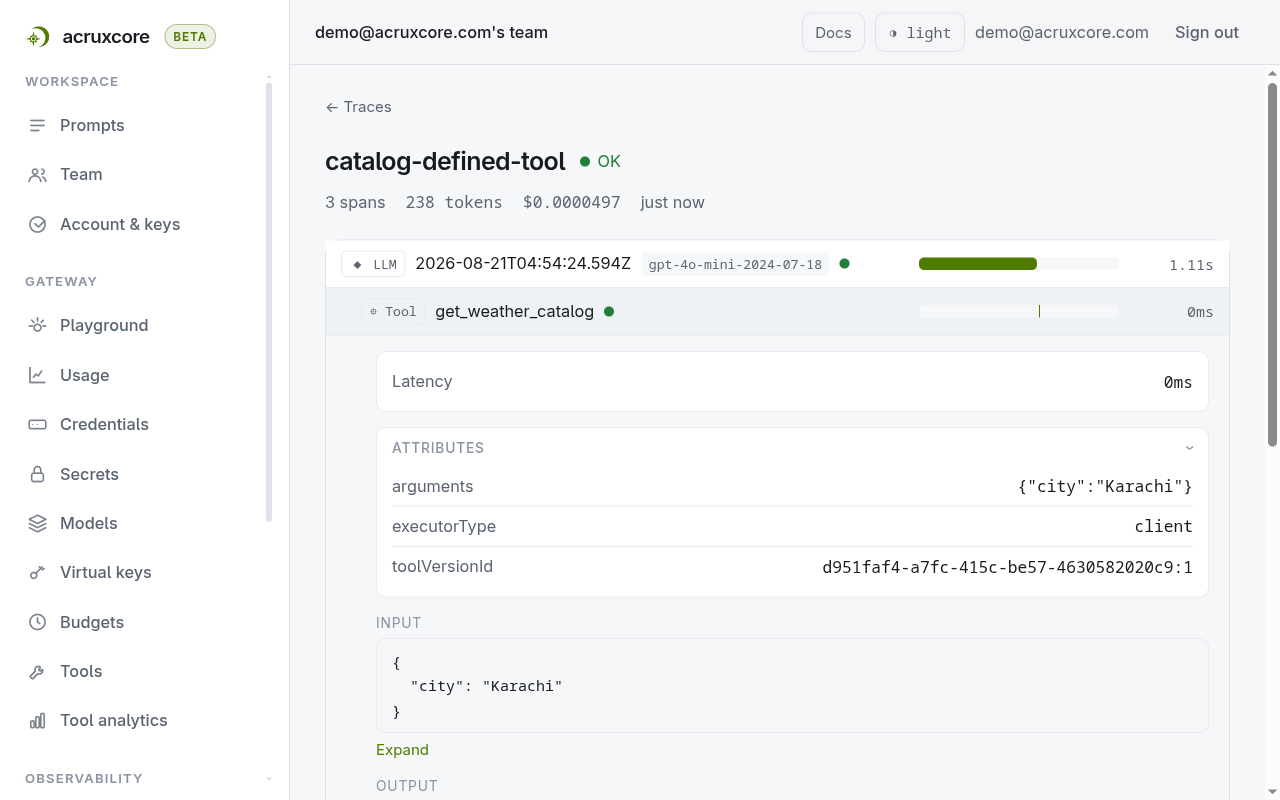
On path A the same attribute appears only when the loop actually synced the
tool. Running with sync=False leaves the span with no toolVersionId — there is
no catalog version that this particular run can honestly point at.
5. Four ways to get this wrong
A catalog tool that nothing points at fails silently. If the definition
exists but no binding and no tool_refs name it, render returns no tools and
the run becomes a plain completion. The model answers from its own knowledge, no
error is raised, and your function is never called. If a tool "does nothing",
check the prompt's Tools tab first.
A bound client tool with no implementation fails loudly. You get a
MISSING_DISPATCH error before the first model call, and it lists the keys you
did supply, so a typo in the map is a one-second fix.
tools=[fn] on a name that already exists rewrites it. Passing a decorated
function whose name matches a catalog tool commits a new version from your local
schema and moves its alias — and a prompt that pinned an exact version loses the
pin. That is the failure that looks like nothing happened: the run works, and
the pinned prompt silently starts following your laptop.
client_tools to run, tools= to publishclient_tools writes nothing to the catalog. Reach for tools=[fn] only when
your code is meant to be the source of truth for that tool's definition.
A decorated function inside client_tools keeps its decorator, and loses it.
It runs fine, but the definition is ignored — the schema and description come
from the catalog. Someone can edit the docstring, redeploy, and wonder why the
model's behaviour never changed.
6. Which one to use
Default to the catalog owning the definition whenever a prompt binds its tools.
Version pinning then means something, the model-facing text can be fixed without
a deploy, and the same prompt can move from a client tool in staging to an
http tool in production without touching your app.
Choose the decorator when the tool exists only in code and the repository should be the source of truth — an internal agent, a CLI, no dashboard step in the loop. Deriving a schema from type hints is worth a lot when the tool is yours alone.
The two combine well. Run hub.tools.sync([...]) in your deploy step so the
definitions are published from code, and run with client_tools at runtime so
execution stays pinned to a catalog version. You get schemas generated from code
and traces that name the exact version that ran.
Doing this over the API
Both paths are plain HTTP, and every endpoint below has an SDK method too. The call count is the clearest summary of the difference. Publishing from code is one call, because the definition is already complete.
- curl
- Python
- Node
curl -X POST "$ACRUXCORE_BASE_URL/tools/sync" \
  -H "Authorization: Bearer $ACRUXCORE_API_KEY" \
  -H "Content-Type: application/json" \
  -d '{"name":"get_weather_api_sync","description":"Get today'\''s weather for a city.","parametersSchema":{"type":"object","properties":{"city":{"type":"string","description":"City name, e.g. Lahore."}},"required":["city"]},"executor":{"type":"client"},"alias":"production","source":"code"}'
{
  "toolId": "4305e3f7-af4b-4bb3-b726-f21af51d42ee",
  "versionNumber": 1,
  "committed": true,
  "alias": "production"
}
result = (await hub.tools.sync([get_weather_code]))[0]
print(result.tool_id, result.version_number, result.alias, result.committed)
This is the call from path A, shown again because it
is the same request: sync builds that JSON body out of the decorated function, so
there is no second shape to learn.
const [result] = await hub.tools.sync([getWeatherCode]);
console.log(result.toolId, result.versionNumber, result.alias, result.committed);
This is the call from path A, shown again because it
is the same request: sync builds that JSON body out of the definition
acrux.tool returned.
One request created the shell, committed version 1, and moved the production
alias. source: "code" is what earns the "Defined in code" badge, and this is the
only endpoint that accepts it. A version committed any other way therefore cannot
claim code ownership: sending source: "code" to the versions endpoint returns
VALIDATION_ERROR.
Defining the same tool in the catalog takes three calls, because the shell, the version and the binding are three separate decisions.
- curl
- Python
- Node
# 1. the shell — a name, no schema
curl -X POST "$ACRUXCORE_BASE_URL/tools" \
  -H "Authorization: Bearer $ACRUXCORE_API_KEY" \
  -H "Content-Type: application/json" \
  -d '{"name":"get_weather_api","description":"Weather lookup."}'

# 2. the version — the schema and the executor
curl -X POST "$ACRUXCORE_BASE_URL/tools/<tool-id>/versions" \
  -H "Authorization: Bearer $ACRUXCORE_API_KEY" \
  -H "Content-Type: application/json" \
  -d '{"description":"Get today'\''s weather for a city.","parametersSchema":{"type":"object","properties":{"city":{"type":"string","description":"City name, e.g. Lahore."}},"required":["city"]},"executor":{"type":"client"}}'

# 3. the binding — pin this prompt to version 1
curl -X PUT "$ACRUXCORE_BASE_URL/prompts/$PROMPT_ID/tools/<tool-id>" \
  -H "Authorization: Bearer $ACRUXCORE_API_KEY" \
  -H "Content-Type: application/json" \
  -d '{"pinned_version_number":1}'
from acruxcore import AcruxCore

PROMPT_ID = "<prompt-id>"

async with AcruxCore() as hub:
    # 1. the shell — a name, no schema
    tool = await hub.tools.create("get_weather_api", description="Weather lookup.")

    # 2. the version — the schema and the executor
    version = await hub.tools.commit_version(
        tool.id,
        {
            "type": "object",
            "properties": {"city": {"type": "string", "description": "City name, e.g. Lahore."}},
            "required": ["city"],
        },
        {"type": "client"},
        description="Get today's weather for a city.",
    )

    # 3. the binding — pin this prompt to version 1
    await hub.prompts.set_tool_binding(
        PROMPT_ID, tool.id, pinned_version_number=version.version_number
    )
import AcruxCore from '@acruxcoreai/sdk';

const PROMPT_ID = '<prompt-id>';
const hub = new AcruxCore();

// 1. the shell — a name, no schema
const tool = await hub.tools.create({ name: 'get_weather_api', description: 'Weather lookup.' });

// 2. the version — the schema and the executor
const version = await hub.tools.commitVersion(tool.id, {
  description: "Get today's weather for a city.",
  parametersSchema: {
    type: 'object',
    properties: { city: { type: 'string', description: 'City name, e.g. Lahore.' } },
    required: ['city'],
  },
  executor: { type: 'client' },
});

// 3. the binding — pin this prompt to version 1
await hub.prompts.setToolBinding(PROMPT_ID, tool.id, {
  pinnedVersionNumber: version.versionNumber,
});
The first version a tool ever gets mints both the production and staging
aliases. Later commits mint none. The SDK methods take the same three decisions in
the same order, and commit_version (Node: commitVersion) refuses a source of
code before the request leaves your process, for the reason above.
Full request and response bodies: Tools,
Tool versions and
Prompt tool bindings. The matching SDK
signatures, including tools.update and tools.delete, are in the
Node and Python references.
There is no decorator. acrux.tool({ name, description, parameters }, handler)
builds the same definition from a factory call, and clientTools is the same
map — except each handler receives one arguments object, not keyword arguments.
What's next
- Connect a tool to a prompt — bind it, and give one prompt alias a different build of it.
- Call a prompt's tools from the SDK — the three calls that run a bound tool, streaming or not.
- Version and track a tool — commit a second version, move an alias, and read call volume and latency.