Evaluate a prompt that reads an image
What you'll build: a prompt that reads an image, a dataset whose example holds the image link, and a run that sends the image to three vision models. A judge then scores each answer after looking at the same image.
This guide extends Evaluate a prompt against a dataset. It changes three things: the prompt has an image part, the dataset example holds a link, and the judge model must read images.
Before you start
You need three registered models that read images, a gateway key, and a running worker. Send an image to a model shows how to register one. This guide uses vision-gemma, vision-gemini-or and vision-claude.
The judge is a model too. Each experiment names it with judge_model, one of your registered models, and it must read images when a dataset has one. This guide uses vision-claude. A judge that cannot read images fails every scoring call with the provider's error. If the experiment uses your own judge prompt, the image is added after the text of its last user message, so say there what the judge should check in it.
export ACRUXCORE_BASE_URL=https://api.acruxcore.com/api/v1
export ACRUXCORE_API_KEY=acx_sk_...
The SDK tabs use @acruxcoreai/sdk from npm and acruxcore from PyPI, and both read these two variables. Use version 0.17.0 or later of either SDK, because that release types the image parts.
1. Commit a prompt with an image part
A user message holds a list of parts instead of a string. Each part is a text template or an image link template. {{ receipt_url }} is filled with a variable when the prompt runs, the same way {{ kind }} is.
- Node (SDK)
- Python (SDK)
- curl
import AcruxCore from '@acruxcoreai/sdk';

const hub = new AcruxCore();

const prompt = await hub.prompts.create({ name: 'image-reader' });
const version = await hub.prompts.commitVersion(prompt.id, {
  messages: [
    { role: 'system', content: 'You read images. Reply with the main text in the image.' },
    {
      role: 'user',
      content: [
        { type: 'text', text: 'Read this {{ kind }}.' },
        { type: 'image_url', image_url: { url: '{{ receipt_url }}' } },
      ],
    },
  ],
});
console.log(version.variables); // [ 'kind', 'receipt_url' ]
from acruxcore import AcruxCore

hub = AcruxCore()

prompt = await hub.prompts.create("image-reader")
version = await hub.prompts.commit_version(prompt.id, [
    {"role": "system", "content": "You read images. Reply with the main text in the image."},
    {"role": "user", "content": [
        {"type": "text", "text": "Read this {{ kind }}."},
        {"type": "image_url", "image_url": {"url": "{{ receipt_url }}"}},
    ]},
])
print(version.variables)  # ['kind', 'receipt_url']
curl -X POST $ACRUXCORE_BASE_URL/prompts \
  -H "Authorization: Bearer $ACRUXCORE_API_KEY" \
  -H "Content-Type: application/json" \
  -d '{"name":"image-reader"}'
curl -X POST $ACRUXCORE_BASE_URL/prompts/<prompt-id>/versions \
  -H "Authorization: Bearer $ACRUXCORE_API_KEY" \
  -H "Content-Type: application/json" \
  -d '{"messages":[
    {"role":"system","content":"You read images. Reply with the main text in the image."},
    {"role":"user","content":[
      {"type":"text","text":"Read this {{ kind }}."},
      {"type":"image_url","image_url":{"url":"{{ receipt_url }}"}}
    ]}
  ]}'
The response lists "variables": ["kind", "receipt_url"]. The version also appears in the dashboard. Open the prompt and the Editor tab shows the text part and the image link as separate fields:
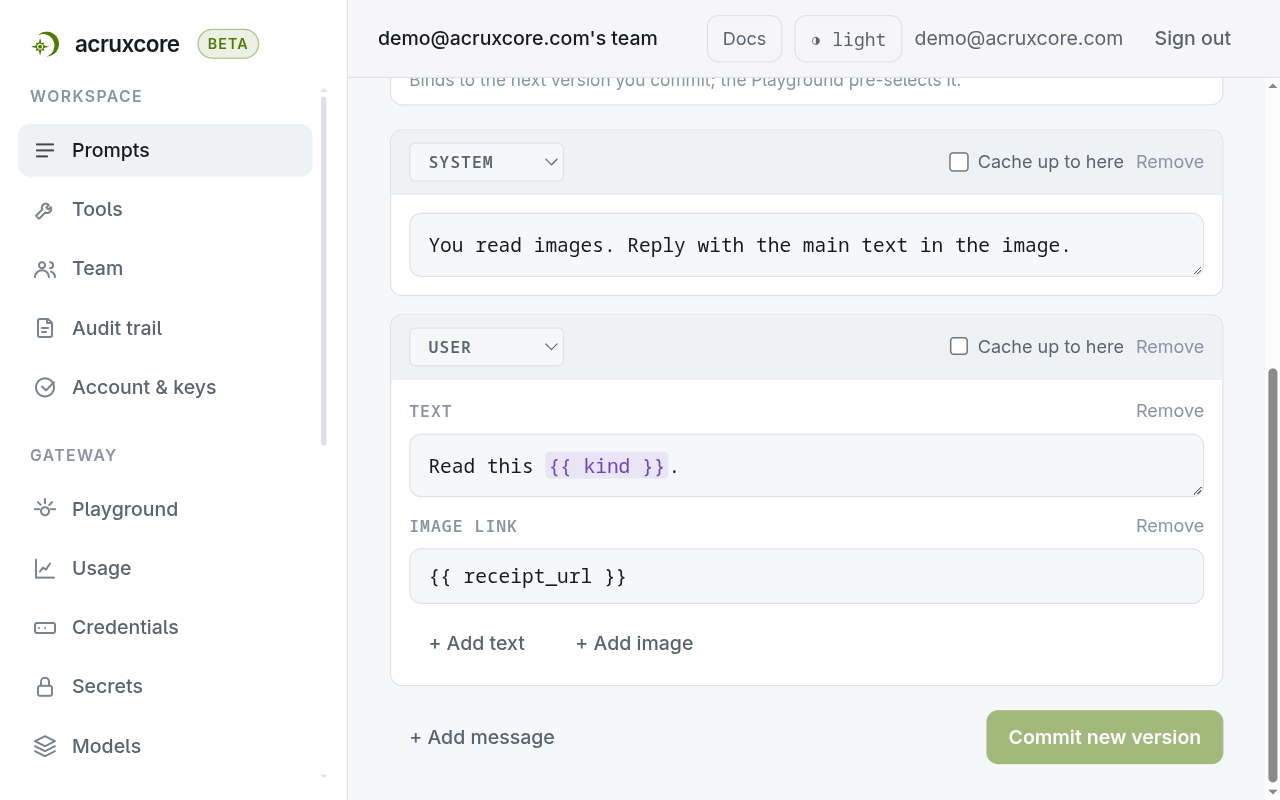
To add an image to a text message in the dashboard, open a user message and select + Add image. A system or assistant message cannot hold an image, and the API answers 400 if you try.
The Preview tab fills the variables and shows the image the model would receive:
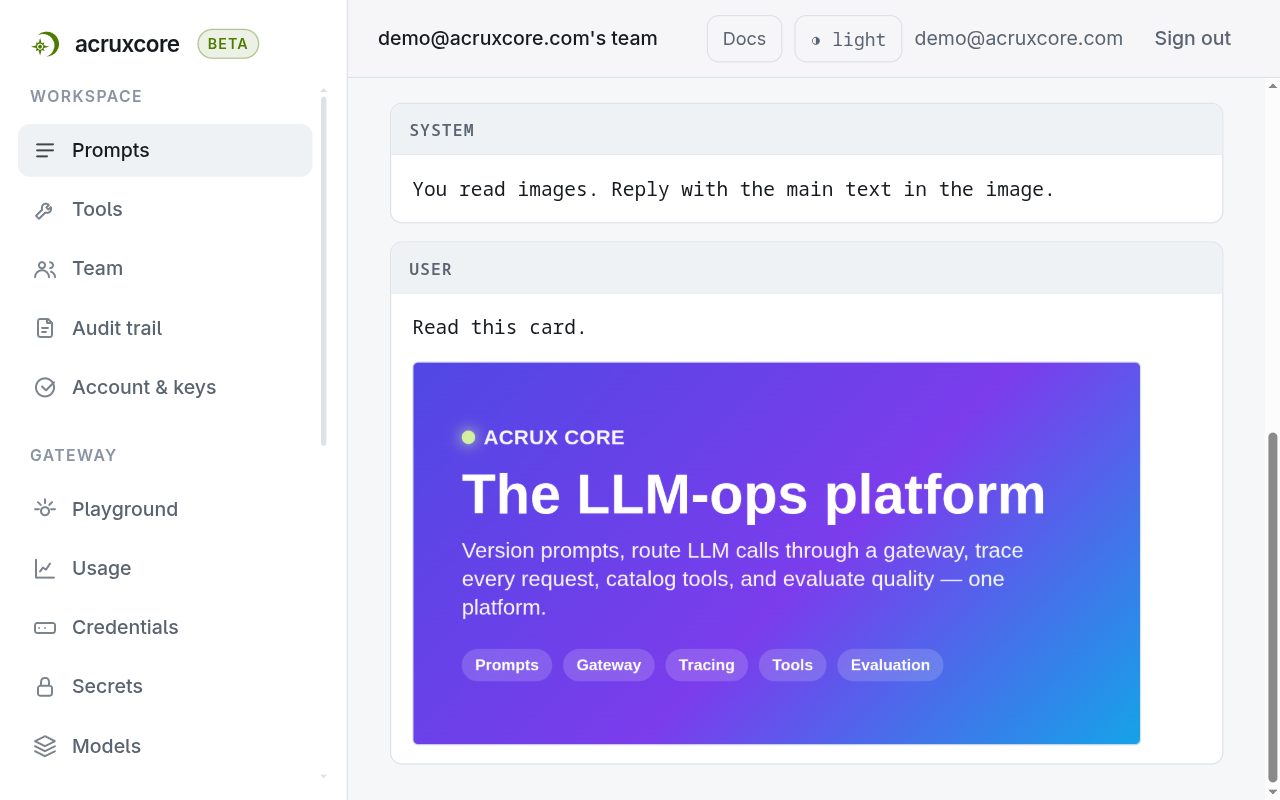
2. Add an example with an image link
An example holds the image as a link in a variable. The link must be public, because the model's provider downloads it. A file does not fit in an example: input is limited to 8,192 bytes, so an inline data: image returns 400.
- Node (SDK)
- Python (SDK)
- curl
const dataset = await hub.datasets.create({ name: 'image-text' });
await hub.datasets.addExample(dataset.id, {
  input: {
    kind: 'card',
    receipt_url: 'https://raw.githubusercontent.com/AcruxCore/AcruxCore/main/apps/docs/static/img/social-card.png',
  },
  criteria: 'The reply must name the product ACRUX CORE.',
});
dataset = await hub.datasets.create("image-text")
await hub.datasets.add_example(
    dataset.id,
    {
        "kind": "card",
        "receipt_url": "https://raw.githubusercontent.com/AcruxCore/AcruxCore/main/apps/docs/static/img/social-card.png",
    },
    criteria="The reply must name the product ACRUX CORE.",
)
curl -X POST $ACRUXCORE_BASE_URL/datasets \
  -H "Authorization: Bearer $ACRUXCORE_API_KEY" \
  -H "Content-Type: application/json" \
  -d '{"name":"image-text"}'
curl -X POST $ACRUXCORE_BASE_URL/datasets/<dataset-id>/examples \
  -H "Authorization: Bearer $ACRUXCORE_API_KEY" \
  -H "Content-Type: application/json" \
  -d '{
    "input": {
      "kind": "card",
      "receipt_url": "https://raw.githubusercontent.com/AcruxCore/AcruxCore/main/apps/docs/static/img/social-card.png"
    },
    "criteria": "The reply must name the product ACRUX CORE."
  }'
criteria says what a correct answer contains. For a receipt, write the merchant and the total: "The merchant is BLUE HERON CAFE and the total is 12.50." The judge compares the answer with the criteria and with the image.
3. Run the experiment on three models
- Node (SDK)
- Python (SDK)
- curl
const experiment = await hub.experiments.create({
  datasetId: dataset.id,
  promptId: prompt.id,
  versionIds: [version.id],
  models: ['vision-gemma', 'vision-gemini-or', 'vision-claude'],
  judgeModel: 'vision-claude',
});
const run = await hub.experiments.startRun(experiment.id);
console.log(run.runId, run.status); // -> queued
experiment = await hub.experiments.create(
    dataset.id,
    [version.id],
    ["vision-gemma", "vision-gemini-or", "vision-claude"],
    prompt_id=prompt.id,
    judge_model="vision-claude",
)
run = await hub.experiments.start_run(experiment.id)
print(run.run_id, run.status)  # -> queued
curl -X POST $ACRUXCORE_BASE_URL/experiments \
  -H "Authorization: Bearer $ACRUXCORE_API_KEY" \
  -H "Content-Type: application/json" \
  -d '{
    "dataset_id": "<dataset-id>",
    "prompt_id": "<prompt-id>",
    "version_ids": ["<version-id>"],
    "models": ["vision-gemma", "vision-gemini-or", "vision-claude"],
    "judge_model": "vision-claude"
  }'
curl -X POST $ACRUXCORE_BASE_URL/experiments/<experiment-id>/runs \
  -H "Authorization: Bearer $ACRUXCORE_API_KEY" \
  -H "Content-Type: application/json" \
  -d '{}'
Each cell renders the prompt with the example's variables and sends the image to its model. A link that is not an http(s) or data:image/ URL fails the cell with a message that names it, before any model is called.
4. Read the report
Wait until the run's status is no longer queued or running, then read the report. Each cell is one model's result for the prompt version:
- Node (SDK)
- Python (SDK)
- curl
let detail = await hub.runs.get(run.runId);
while (detail.status === 'queued' || detail.status === 'running') {
  await new Promise((r) => setTimeout(r, 3000));
  detail = await hub.runs.get(run.runId);
}
const report = await hub.runs.getReport(run.runId);
for (const cell of report.cells) console.log(cell.model, cell.avgScore);
import asyncio

detail = await hub.runs.get(run.run_id)
while detail.status in ("queued", "running"):
    await asyncio.sleep(3)
    detail = await hub.runs.get(run.run_id)
report = await hub.runs.get_report(run.run_id)
for cell in report.cells:
    print(cell["model"], cell["avgScore"])
curl $ACRUXCORE_BASE_URL/runs/<run-id>/report \
  -H "Authorization: Bearer $ACRUXCORE_API_KEY"
Both SDK examples print each model with its average score:
vision-gemma 100
vision-gemini-or 100
vision-claude 100
The same report is in the dashboard. Open Evaluations → Runs and select the run. The leaderboard ranks the three models by their judge score:
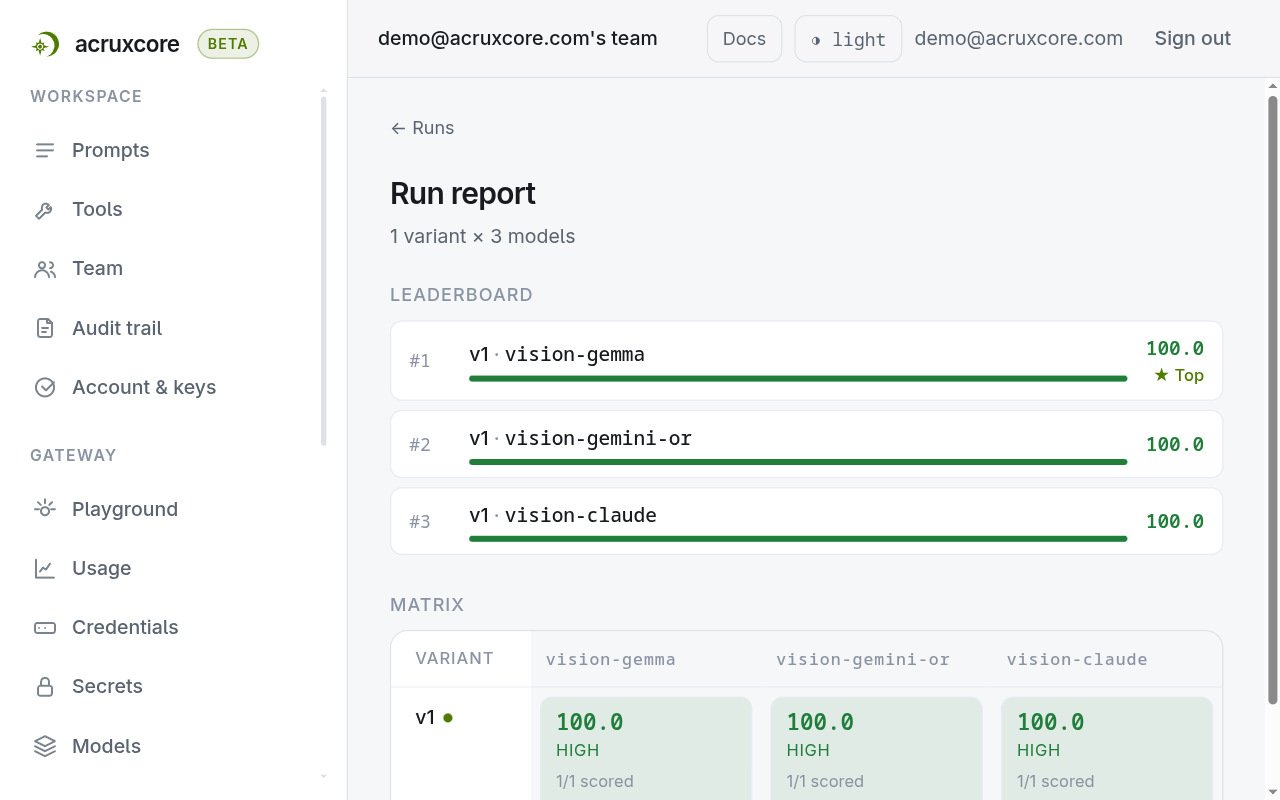
Select a cell to read the model's answer and the judge's reason. In this run, all three models returned the text on the card, and each scored 100 because each named ACRUX CORE.
The judge's trace shows the image link after the text of its message, so you can check what the judge saw.
What to know
- A link, not a file. Keep the original files in your own storage and put a public link in each example. A private link that the provider cannot download fails the cell with the provider's reason.
- A trace keeps a link as you sent it. An inline
data:image is replaced by a placeholder that names its type and size. Adding feedback to a dataset skips a call whose image variable held an inline image, and the response names that variable. - The optimizer keeps the image. Improve a prompt from feedback rewrites the text of a prompt with an image part and keeps the image part unchanged. A rewrite that drops
{{ receipt_url }}is rejected.
Next
Evaluate a prompt with conversation history carries earlier turns into an example. The datasets reference lists every example field.