Migrate your prompts from Langfuse
This guide copies every prompt in a Langfuse project into an AcruxCore team. Each prompt keeps its versions in the same order, and each Langfuse label becomes an AcruxCore alias on the same version. The last step changes the one call in your app that reads a prompt.
You need a Langfuse project's API keys, an AcruxCore API key, and Python 3.9 or newer.
The migration tool, acruxcore-migrate, reads Langfuse over its public REST API, so it
does not need the Langfuse SDK.
acruxcore-migrate holds the migration
tool's source.
What maps to what
| In Langfuse | In AcruxCore |
|---|---|
| Prompt | Prompt, with the same name |
| Version 1, 2, 3 … | Version 1, 2, 3 …, committed in the same order |
Label (production, staging, a custom one) | Alias with the same name, on the same version |
latest label | A latest alias on the newest version. Langfuse moves latest to each new version, and AcruxCore keeps the alias where the tool put it. |
| Text prompt | A prompt with one message. The tool uses the user role unless you pass --text-role system. |
| Chat prompt | The same messages, in the same order |
{{variable}} | {{ variable }}. A name with -, . or a space is renamed to snake_case. |
placeholder message in a chat prompt | Not stored. Your code inserts those messages after it renders the prompt. |
Prompt reference @@@langfusePrompt:…@@@ | The referenced text, copied in |
config.model | The version's default model, if that model is set up in your gateway |
Other config keys, tags, commit messages | Not copied. Pass settings such as temperature in your model call. |
AcruxCore gives every prompt a production alias and a staging alias on version 1.
When a Langfuse prompt has no staging label, the AcruxCore staging alias stays on
version 1 after the migration. The same is true for production.
1. Preview the migration
Install the tool and set both sets of keys. LANGFUSE_HOST defaults to
https://cloud.langfuse.com, so set it only for a self-hosted Langfuse or another
region.
pip install git+https://github.com/AcruxCore/acruxcore-migrate
export LANGFUSE_PUBLIC_KEY=pk-lf-...
export LANGFUSE_SECRET_KEY=sk-lf-...
export LANGFUSE_HOST=http://localhost:3050    # self-hosted only
export ACRUXCORE_API_KEY=acx_sk_...
export ACRUXCORE_BASE_URL=https://api.acruxcore.com/api/v1
Run it with --dry-run first. The dry run prints the same lines as the real run in
step 2, and it writes nothing to AcruxCore.
acruxcore-migrate langfuse --dry-run
To migrate only some prompts, put their names after the command:
acruxcore-migrate langfuse support-reply ticket-summary.
2. Run it
acruxcore-migrate langfuse
This is the output for a Langfuse project with three prompts. Lines that start with
- are changes you may need to act on:
3 prompt(s) in Langfuse at http://localhost:3050

support-reply: 3 version(s) in Langfuse
  Langfuse v1 -> AcruxCore v1
  Langfuse v2 -> AcruxCore v2
    - config not copied: temperature
    - model 'gpt-4o-mini' is not registered in your gateway, so the version has no default model
  Langfuse v3 -> AcruxCore v3
    - placeholder 'history' dropped: insert those messages at index 1
    - text of prompt 'tone' v1 copied in; it will not follow later changes
    - config not copied: temperature
    - model 'gpt-4o-mini' is not registered in your gateway, so the version has no default model
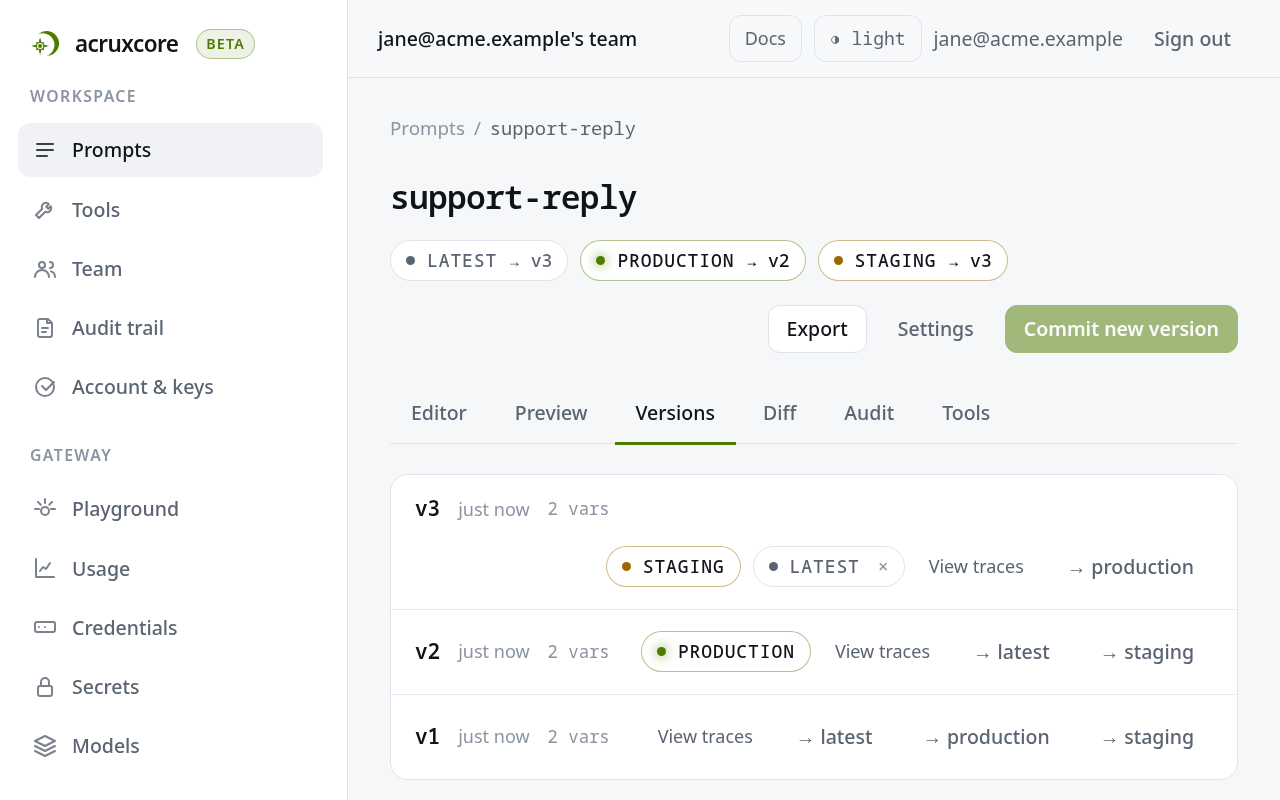
  alias 'latest' -> v3
  alias 'production' -> v2
  alias 'staging' -> v3

ticket-summary: 2 version(s) in Langfuse
  Langfuse v1 -> AcruxCore v1
  Langfuse v2 -> AcruxCore v2
    - variable 'max-words' renamed to 'max_words'
  alias 'canary' -> v2
  alias 'latest' -> v2
  alias 'production' -> v2
  alias 'staging' -> v1 (created by AcruxCore; Langfuse had no 'staging' label)

tone: 1 version(s) in Langfuse
  Langfuse v1 -> AcruxCore v1
  alias 'latest' -> v1
  alias 'production' -> v1
  alias 'staging' -> v1 (created by AcruxCore; Langfuse had no 'staging' label)
What to do about each kind of line:
model … is not registered. Add the model the line names in Gateway → Models. Then open the prompt in AcruxCore, choose that model under Default model, and commit a new version.variable … renamed. Your app must send the variable under its new name. The AcruxCore template engine reads{{order-id}}as the variableorderminus the variableid, so the tool renames it toorder_id.placeholder … dropped. Step 4 shows where your code inserts the dropped messages.copied in. A later change totonein AcruxCore does not reachsupport-reply. Edit both prompts when the shared text changes.
A prompt whose name already exists in the AcruxCore team is skipped, not merged, so a second run copies only the prompts that are missing. If a run stops in the middle of a prompt, delete the half-copied prompt in AcruxCore before you run the tool again.
3. Check the migrated prompts
Open Prompts in AcruxCore. Each prompt has every version, and the aliases point where the Langfuse labels pointed:
You can check a prompt's content by rendering one alias in both systems with the same
variables. For the three prompts above, the production and staging labels give the
same messages in Langfuse's compile() and in AcruxCore's render().
4. Change the code that reads a prompt
In Langfuse, your app reads a prompt with get_prompt() and fills it with
compile(). In AcruxCore, one render() call takes the alias and the variables
together. In the code below, history is the list of earlier chat messages:
# Before: Langfuse
from langfuse import Langfuse

langfuse = Langfuse()
prompt = langfuse.get_prompt("support-reply", label="staging", type="chat")
messages = prompt.compile(customer_name="Ana", question="Where is my order?", history=history)

# After: AcruxCore
from acruxcore import AcruxCore

async with AcruxCore() as hub:
    result = await hub.prompts.render(
        "support-reply", "staging",
        {"customer_name": "Ana", "question": "Where is my order?"},
    )
messages = result.messages[:1] + history + result.messages[1:]
The last line puts the conversation history back at index 1. That is the position
the migration tool printed for the history placeholder. With the same inputs, the
Langfuse code and the AcruxCore code produce the same list of messages.
Two details to check in your code:
- A missing variable is an error. Langfuse leaves
{{question}}in the text when you do not passquestion. AcruxCore'srender()raises an error that names the missing variables. - The default is
productionin Langfuse and in AcruxCore.get_prompt("support-reply")reads theproductionlabel, andrender("support-reply", "production", …)reads theproductionalias.
To trace the model call as well, send it through the AcruxCore gateway. See Route calls through the gateway.
What the tool does not move
The tool moves prompts only. Traces, datasets, scores and evaluation runs stay in Langfuse. AcruxCore records new traces from the first model call your app sends through the AcruxCore gateway.
What's next
- Version a prompt shows how to commit a version and promote an alias after the migration.
- Use conditional logic in prompt templates
covers
ifandforin templates.