Report a tool failure from your own code
What you'll build: one weather tool that calls a real geocoding API, run twice over the same three questions. In the first run the tool hands the model an error message and records nothing anywhere else. In the second run the same tool also reports the failure to AcruxCore. You then compare the two runs in the dashboard.
A run is recorded as a trace, and each step inside it — one model call, one tool call — is a span carrying a status of its own.
A tool call can fail in ways nobody outside the tool can see. The network reached the server, the server answered, the status was 200, and the body said the city does not exist. The transport succeeded. The protocol succeeded. The call failed, and your tool's code is the only place that knows. This page shows how a tool reports a failure like that, so its span turns red instead of green.
1. What a silent failure looks like
Open-Meteo's geocoder behaves this way today. Ask for a city it cannot place and it
answers 200 OK with a body that has no results key:
curl -s "https://geocoding-api.open-meteo.com/v1/search?name=Atlantis%20Prime&count=1"
{ "generationtime_ms": 0.22339821 }
A tool wrapping that call has to decide what to do with an empty answer. The easiest option is to hand the model a dictionary that describes the problem:
matches = geo.get("results") or []
if not matches:
    return {"error": f"Open-Meteo has no coordinates for {city!r}."}
That works: the model reads the error and usually says something sensible. What the dictionary does not do is leave any mark on the run. Below are three traces from a script that asks about Kathmandu, Atlantis Prime and Hyderabad. The tool is written exactly that way:
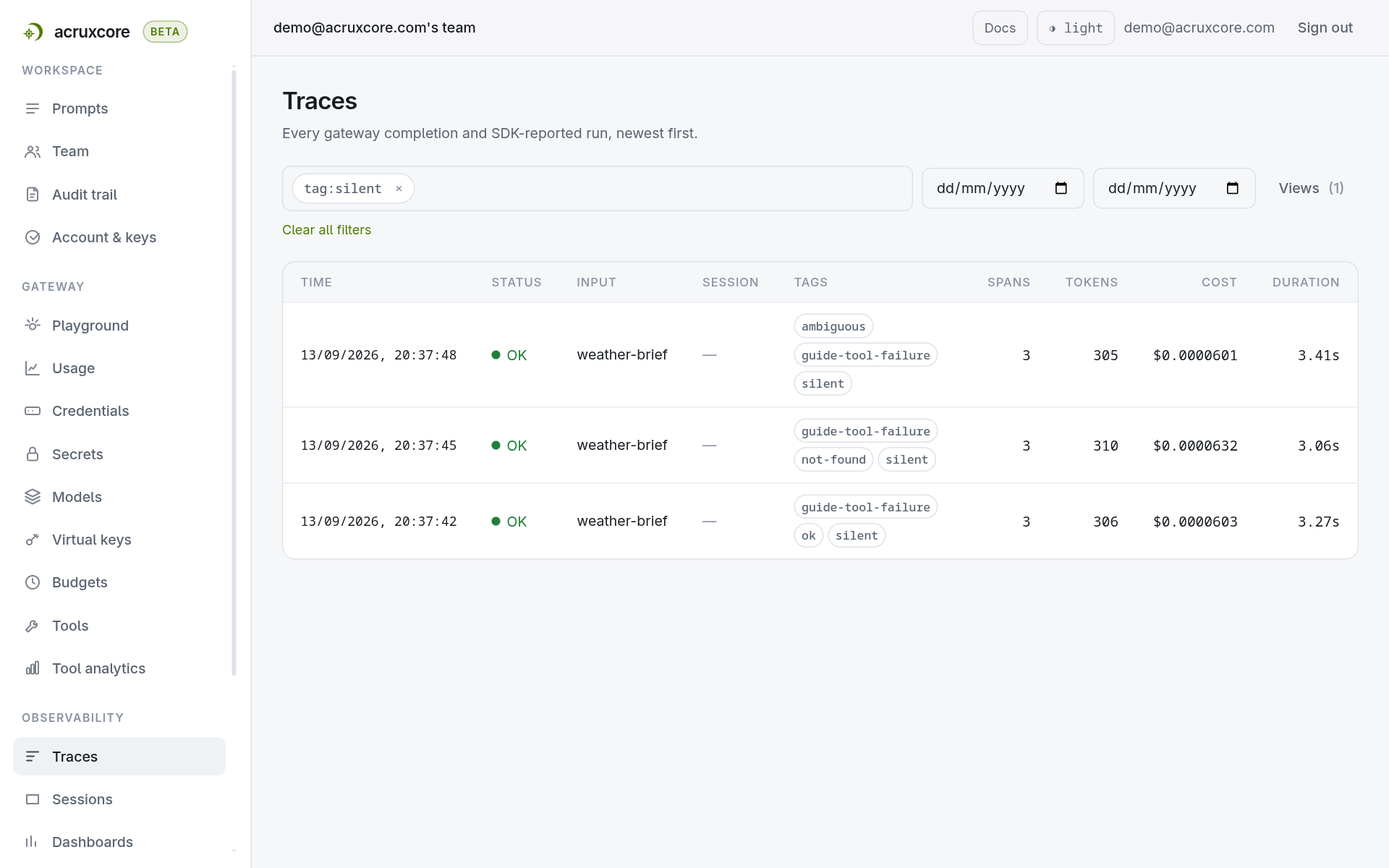
Three runs, three green OK rows. One of the three failed, and the status column does not say which. As far as AcruxCore was told, every tool call returned a value and none of them raised an exception.
guide-tool-failure, silent, declared, ok, not-found and ambiguous are
string literals the script passes in trace={"tags": [...]}, so that its runs can be
filtered apart. AcruxCore classified nothing. Each tag records what a question was
expected to do, chosen before the call was made.
Open the Atlantis Prime run and the evidence is there, but only as text inside the payload:
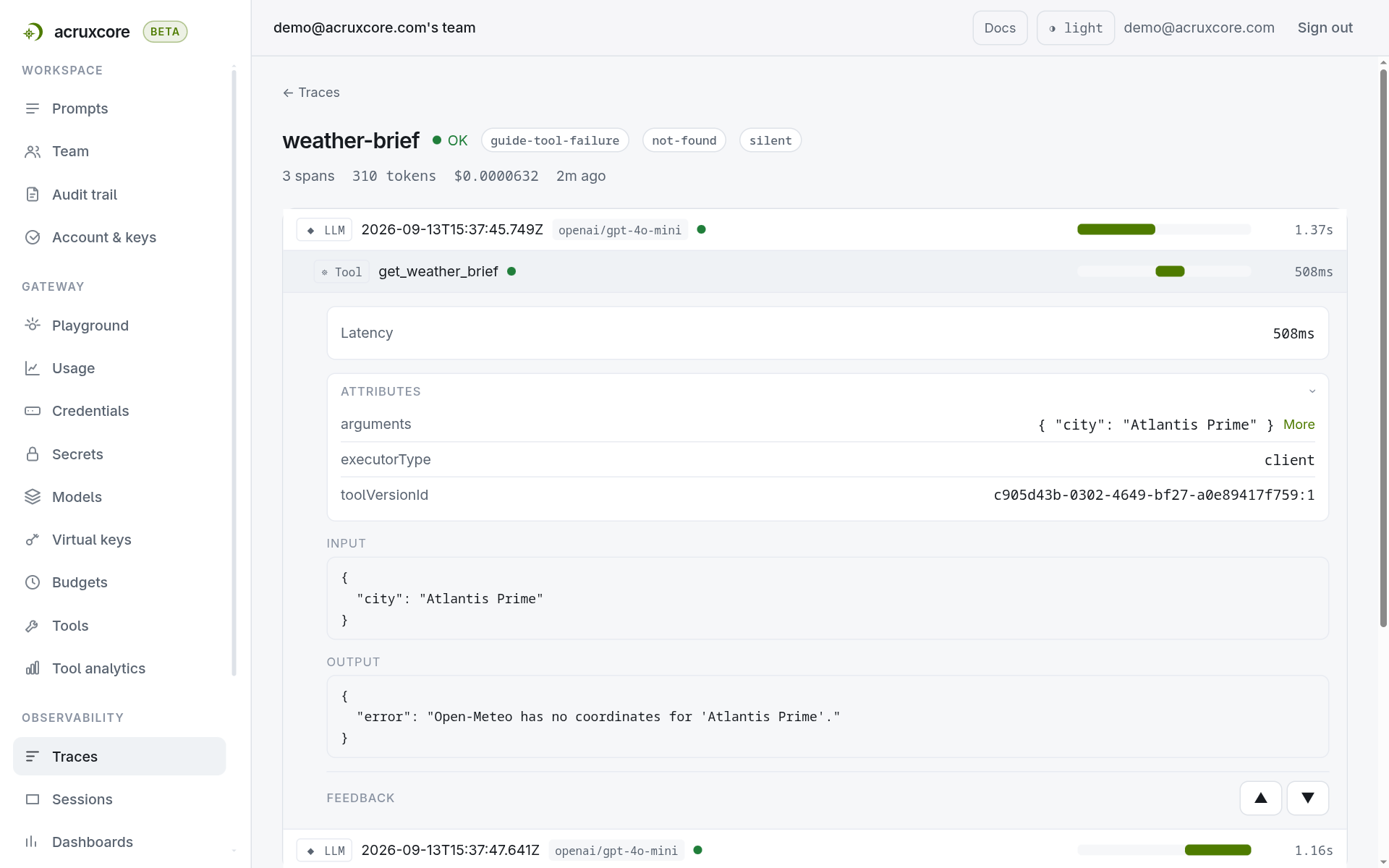
The span's status is OK. The span's output is an error message. To find this run
you would have to know already that it existed, and then go looking for it.
2. Return a ToolResult instead
The fix is one return statement. The tool still returns the value the model needs. It now returns a verdict on its own call alongside that value: failed, or worth a warning.
- Python
- Node (SDK)
from acruxcore import ToolResult

matches = geo.get("results") or []
if not matches:
    return ToolResult.error(
        "location_not_found",
        f"Open-Meteo has no coordinates for {city!r}.",
    )
import { toolError } from '@acruxcoreai/sdk';

const matches = geo.results ?? [];
if (matches.length === 0) {
  return toolError('location_not_found', `Open-Meteo has no coordinates for '${city}'.`);
}
The first argument is a code: a short, stable slug you choose, like
location_not_found or rate_limited. It is recorded on the span as errorCode,
and it is what tells your own failure modes apart from each other, so pick it once
and keep it — rename it and the runs before the rename no longer answer the same
search as the runs after it. Step 5 covers how to look it up. The second argument is
a message for whoever reads the span.
There is a third argument, which both snippets above leave out, and it controls
what the model gets to see. Omit it and the SDK hands the model {"error": "<your message>"} — the same value the dictionary in step 1 returned. Pass something else
when you have a useful partial answer to give.
The loop that calls your tools keeps running. The model still receives the result, still gets its next turn, and still writes an answer. Whether a failed tool should end the run is a decision about your application, not about your traces, so AcruxCore records the failure and leaves the control flow to you. To stop the run, raise an exception from the tool instead, and your own framework handles it the way it always has.
3. Read the difference
Here is the same script, same three questions, with that one return statement changed:
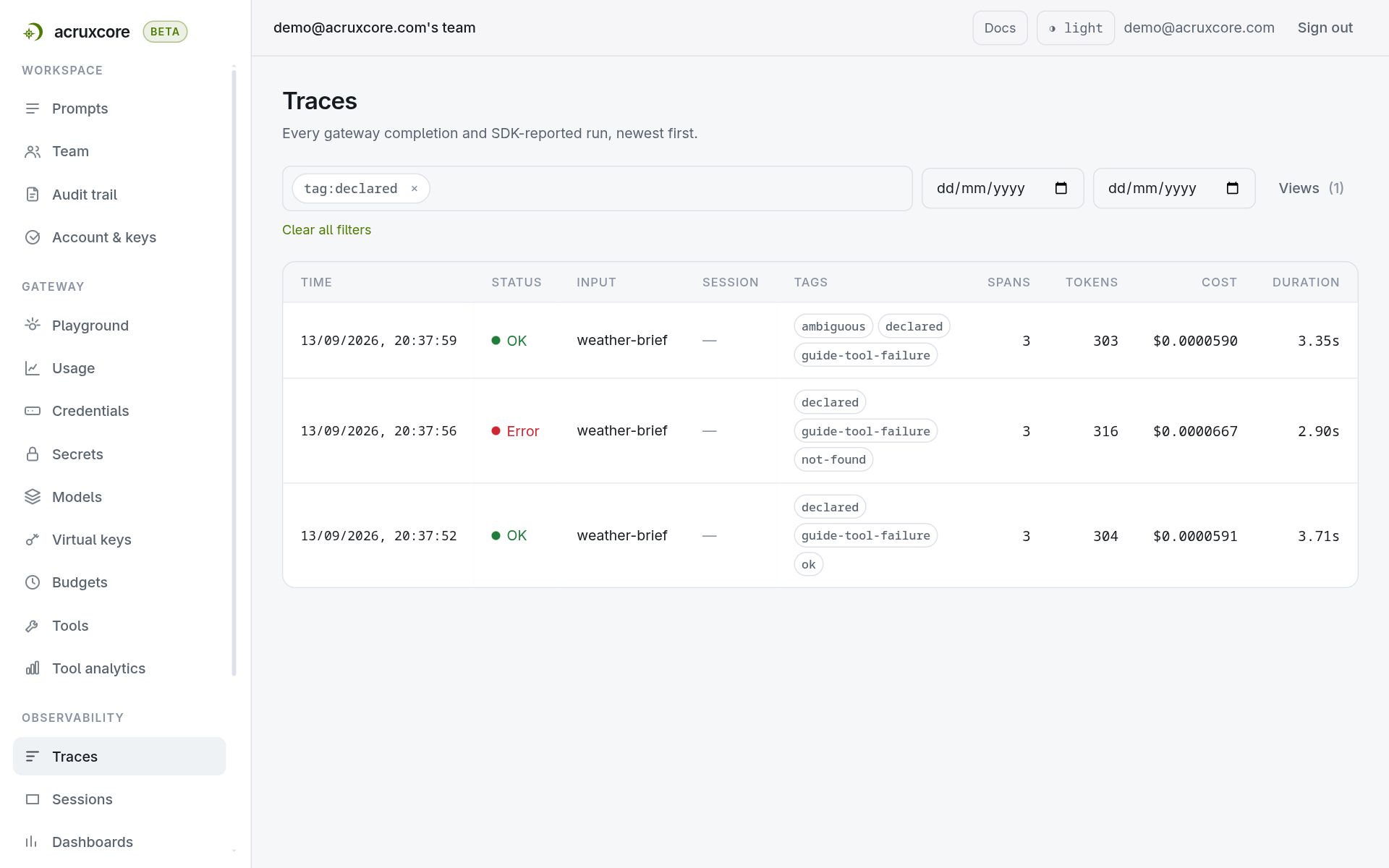
The failed run is now the only red row in the list. Opening it shows what happened without expanding a payload:
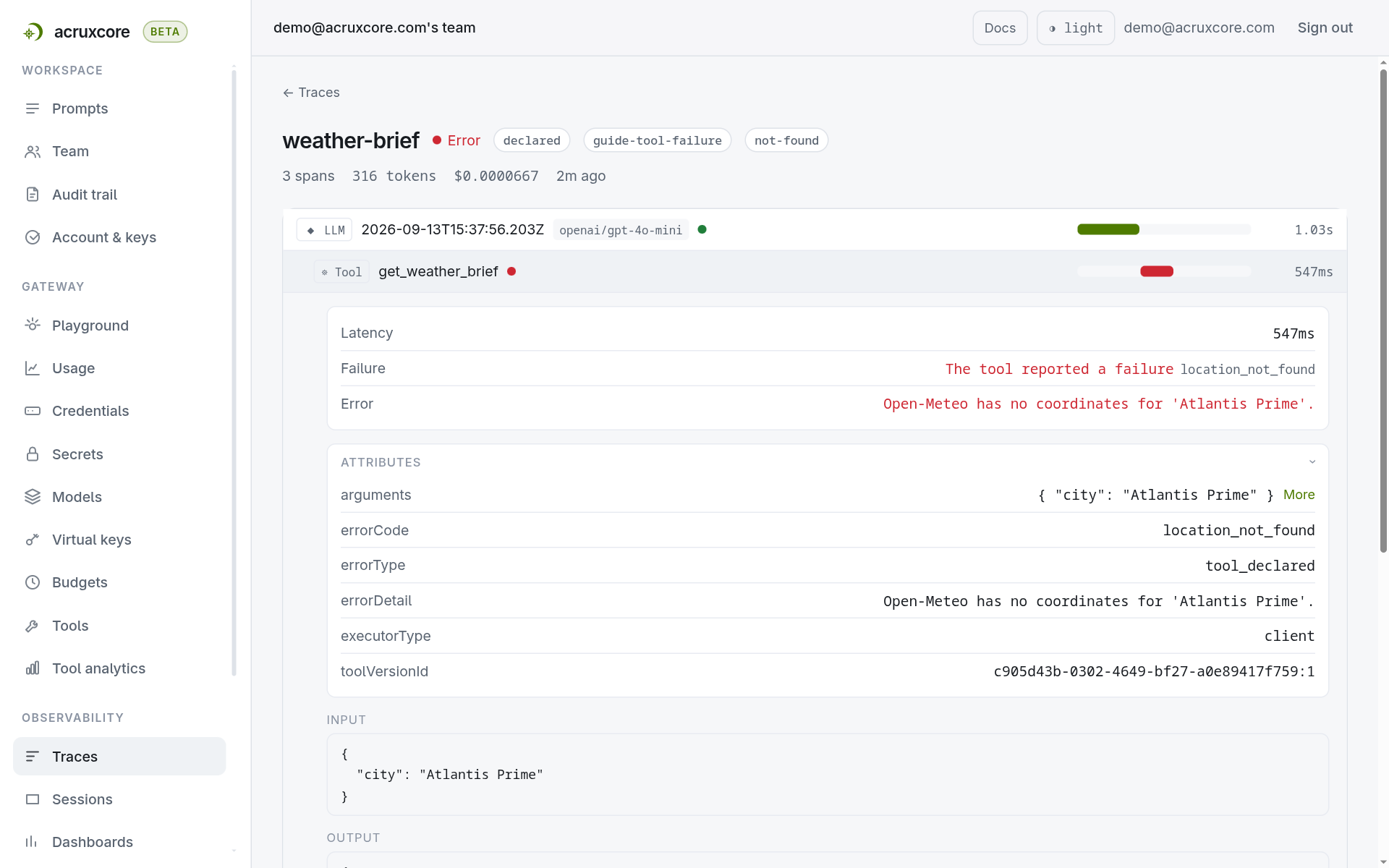
The call wrote three attributes onto the span, and each answers a different question:
| Attribute | Value here | What it means |
|---|---|---|
errorType | tool_declared | Which kind of check caught the failure. It is one of six fixed values: transport, http_status, tool_declared, schema_mismatch, transform, provider_error. The list is fixed, which is what lets you filter on it in step 5. |
errorCode | location_not_found | Your own slug. Open-ended, so you can name failure modes AcruxCore has never heard of. |
errorDetail | the message | Free text for a person reading the span. |
A red tool span also turns the whole trace red: if any span errored, the trace errored. So a tool call that failed deep inside a long agent run still shows up in the list you scan.
4. Flag something without calling it a failure
Not everything worth seeing is a failure. A cache may have served stale data, or a fallback source may have answered instead of the primary one. In this tool, the city name can be ambiguous. Open-Meteo returns the most populous match, so "Hyderabad" means the Indian one, and a user in Pakistan reads a confident temperature for the wrong city.
Ambiguity is worth recording and not worth failing the run over:
- Python
- Node (SDK)
countries = {m.get("country") for m in matches if m.get("country")}
if len(countries) > 1:
    return ToolResult.warn(
        "ambiguous_city",
        f"{city!r} matches places in {', '.join(sorted(countries))}. "
        f"Answered for {place['name']}, {place.get('country')}.",
        reading,
    )
const countries = [...new Set(matches.map((m) => m.country).filter(Boolean))].sort();
if (countries.length > 1) {
  return toolWarning(
    'ambiguous_city',
    `'${city}' matches places in ${countries.join(', ')}. ` +
      `Answered for ${place.name}, ${place.country}.`,
    reading,
  );
}
The span stays green and gains an amber band:
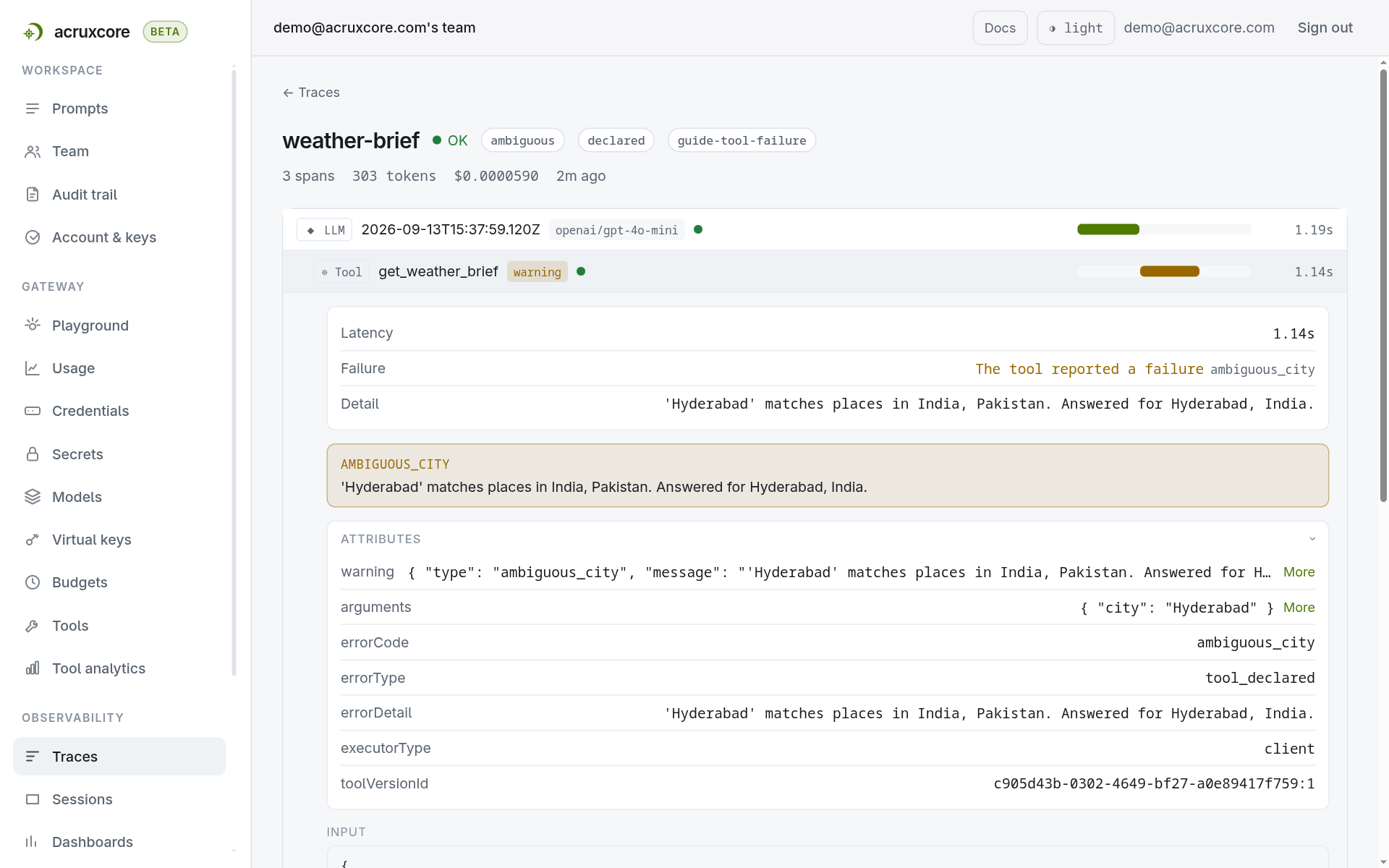
A warning is an attribute, not a status. The span still gets an errorType and an
errorCode, because a check did fire and which check fired is worth knowing. The
span's status stays ok, and so the trace stays green. "Worth looking at" and
"this run failed" are different claims, and counting both as failures would make
your error rate meaningless. Warnings get their own filter instead, warning:yes.
5. Find them again
Failures and warnings are both filterable from the trace list. Type these into the filter box, or put them straight in the URL:
| Filter | Finds |
|---|---|
error_type:tool_declared | every run where a tool declared its own failure |
error_code:location_not_found | every run that declared that one slug |
warning:yes | every run carrying a warning, green ones included |
status:error | every failed run, whatever caused it |
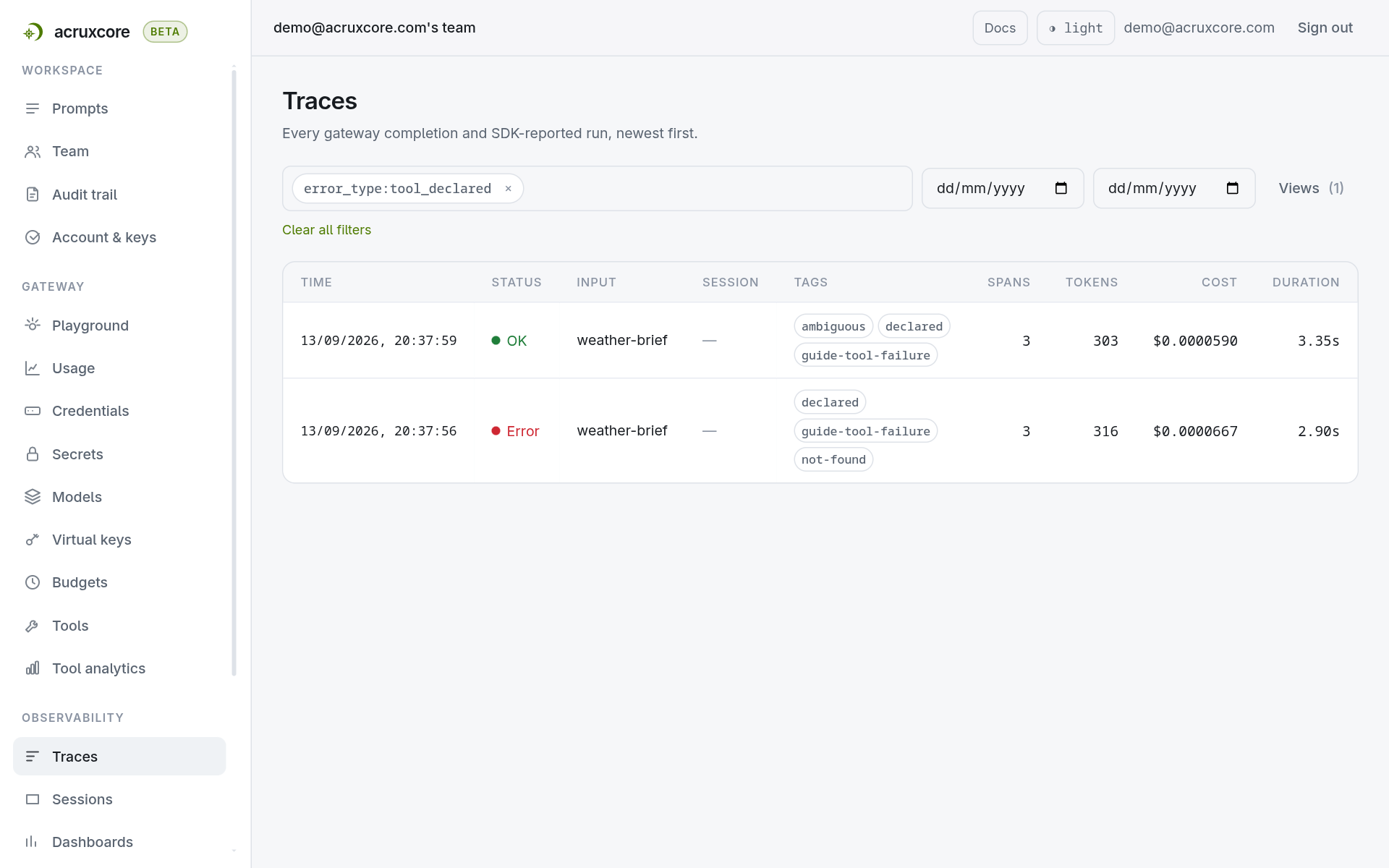
Two of the second run's three traces match. One is the red Atlantis Prime trace.
The other is the green Hyderabad trace, because a warning also carries the
tool_declared classification — the warning simply did not fail the run. Add
status:error when you want the failed trace on its own.
error_code: is where your own vocabulary pays off. error_type: groups your two
failures together, because both were declared by the tool; the slug is what tells
them apart. Type error_code: and the box offers the slugs your tools have actually
declared, so you do not have to remember how you spelled one.
Do not reach for a plain search instead. Typing location_not_found with no prefix
searches span attributes and payloads as free text, so it also matches the slug
written anywhere else — in a log line, in a model's answer. error_code: matches
the recorded value exactly, which is what makes a count of one failure mode worth
trusting.
6. Run it yourself
The script exists in Python and in TypeScript, one file each. Each takes a
--silent flag, which switches the same tool back to returning a plain dictionary,
so one file produces both the green traces and the red one.
Running the script is the whole setup. You create nothing by hand: the tool is
defined in code, and passing it as tools=[get_weather_brief] syncs its definition
into the catalog for you on the first run. There is no version to commit and no
step in the dashboard. Tracing needs no setup either — the spans appear because the
call went through the gateway.
Two things do have to exist in your account already, and neither is specific to
this guide: an API key for ACRUXCORE_API_KEY, and a model your gateway can
route to for ACRUXCORE_MODEL, which means a provider connection holding that
provider's key. If you can already make a gateway call from this account, you have
both.
Because tools= syncs, a tool already named get_weather_brief in your catalog
gets a new version from this script. Rename the function first if that name is
taken. To run a catalog tool without writing to it, pass it through client_tools=
instead.
- Python
- Node (SDK)
pip install acruxcore
export ACRUXCORE_API_KEY=<your api key>
export ACRUXCORE_MODEL=<a model your AcruxCore gateway can route to>

python report_a_tool_failure.py --silent   # three green traces
python report_a_tool_failure.py            # one red, one warned, one green
report_a_tool_failure.py — the full Python script.
npm install @acruxcoreai/sdk
export ACRUXCORE_API_KEY=<your api key>
export ACRUXCORE_MODEL=<a model your AcruxCore gateway can route to>

node report_a_tool_failure.mjs --silent   # three green traces
node report_a_tool_failure.mjs            # one red, one warned, one green
report_a_tool_failure.mjs — the full Node script.
Real output from the declared run:
Q: What is the weather in Atlantis Prime?
A: I could not find any weather information for Atlantis Prime. It appears to be
   fictional or not recognized as a real location.
   trace: 4993329e-8596-42bf-ae1f-05a8f32b25dc
What's next
Everything above is for a tool your own process runs, because ToolResult is a
value your code returns. A tool with an http executor is the other kind:
AcruxCore calls the URL itself and your code never runs, so the check lives on the
tool version as a failureWhen predicate instead.
- Create a tool — choosing between a tool your own code runs and a tool AcruxCore runs, which is what decides where the check lives.
- Tag and filter traces — the rest of the filter
vocabulary, which
error_type:,error_code:andwarning:are part of. failureWhen,resultSchemaand the order the checks run in: see Tools → Versions in the API Reference.