Version and track a tool
What you'll build: a tool with two committed versions, a staging alias
moved ahead of production to try the new one safely, a read of real call
volume, error rate and latency, and a tool retired at the end.
A tool is versioned exactly like a prompt. Create a tool makes the first version, and this page is everything after it.
1. Commit a second version
Open a tool's page and click New version — the form prefills from the
current version, so a small change (here, adding an optional currency
parameter) is a few edits, not a rewrite.
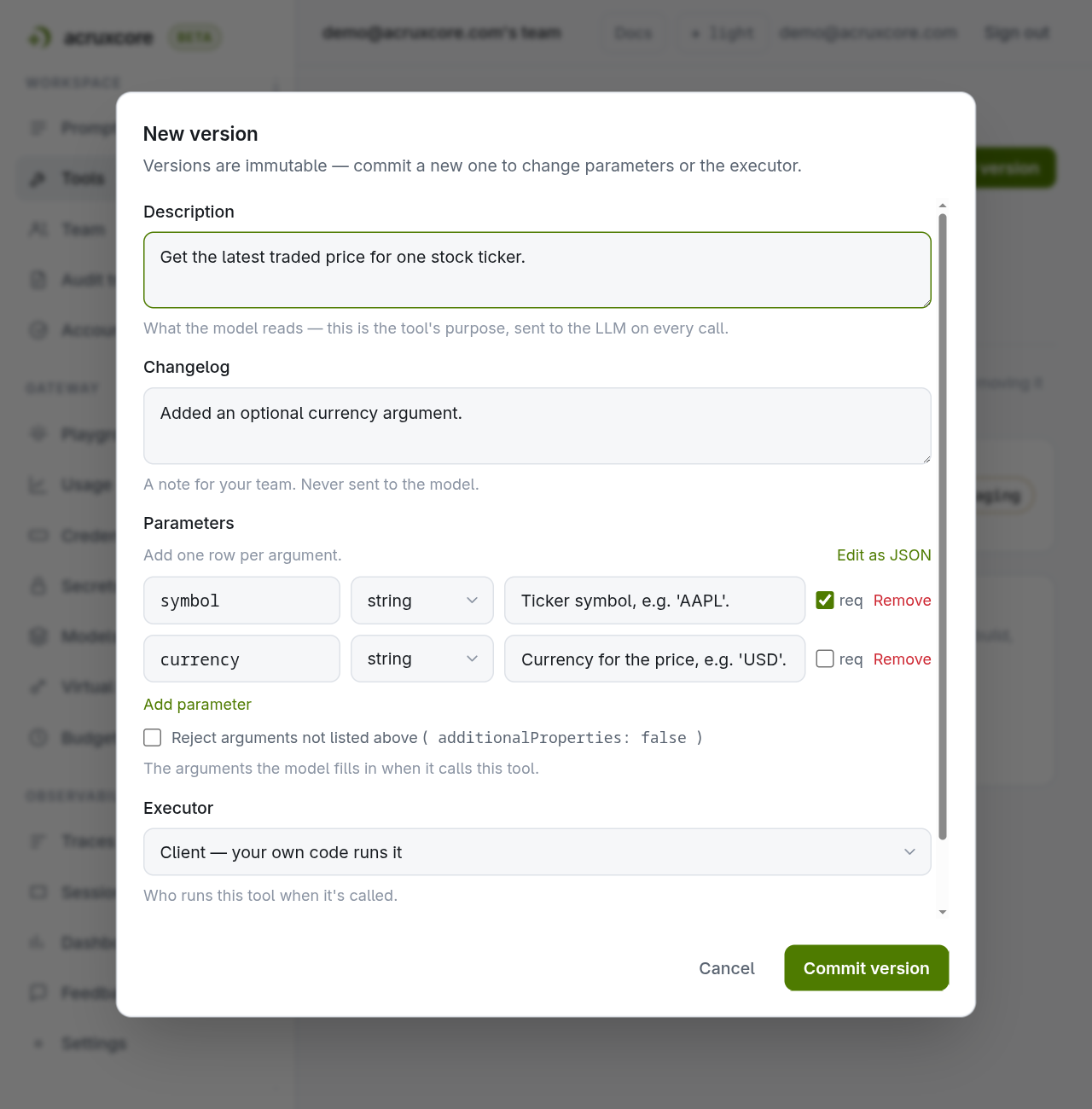
Three fields on that form are easy to mix up, and mixing them up changes what the model does:
| Field | Who reads it | Effect |
|---|---|---|
description | The model. It decides whether to call the tool from this text. | Changing it changes the model's behaviour. |
changelog | Your team, in the version list. | None — the model never sees it. |
source | The dashboard and the audit log. | Records who authored the version, so the dashboard can warn before a deploy overwrites a hand-made edit. |
Commit a changelog with no description and the response carries a warnings
array saying so. A release note is not what the model reads, and the warning
exists so that omission does not go unnoticed.
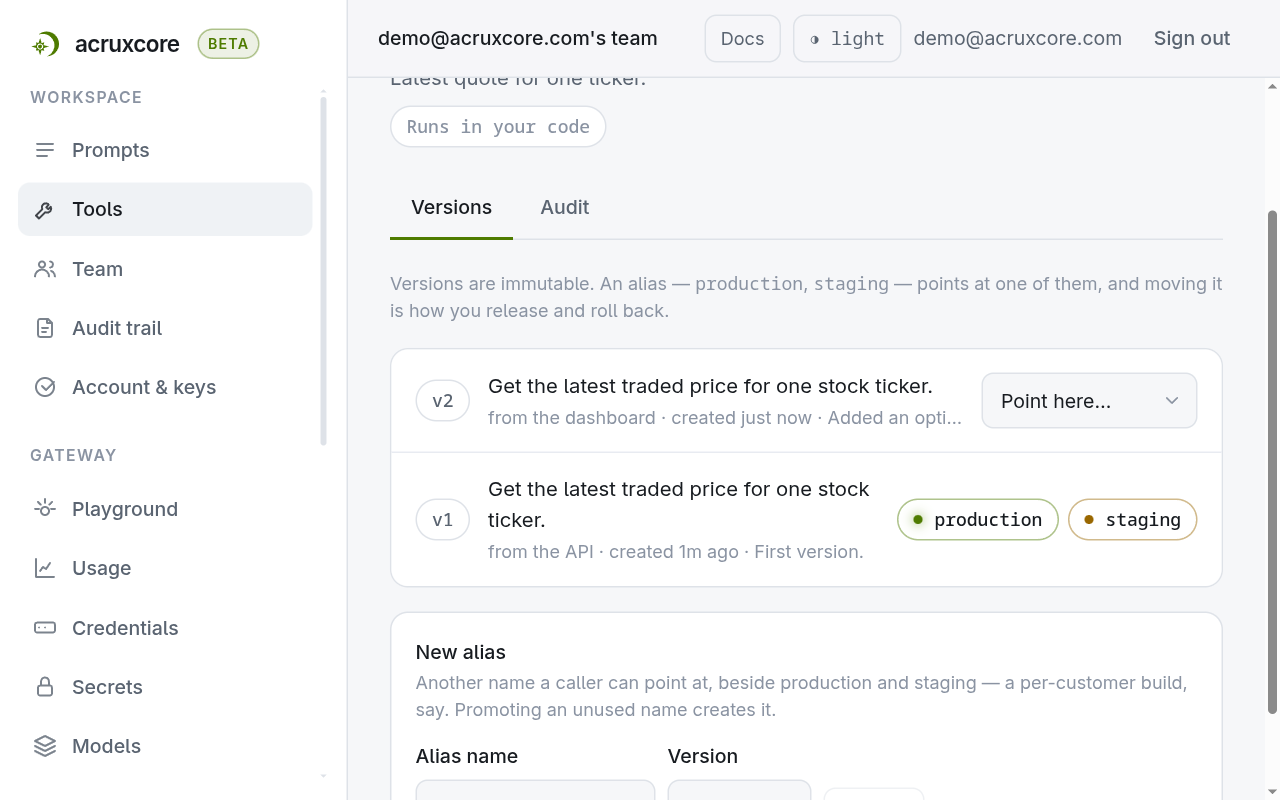
Commit it, and both versions now show on the Versions tab — each
immutable, each with its own changelog note. Every new tool gets production
and staging, and both sit on v1 until you move them, shown as chips on the row
they point at:
2. Move one alias, not the other
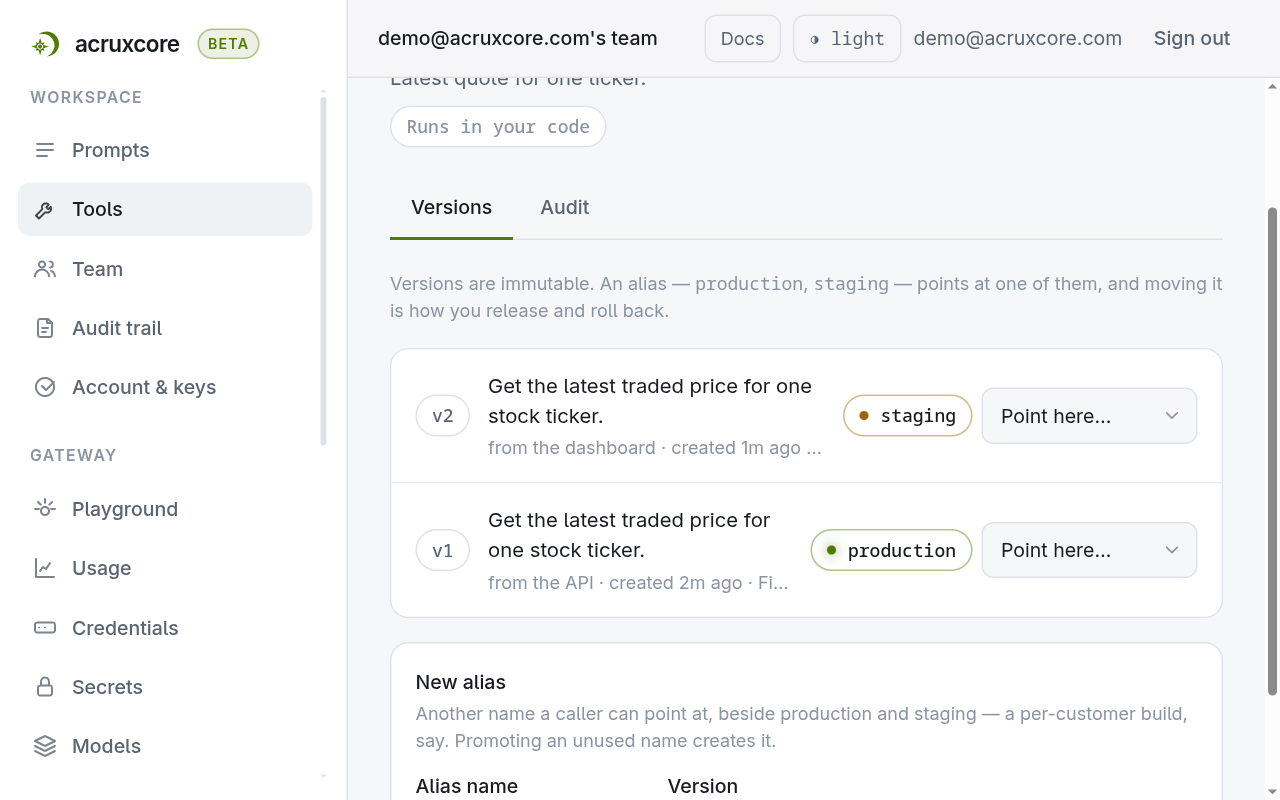
Aliases live on the version rows rather than a tab of their own, so the question
"which version is live" and the control that answers it are the same line. On
v2's row, open Point here… and choose staging. production doesn't
move — this is the same pattern prompts use, and for the same reason: try
the new version wherever your code renders against staging, without
touching what's live.
A prompt reaches the new version only if its binding follows an alias. A binding that pins an exact version ignores every promotion. Connect a tool to a prompt is where that choice is made.
3. Read real usage across every tool
Open Tools → Analytics. This aggregates every traced tool call your team has made — call volume, error rate, and p50/p95 latency, grouped by tool name.
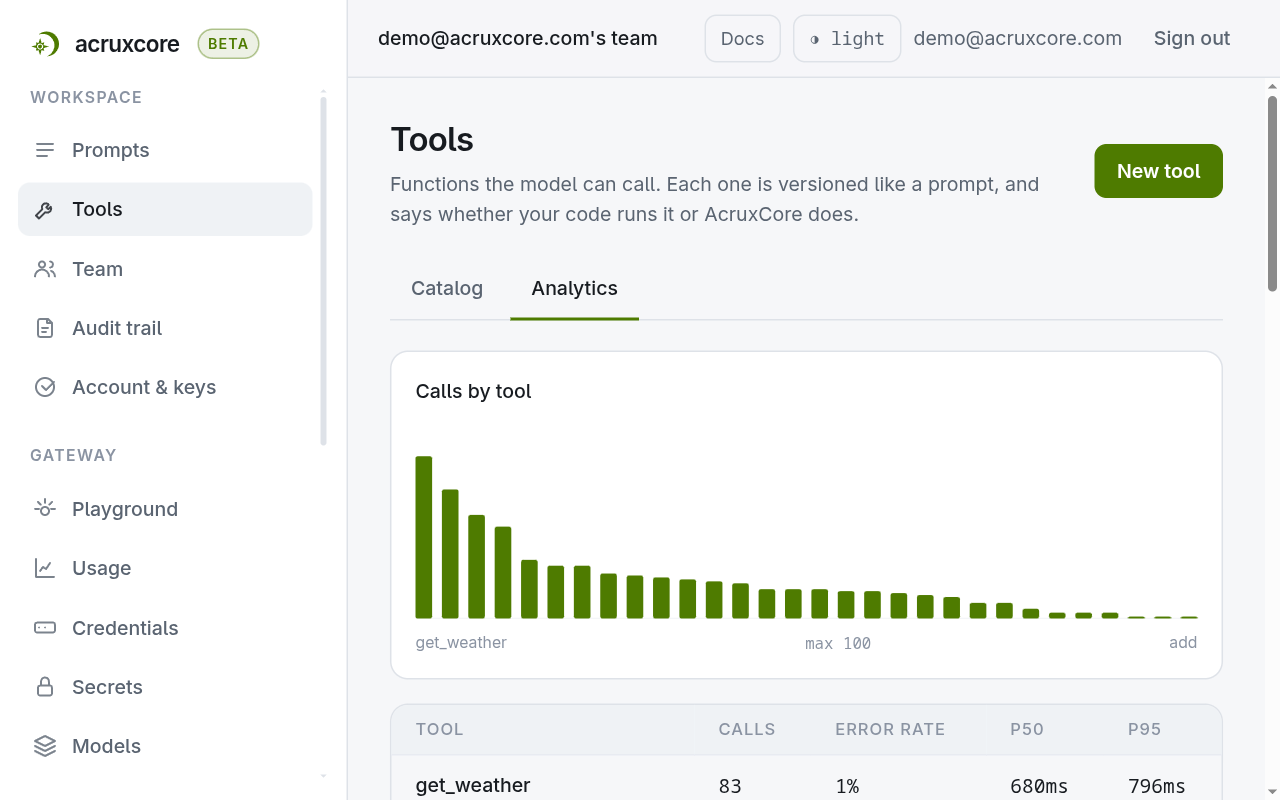
A tool only shows up once it's actually been called — this reads real
tool-kind trace spans, not a static list of what exists in the catalog.
That's also why a brand-new tool won't appear here yet: nothing has called it.
Error rate counts the failures the platform can see. A tool that answers 200
with a body saying the lookup failed is counted as a success until the tool says
otherwise. See
Report a tool failure from your own code
for how a tool says so.
4. Retire a tool
Deleting a tool is a soft delete. The tool stops appearing in the catalog and in the API's list and get responses. Its versions and aliases are preserved rather than removed. A prompt still bound to the tool stops resolving it, and the run becomes a plain completion rather than an error, so check the bindings before you delete.
Doing this over the API
- curl
- Node (SDK)
- Python (SDK)
# List a tool's aliases
curl "$ACRUXCORE_BASE_URL/tools/<tool-id>/aliases" \
  -H "Authorization: Bearer $ACRUXCORE_API_KEY"
{
  "data": [
    {"id":"9b760d3c-88c6-4104-8323-9bd68055af76","alias":"production","versionId":"c0c6fd75-3d39-4555-a4c2-db5b1bb7155a","versionNumber":1,"updatedAt":"2026-08-01T03:42:06.695Z"},
    {"id":"562f6352-934e-41f1-bc66-7e5cd0a3891a","alias":"staging","versionId":"db1c38ca-44d5-4b49-9937-ff91c47b4884","versionNumber":2,"updatedAt":"2026-08-01T03:44:25.523Z"}
  ]
}
# Promote an alias to a specific version number — note the snake_case field
curl -X POST "$ACRUXCORE_BASE_URL/tools/<tool-id>/aliases/staging/promote" \
  -H "Authorization: Bearer $ACRUXCORE_API_KEY" \
  -H "Content-Type: application/json" \
  -d '{"version_number": 2}'
{"id":"562f6352-934e-41f1-bc66-7e5cd0a3891a","alias":"staging","versionId":"db1c38ca-44d5-4b49-9937-ff91c47b4884","versionNumber":2,"updatedAt":"2026-08-01T03:46:12.877Z"}
# Read usage analytics across every tool, optionally windowed by since/until
curl "$ACRUXCORE_BASE_URL/tools/analytics" \
  -H "Authorization: Bearer $ACRUXCORE_API_KEY"
{"data":[{"toolName":"search_orders","calls":9,"errorRate":0,"p50Ms":823,"p95Ms":2850},{"toolName":"get_weather","calls":9,"errorRate":0,"p50Ms":606,"p95Ms":1247}]}
# Retire it
curl -X DELETE "$ACRUXCORE_BASE_URL/tools/<tool-id>" \
  -H "Authorization: Bearer $ACRUXCORE_API_KEY"
# 204 No Content
hub.tools has no listAliases binding yet, so listing aliases still needs
the raw API call above. The rest are one call each:
import AcruxCore from '@acruxcoreai/sdk';

const hub = new AcruxCore();

const v2 = await hub.tools.commitVersion(toolId, {
  description: 'Look up a stock price, optionally in another currency.',
  parametersSchema: {
    type: 'object',
    properties: {
      symbol: { type: 'string', description: 'Ticker, e.g. "MSFT".' },
      currency: { type: 'string', description: 'ISO code, e.g. "EUR". Defaults to USD.' },
    },
    required: ['symbol'],
  },
  executor: { type: 'client' },
  changelog: 'Optional currency parameter.',
});
// v2.versionNumber === 2 — aliases stay where they are

const promoted = await hub.tools.promoteAlias(toolId, 'staging', 2);
// promoted.versionNumber === 2 — staging now points at v2

const usage = await hub.tools.analytics();
// usage.data is one entry per tool with calls in the window — [] until a tool is called

await hub.tools.delete(toolId);
hub.tools has no list_aliases binding yet, so listing aliases still
needs the raw API call above. The rest are one call each:
from acruxcore import AcruxCore

hub = AcruxCore()

v2 = await hub.tools.commit_version(
    tool_id,
    {
        "type": "object",
        "properties": {
            "symbol": {"type": "string", "description": 'Ticker, e.g. "MSFT".'},
            "currency": {"type": "string", "description": 'ISO code, e.g. "EUR". Defaults to USD.'},
        },
        "required": ["symbol"],
    },
    {"type": "client"},
    description="Look up a stock price, optionally in another currency.",
    changelog="Optional currency parameter.",
)
# v2.version_number == 2 — aliases stay where they are

promoted = await hub.tools.promote_alias(tool_id, "staging", 2)
# promoted.version_number == 2 — staging now points at v2

usage = await hub.tools.analytics()
# usage.data is one entry per tool with calls in the window — [] until a tool is called

await hub.tools.delete(tool_id)
Promoting an alias that doesn't exist yet creates it — there's no separate
"create alias" call. Listing aliases and reading analytics both work for any
authenticated team member; committing, promoting and deleting require owner,
admin, or editor.
The whole sequence — three commits, an alias promotion, and analytics — is one runnable script per language:
run_lifecycle.py— Pythonrun_lifecycle.mjs— TypeScript
Each needs only pip install acruxcore / npm install @acruxcoreai/sdk plus
ACRUXCORE_API_KEY and ACRUXCORE_BASE_URL — no monorepo checkout required.
What's next
- Create a tool — where the first version came from.
- Connect a tool to a prompt — decide whether a prompt follows an alias you just moved, or pins a version instead.
- The same alias and promote pattern for prompts — see Version a prompt.
- Full field reference: Tool aliases and Tools analytics.