Write a custom judge prompt
What you'll build: a judge prompt with its own rubric, used to grade an experiment run. The run in this guide scores a support-ticket classifier on three examples. Two of the examples have no criteria, and the judge still grades them against the rubric.
A judge is the model that scores each reply in a run. By default AcruxCore uses a built-in judge prompt. The built-in prompt has no rules of its own. It grades only against an example's criteria and the dataset's overall feedback. Overall feedback is one instruction that applies to every example in a dataset. An example that has no criteria and no overall feedback is marked "not judged".
A custom judge prompt is an ordinary prompt in your team, and it holds the rules the judge grades by. A custom judge prompt grades every example, with or without criteria.
You need a dataset and a prompt to test, as in Evaluate a prompt against a dataset. This guide uses a prompt that classifies a support message, and a dataset of three messages:
| Message | Criteria |
|---|---|
| I was charged twice for my October invoice. Please refund one of the payments. | category billing |
| The export button does nothing when I click it. | (none) |
| How do I change the email address on my account? | (none) |
Step 1 — Create the judge prompt
- Dashboard
- curl
Open the dataset, click Run experiment, and go to the Judge prompt field. Click Create judge prompt. AcruxCore creates a prompt named after the dataset, commits a starter template as its version 1, and selects it.
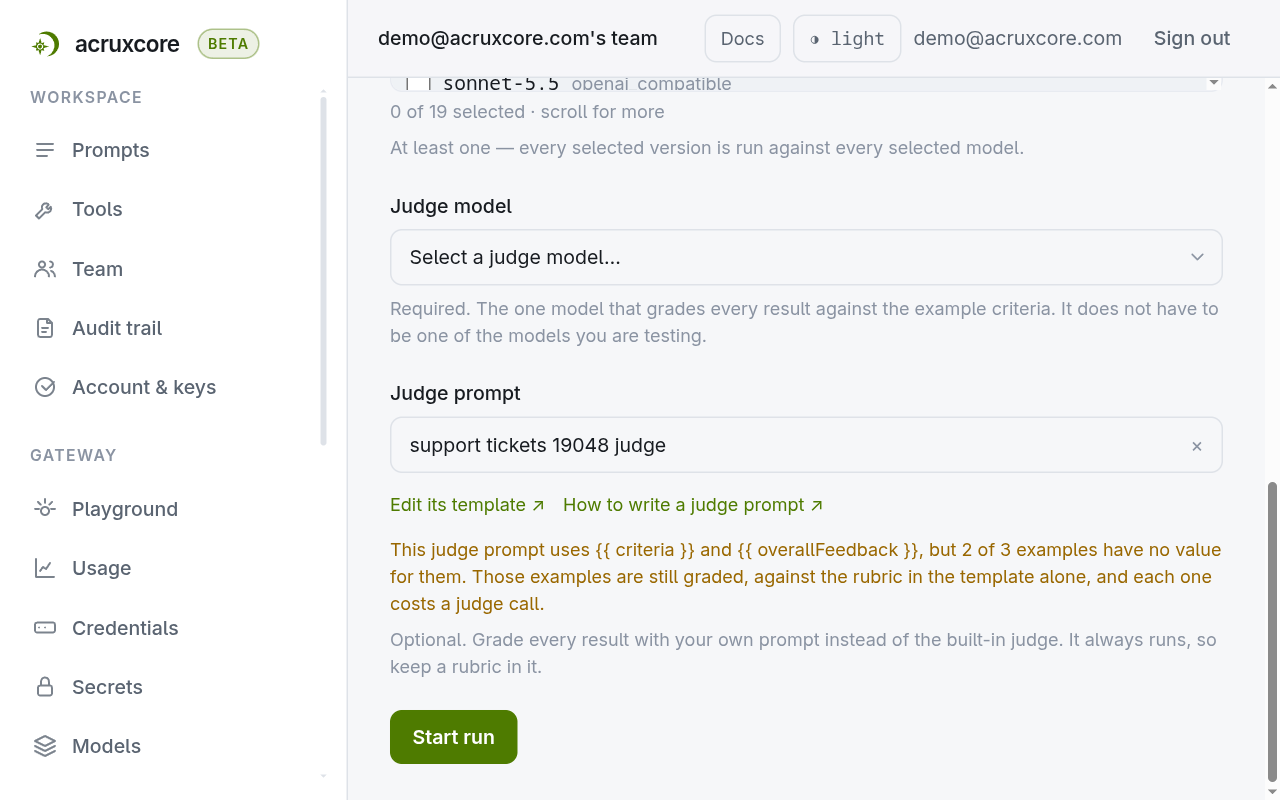
Click Edit its template to open the prompt in a new tab. The starter template has a generic three-line rubric. Replace that rubric with your own rules in Step 2 before you rely on the scores.
A judge prompt is a prompt with at least one committed version. Create the prompt:
curl -X POST $ACRUXCORE_BASE_URL/prompts \
  -H "Authorization: Bearer $ACRUXCORE_API_KEY" \
  -H "Content-Type: application/json" \
  -d '{"name": "ticket-triage judge"}'
{
  "id": "ca1ea5f1-e9dc-46c3-9bdb-c64f7d1e514e",
  "name": "ticket-triage judge",
  "description": null,
  "teamId": "8d3ceb9b-39d0-463b-8b91-aa2ef20ac9ba",
  "createdBy": "18c76b52-ee0d-4001-be8e-c29976488fbb",
  "createdAt": "2026-10-13T19:17:28.575Z"
}
Step 2 commits the judge template as the prompt's first version.
Step 2 — Write the rubric
The rubric below grades the classifier's format on every example. It also checks the category whenever an example has criteria:
You grade the reply of a support-ticket classifier. Give a score from 0 to 100.

Rubric:
- The reply must be one JSON object and nothing else: no code fences, no prose. If it is not, score 0.
- The object has two keys: "category" (billing, bug or account) and "priority" (low, medium or high). Take 40 points off for each key that is missing or has a value outside its list.
{% if criteria %}
What this example expects:
{{ criteria }}
Take 50 points off if the reply contradicts it.
{% endif %}
Reply to grade:
<<<OUTPUT_START>>>
{{ output }}
<<<OUTPUT_END>>>
On an example with no criteria, {{ criteria }} is an empty string. The {% if criteria %}
block then renders nothing, so the judge grades by the two rubric lines alone.
Text between {# and #} is a comment, and the judge model never sees a comment. The
dashboard's starter template opens with a comment that says where the rubric goes. You can
keep that comment or delete it.
- Dashboard
- curl
On the judge prompt's page, paste the two messages into the editor and click Commit new
version. A prompt can have several versions. A run grades with the version marked
production, or with the latest version when no version is marked production.
curl -X POST $ACRUXCORE_BASE_URL/prompts/ca1ea5f1-e9dc-46c3-9bdb-c64f7d1e514e/versions \
  -H "Authorization: Bearer $ACRUXCORE_API_KEY" \
  -H "Content-Type: application/json" \
  -d @judge-v1.json
judge-v1.json holds {"messages": [...]} with the two messages above. The first version
of a prompt also gets the production alias, so runs grade with it. The response
(shortened):
{
  "id": "17144e5a-2a17-45ce-9544-75cb25566301",
  "promptId": "ca1ea5f1-e9dc-46c3-9bdb-c64f7d1e514e",
  "versionNumber": 1,
  "variables": ["criteria", "output"]
}
Your template does not need to describe the score format. AcruxCore adds its own message
after your template, and that message asks the judge model to reply with score, passed
and reason as JSON. AcruxCore reads the score from that JSON, so a custom template cannot
change the reply format.
Step 3 — Run the experiment with your judge
- Dashboard
- curl
- Python (SDK)
- Node (SDK)
On the Run experiment page, pick the prompt under test, its version, the model, and a Judge model. In the Judge prompt field, pick the judge prompt from Step 1.
Two of the three examples have no criteria, and this judge's template uses
{{ criteria }}. The Judge prompt field therefore shows a warning:
This judge prompt uses {{ criteria }}, but 2 of 3 examples have no value for it. In this
guide the warning is expected, because the two rubric lines can grade an example without
criteria. If your own template
cannot give a useful score without criteria, add criteria to the examples first.
Click Start run.
Pass the judge prompt's id as judge_prompt_id:
curl -X POST $ACRUXCORE_BASE_URL/experiments \
  -H "Authorization: Bearer $ACRUXCORE_API_KEY" \
  -H "Content-Type: application/json" \
  -d '{
    "dataset_id": "4e187851-1a43-4a8a-9b19-fefc8a001dfe",
    "prompt_id": "5f66cdf2-b91f-42a4-85ca-03df2a504a9e",
    "name": "triage, rubric judge",
    "version_ids": ["c74e1464-0f27-4ffa-a7b2-c8d54fe58033"],
    "models": ["gpt-4o-mini-or"],
    "judge_model": "gpt-4o-mini-or",
    "judge_prompt_id": "ca1ea5f1-e9dc-46c3-9bdb-c64f7d1e514e"
  }'
The experiment stores the judge prompt in config.judgePromptId (response shortened):
{
  "id": "ad0ae8a1-1e92-4711-ab8b-cad6363adb0e",
  "name": "triage, rubric judge",
  "config": {
    "models": ["gpt-4o-mini-or"],
    "judgeModel": "gpt-4o-mini-or",
    "versionIds": ["c74e1464-0f27-4ffa-a7b2-c8d54fe58033"],
    "judgePromptId": "ca1ea5f1-e9dc-46c3-9bdb-c64f7d1e514e"
  },
  "runs": []
}
Start a run:
curl -X POST $ACRUXCORE_BASE_URL/experiments/ad0ae8a1-1e92-4711-ab8b-cad6363adb0e/runs \
  -H "Authorization: Bearer $ACRUXCORE_API_KEY"
{ "run_id": "0f500cbb-b160-456b-88f1-c8eaa1186bb6", "status": "queued" }
from acruxcore import AcruxCore

hub = AcruxCore()

experiment = await hub.experiments.create(
    dataset_id="<dataset-id>",
    prompt_id="<prompt-id>",
    version_ids=["<version-id>"],
    models=["gpt-4o-mini-or"],
    judge_model="gpt-4o-mini-or",
    judge_prompt_id="<judge-prompt-id>",
)
run = await hub.experiments.start_run(experiment.id)
print(run.run_id, run.status)  # -> queued
import AcruxCore from '@acruxcoreai/sdk';

const hub = new AcruxCore();

const experiment = await hub.experiments.create({
  datasetId: '<dataset-id>',
  promptId: '<prompt-id>',
  versionIds: ['<version-id>'],
  models: ['gpt-4o-mini-or'],
  judgeModel: 'gpt-4o-mini-or',
  judgePromptId: '<judge-prompt-id>',
});
const run = await hub.experiments.startRun(experiment.id);
console.log(run.runId, run.status); // -> queued
When the run starts, it picks one version of the judge prompt and grades every reply with
that version. If you mark a newer version production while a run is in progress, the
run in progress keeps the version it picked, and the next run uses the newer version.
Step 4 — Read the scores
The run scored all three examples, including the two with no criteria:
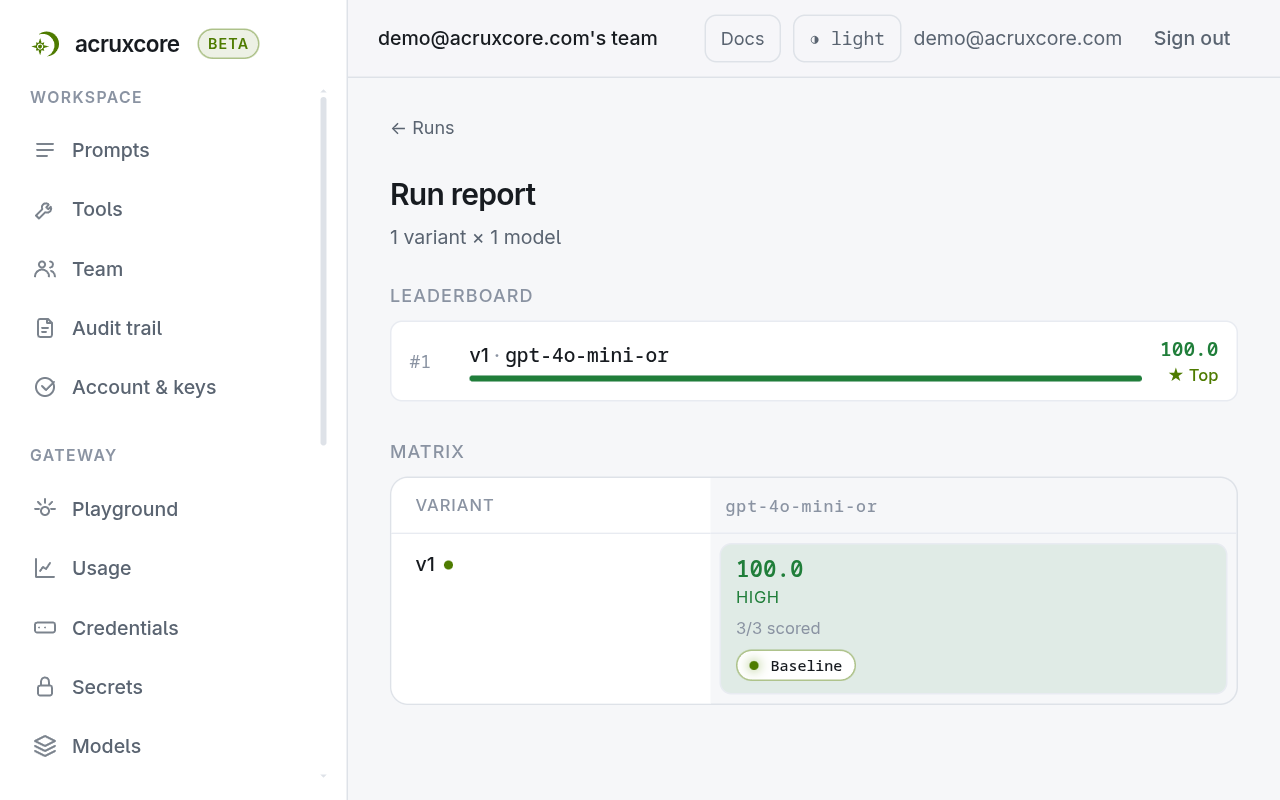
The run report shows a matrix. Each cell in the matrix holds one prompt version run on one
model. This
run has one version and one model, so it has one cell. Click the cell to see each example's
score and the judge's reason. Over the API, GET /runs/:id/cells/:cellKey returns
the same data (response shortened to two examples):
curl -H "Authorization: Bearer $ACRUXCORE_API_KEY" \
  "$ACRUXCORE_BASE_URL/runs/0f500cbb-b160-456b-88f1-c8eaa1186bb6/cells/v1%7Cgpt-4o-mini-or"
{
  "cellKey": "v1|gpt-4o-mini-or",
  "examples": [
    {
      "input": { "message": "The export button does nothing when I click it." },
      "criteria": null,
      "output": "{\n  \"category\": \"bug\",\n  \"priority\": \"high\"\n}",
      "score": 100,
      "passed": true,
      "reason": "The reply is a valid JSON object with both required keys 'category' and 'priority', and both have acceptable values."
    },
    {
      "input": { "message": "I was charged twice for my October invoice. Please refund one of the payments." },
      "criteria": "category billing",
      "output": "{\n  \"category\": \"billing\",\n  \"priority\": \"high\"\n}",
      "score": 100,
      "passed": true,
      "reason": "The reply is a valid JSON object with both required keys and appropriate values."
    }
  ]
}
The full response also gives each example a judgeTraceId, which the shortened response
above leaves out. That id points to the trace of the judge call: the record of the messages
the judge model received and its reply. Open the trace under Traces. For the
export-button example, the system message ends after the two rubric lines, because the
{% if criteria %} block rendered nothing.
What a judge template can use
| Variable | Value | When there is none |
|---|---|---|
{{ output }} | The reply being graded. | Never empty. |
{{ criteria }} | The example's criteria. In an evaluation rule, the rule's criteria. | Empty string. In an evaluation rule, the word none. |
{{ overallFeedback }} | The dataset's overall feedback. An evaluation rule has none. | Empty string. In an evaluation rule, the word none. |
{{ history }} | In a multi-turn example, the earlier turns of the conversation, as JSON. Inline images in that JSON appear as [inline image]. | Empty string. |
To use one judge prompt in both an experiment and an evaluation rule, check for both
values: {% if criteria and criteria != 'none' %}. The dashboard's starter template
already does this.
The judge does not see the example's input variables, such as message above. Write a
rubric the judge can apply to the reply alone, and put anything that depends on the input
in the criteria.
When the model under test was shown an image, the judge receives the same image. AcruxCore adds it to the last user message of your template, after the text. See Evaluate a prompt that reads an image.
The same judge prompt works for an evaluation rule. Pick it in the rule's Judge prompt
field, or set judgePromptId over the API. See
Score live traffic with an evaluation rule.
When an example says "judge prompt error"
When the judge template fails to render, for example because it uses a nunjucks filter that
does not exist, the example gets no score. The reason shown for that example is
judge prompt error: …. No judge call is made for the example, so none is billed. Fix the
template, commit a new version, and start a new run.
For every field and error of the experiments endpoint, see the experiments API reference.