Improve a RAG agent from user feedback
What you'll build: a customer-support agent for Brewline, an online coffee-gear shop. The agent searches the shop's policies and looks up orders. When it answers wrong, you mark the answer in the dashboard. AcruxCore drafts rewrites of the prompt from that feedback, and you run the whole agent on each rewrite before one goes to production.
Prefer a notebook? improve_rag_agent.ipynb — this whole page as one runnable notebook.
The agent's answers depend on what it searches for and which order it looks up, not only on the prompt's wording. AcruxCore's optimizer scores each rewrite with one model call per example, and that call has no tools and no retrieval. So this tutorial adds a second test. Your own agent code runs twice side by side: once with the prompt version that serves users now, and once with the rewrite. An LLM judge grades both runs the same way.
improve-a-rag-agent-from-feedback — every script on this page, plus its data/ folder.
The outputs on this page come from one run of those scripts. Your ids, scores and rewrites will differ, so use the ids your own scripts print.
Before you start
You need an AcruxCore account and an API key from Account & keys (Quickstart shows both). Connect a model provider under Gateway → Credentials, and add two models under Gateway → Models:
gpt-4o-miniruns the agent.gpt-4.1drafts the rewrites and grades the answers. Drafting and grading are harder jobs than one answer, so the scripts give them the stronger model.
Both are OpenAI models. To use other models, set ACRUXCORE_MODEL and
ACRUXCORE_STRONG_MODEL to two names from your Models list. Every script reads these
variables, so set them in the shell you run the scripts from.
The agent stores the shop's policies in Milvus, an open-source vector
database. You need a running Milvus; the
Milvus deployment overview lists the ways to get
one. Set MILVUS_URI to its address. The scripts default to http://localhost:19530.
pip install acruxcore "pymilvus[model]"
export ACRUXCORE_API_KEY=acx_sk_...
export ACRUXCORE_BASE_URL=https://api.acruxcore.com/api/v1
export MILVUS_URI=http://localhost:19530
git clone https://github.com/AcruxCore/AcruxCore.git
cd AcruxCore/scripts/tutorials/improve-a-rag-agent-from-feedback/python
1. Store the prompt
The agent's prompt lives in AcruxCore as brewline-support, so you can change its wording without
a deploy. setup_prompt.py creates it with one version. The system message is short on purpose. It says to use the tools,
but not when:
You are the customer support assistant for Brewline, an online shop for coffee
grinders, espresso machines and brewing gear. Today is {{ today }}.

Be friendly and answer in two to four sentences. Use the tools when you need
store information.
The user message is {{ question }}. The first version also creates two aliases,
production and staging. An alias is a name that points at one version. The agent asks for
production, so moving that alias changes what users get, with no deploy.
python setup_prompt.py
+ created prompt brewline-support
+ committed v1 on gpt-4o-mini
prompt_id=14afe73e-fb4a-4aa6-a914-0ed3ab636a89
setup_prompt.py — creates the brewline-support prompt.
2. Index the policies in Milvus
The shop has four policy files in ../data/policies/: returns, warranty, shipping and grinder
care. index_policies.py splits them into paragraphs and stores each paragraph in a Milvus collection called
brewline_policies, as a vector. A vector is a list of numbers that stands for the meaning of
a text, so a search finds a paragraph by meaning, not only by shared words.
pymilvus[model] includes a small embedding model that runs on your machine, so the vectors need
no API key. It is downloaded the first time it runs.
EMBED = model.DefaultEmbeddingFunction()
MILVUS = MilvusClient(MILVUS_URI)

MILVUS.create_collection(COLLECTION, dimension=EMBED.dim)
vectors = EMBED.encode_documents([c["text"] for c in chunks])
MILVUS.insert(COLLECTION, [{"id": i, "vector": v, **c} for i, (c, v) in enumerate(zip(chunks, vectors))])
Indexing is a separate job from the agent. A real shop runs it when a policy changes, and the agent only searches. A second run of the script indexes nothing if the paragraphs are already there.
python index_policies.py
+ indexed 16 paragraphs into brewline_policies
index_policies.py — indexes the policy files in Milvus.
3. Build the agent
agent.py has two tools, and both run in your process:
search_policiesturns the query into a vector with the same model and asks Milvus for the four closest paragraphs.lookup_orderreads one order from../data/orders.json, which stands in for the shop's order database.
The @acrux.tool decorator turns each function's signature and docstring into the tool definition
the model reads:
def search_policy_store(query: str, k: int = 4) -> List[Dict[str, str]]:
    hits = MILVUS.search(COLLECTION, EMBED.encode_queries([query]), limit=k, output_fields=["source", "text"])[0]
    return [{"source": hit["entity"]["source"], "text": hit["entity"]["text"]} for hit in hits]


@acrux.tool
async def search_policies(query: str) -> List[Dict[str, str]]:
    """Search Brewline's store policies (returns, refunds, warranty, shipping, grinder care).

    Args:
        query: What to look for, in a few words, e.g. "return used grinder".
    """
    return search_policy_store(query)
The agent renders the production alias, then lets the SDK run the tool loop:
async def ask(hub, question, trace=None):
    rendered = await hub.prompts.render(PROMPT, "production", {"question": question, "today": TODAY})
    result = await hub.gateway.run_prompt_with_tools(
        rendered,
        tools=[search_policies, lookup_order],
        trace={"name": PROMPT, **(trace or {})},
    )
    return result.content, result.trace_id
The trace argument is optional. In step 7 a test run passes its own trace in, so the agent's
spans for one test example land in that example's trace.
agent.py — the agent and its two tools.
4. Run it and read the traces
With no arguments, agent.py asks the six questions in ../data/questions.json:
python agent.py
Four answers are right. Two are wrong:
Q: Where is my order BR-1101? It should have arrived by now.
A: Hi Tom! Your order BR-1101, which includes the Acaia Pearl scale, was shipped on October 23,
2026. Since it's headed to the United Kingdom, it might take a little longer to arrive. Please
keep an eye on the tracking information for updates!
   trace 2f8ae96e-4050-4903-a1d5-6bfc27196641

Q: My grinder is making a loud clicking noise. Is it broken?
A: A loud clicking noise from your grinder could be a sign of a few issues, such as obstructions
in the grinding mechanism or wear on the blades. It's best to check for any foreign objects or
grind buildup that may be affecting its performance. If the problem persists, you might want to
consider consulting our warranty or return policies for further assistance. Would you like me to
look up specific information on those policies?
   trace 5fc7b633-cb24-459d-8cef-205ec8f75706
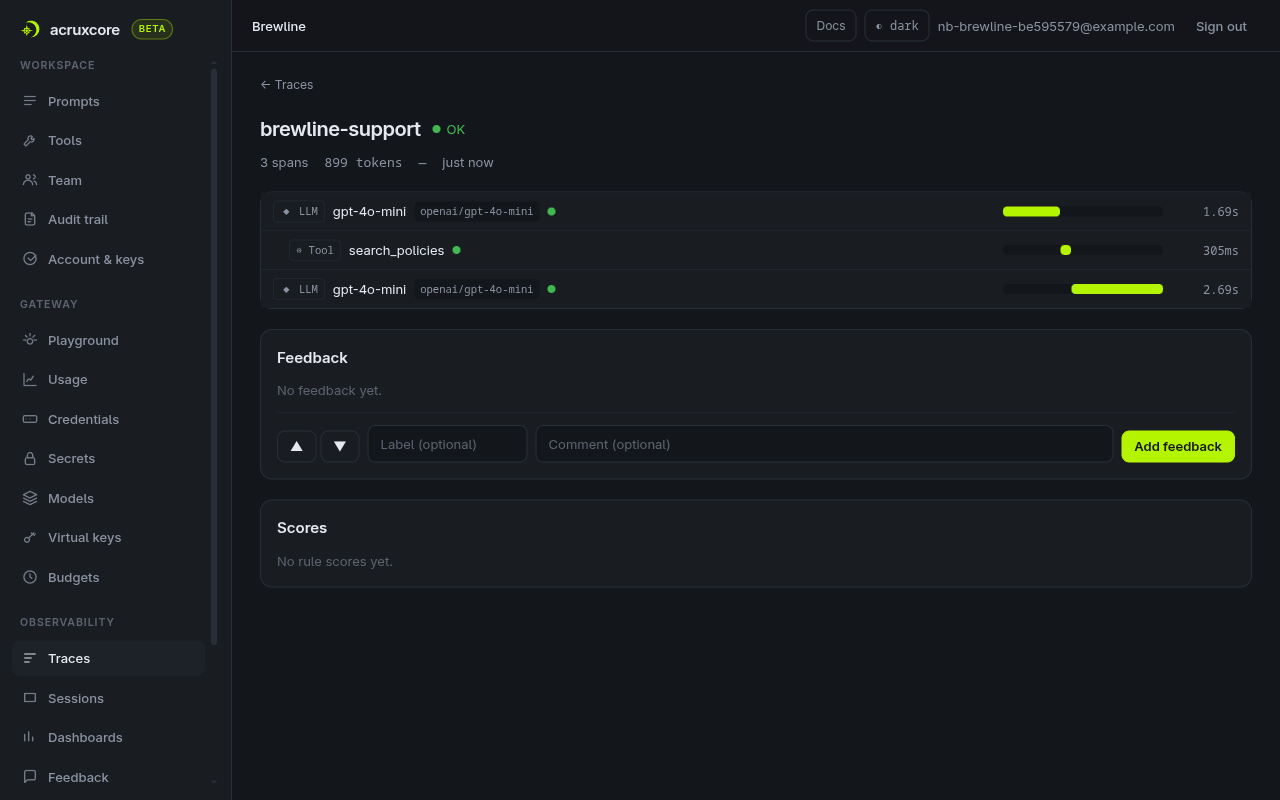
Each answer prints its trace id, which you need in step 5. The shipping policy says UK orders take 5 to 8 business days and the customer pays import VAT on delivery. The grinder care guide says a loud click is usually a stone stuck between the burrs. The agent used neither. Open the first trace under Observability → Traces to see why:
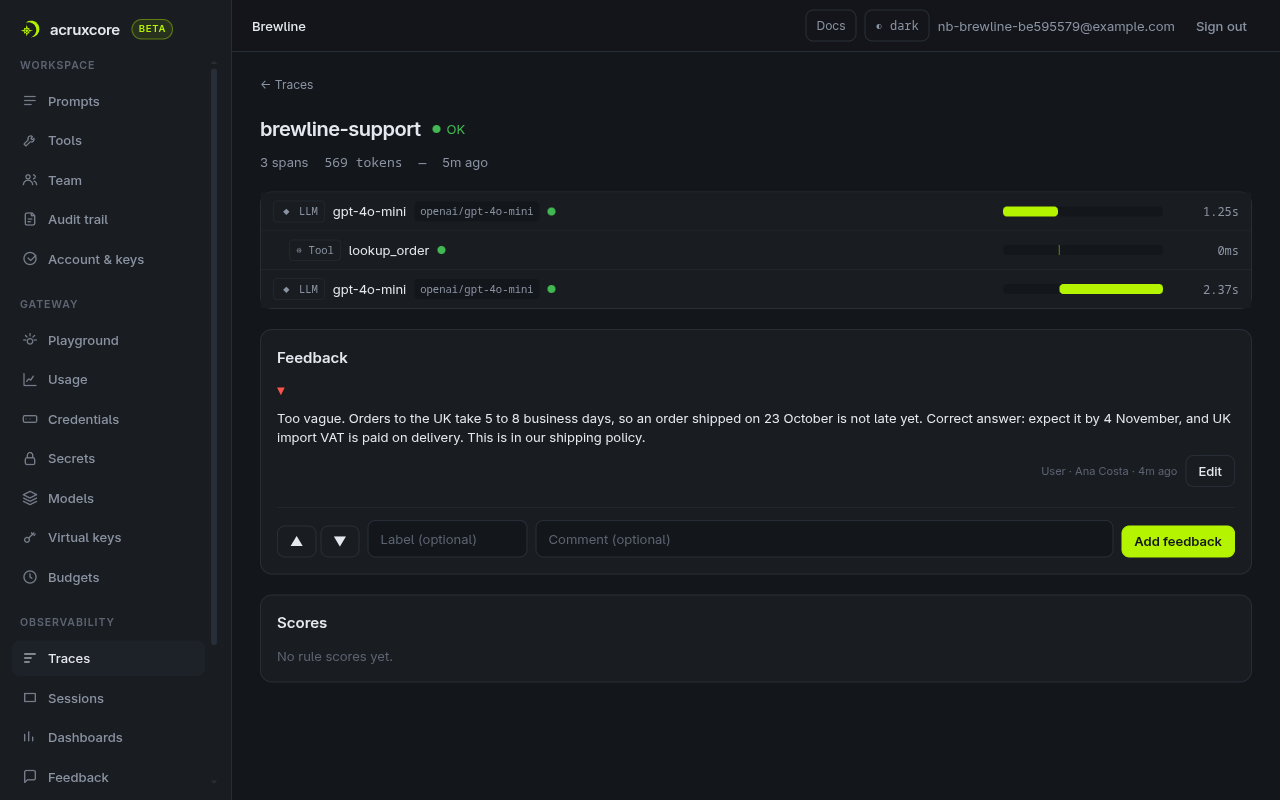
The model called lookup_order and answered from the order alone. It never searched the shipping
policy. The grinder trace has a single LLM span, so for that question the model called no tool at
all.
5. Mark the wrong answers
Feedback is what the optimizer learns from, so write each comment as the correct answer, not only
"wrong". Each comment also becomes the criteria an LLM judge grades against later. The judge sees
only the answer, never which tools ran, so describe what a correct answer contains, not how the
agent should get there. Open the grinder trace under Observability → Traces. Under Feedback, click the
thumbs-down button ▼, type wrong-answer in the optional label field, and write the comment:
Wrong. Our grinder care guide says a loud click usually means a stone or bean husk is stuck
between the burrs. Correct answer: it is probably not broken; unplug the grinder, remove the
upper burr and brush the chamber clean.
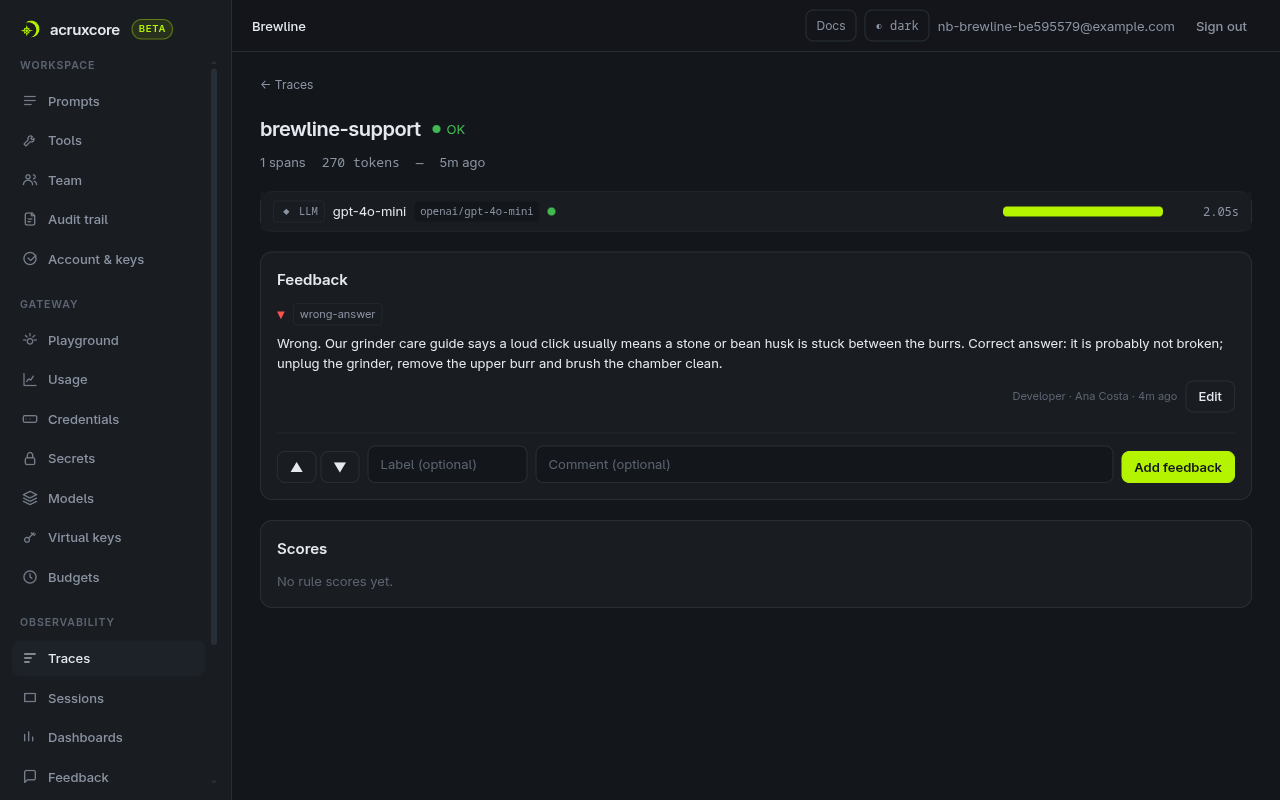
A support tool would leave the same feedback over the API. leave_feedback.py
leaves a thumbs-down with a comment on the BR-1101 trace. Pass your own BR-1101 trace id from
step 4:
python leave_feedback.py 2f8ae96e-4050-4903-a1d5-6bfc27196641 \
  "Too vague. Orders to the UK take 5 to 8 business days, so an order shipped on 23 October is not late yet. Correct answer: expect it by 4 November, and UK import VAT is paid on delivery. This is in our shipping policy."
feedback 5085c77c-a53e-4747-b63f-0a76c9fcbbf6 on trace 2f8ae96e-4050-4903-a1d5-6bfc27196641
leave_feedback.py — leaves feedback on a trace over the API.
6. Let the optimizer draft rewrites
improve.py takes no arguments. It finds the brewline-support prompt by name and reads every thumbs-down
left on a trace that ran that prompt. Then it does three things:
- It builds a dataset from the thumbs-down feedback, so both marks from step 5 become examples. Each feedback comment becomes the grading criteria for its example.
- It adds two regression checks from
../data/regression_checks.json. These are questions the agent already answers well, so a rewrite that breaks them loses points. - It starts an optimize run. The run drafts three rewrites, named candidate-A, candidate-B and candidate-C, and scores each of them and the production version on all four examples.
run = await hub.optimize.start(
    prompt.id,
    dataset_id=dataset.id,
    models=[MODEL],
    judge_model=STRONG_MODEL,
    optimizer_model=STRONG_MODEL,
    draft_count=3,
)
improve.py also gives the dataset one overall feedback text. The judge grades every answer
against this text, and the optimizer reads it when it drafts. So the text describes what a correct
answer contains, and names the tools only as where the facts come from:
A correct answer states the Brewline policy that applies and what it means for this
customer's order (dates, whether the item was used), then the exact next step the
customer must take. It never gives general advice that is not in Brewline's policies.
The policies come from the search_policies tool and the order from the lookup_order tool.
python improve.py
dataset d7a23b1a-7a20-450e-9f73-0a2c9ccc23ec: 2 examples from feedback, skipped []
+ 2 regression checks
optimize run ccd4b75e-a661-41d8-b907-4cddd943a7c1 queued
run succeeded

variant        score  passed
candidate-B     47.5  1/4
candidate-A     45.0  1/4
production      45.0  1/4
candidate-C     45.0  0/4
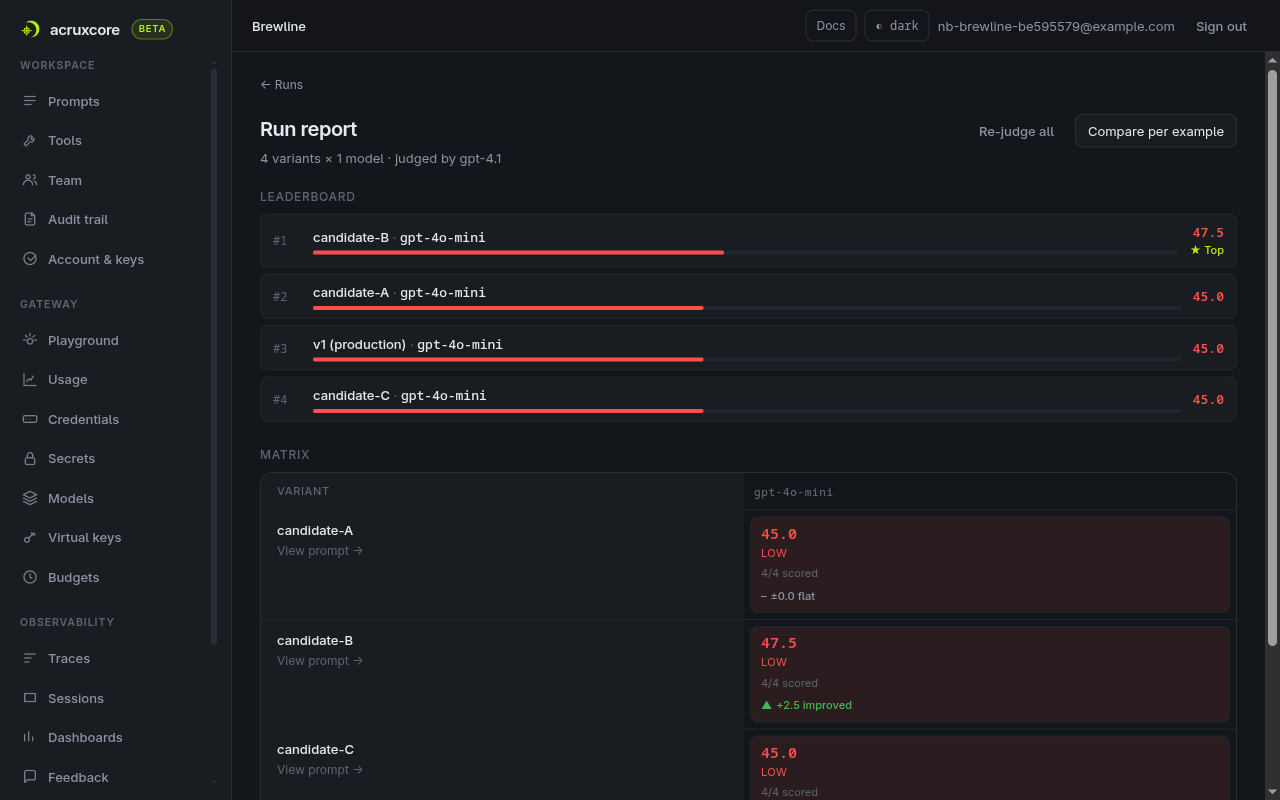
Open the run under Evaluations → Runs to see the run report. In this table, production passes only one of the four examples, although the real agent answers both regression checks well. The scores are low because each example gets one model call with the rendered prompt and no tools. Without a search or an order lookup, the model cannot answer these questions. The table ranks candidate-B's wording first, but it cannot show whether the agent will now search before it answers.
improve.py — builds the dataset and starts the optimize run.
7. Run the whole agent on each rewrite
Open a candidate's cell in the run report, here candidate-A's, and click Test in your pipeline. The dialog commits the rewrite as a prompt version. No alias moves, so production keeps serving v1. Then the dialog shows the code that runs your app on production and on the candidate:
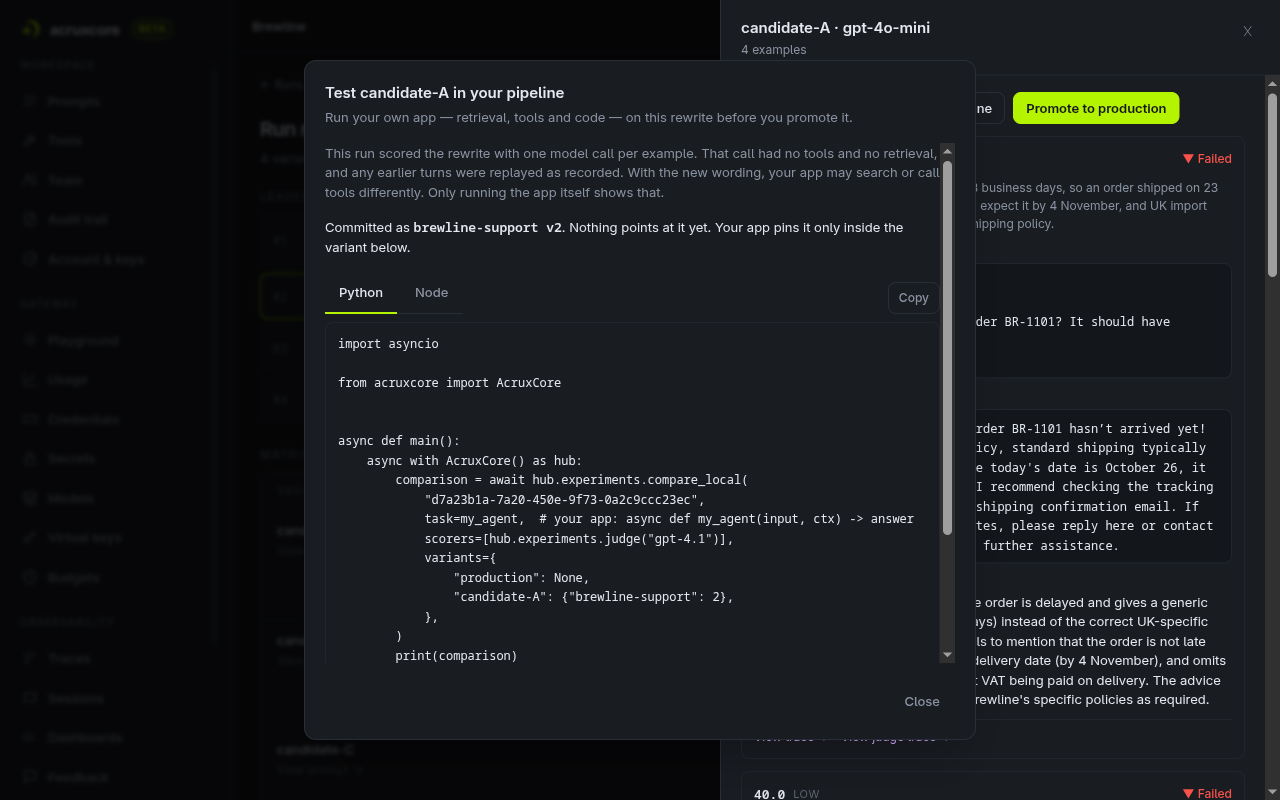
test_candidate.py is the same code with the Brewline agent filled in, for all three candidates. It takes the
optimize run id that improve.py printed. It commits each candidate, then calls compare_local:
run = await hub.runs.get(run_id)  # the optimize run, for its dataset
JUDGE_MODEL = "gpt-4.1"           # the judge the optimize run used

async def agent(example_input, ctx):
    answer, _ = await ask(hub, example_input["question"], trace=ctx.trace)
    return answer

comparison = await hub.experiments.compare_local(
    run.dataset_id,
    task=agent,
    scorers=[hub.experiments.judge(JUDGE_MODEL)],
    variants=variants,  # {"production": None, "candidate-A": {"brewline-support": 2}, ...}
)
compare_local starts one local run per variant, all at the same time, over the same dataset.
While the candidate-A run is active, every prompts.render of brewline-support returns v2, the version
candidate-A was committed as. agent.py does not change. hub.experiments.judge grades each answer with the same
judge and criteria the optimize run used, so the two sets of scores compare.
python test_candidate.py ccd4b75e-a661-41d8-b907-4cddd943a7c1
candidate-A -> brewline-support v2
candidate-B -> brewline-support v3
candidate-C -> brewline-support v4

score  production  candidate-A  candidate-B  candidate-C
judge         50%          50%          50%          50%
(pass rate per score)
compare production → candidate-A: https://acruxcore.com/evaluations/runs/2473d7d0-d9f5-4ff3-b013-2bdf7fbe7c25/compare?target_run=c177a63a-8dbe-488f-a778-6c251e0747a3
compare production → candidate-B: https://acruxcore.com/evaluations/runs/2473d7d0-d9f5-4ff3-b013-2bdf7fbe7c25/compare?target_run=1f94213f-6401-4ca4-bad1-88c273a4d51c
compare production → candidate-C: https://acruxcore.com/evaluations/runs/2473d7d0-d9f5-4ff3-b013-2bdf7fbe7c25/compare?target_run=9e5dd215-2e9a-4d77-b4b4-cf6ef2664a9f
With its tools, production passes the two regression checks and fails the two feedback cases.
So does every candidate. No rewrite passes more examples than production, so none is worth
promoting yet. Open each compare link, or each example's trace, to see why. The table lists the
tools the agent called and the judge's score (0–100). "Both tools" means search_policies and
lookup_order.
| Question | production | candidate-A | candidate-B | candidate-C |
|---|---|---|---|---|
| Grinder clicking | no tool · 40 | no tool · 40 | search_policies · 40 | search_policies · 10 |
| BR-1101 shipping | lookup_order · 40 | lookup_order · 40 | lookup_order · 40 | lookup_order · 60 |
| BR-1077 return (check) | both tools · 85 | both tools · 90 | both tools · 90 | both tools · 85 |
| BR-1088 return (check) | both tools · 80 | both tools · 85 | both tools · 80 | both tools · 90 |
candidate-B and candidate-C made the agent search on the grinder question, and both still failed. Their traces show why: each searched for "grinder care", and that search returns the cleaning, warranty and returns paragraphs, not the one about a clicking noise. So the rewrites changed what the agent does, but not enough.
test_candidate.py — runs your agent on production and on each candidate.
8. Run a second round
Each optimize run drafts new rewrites, so when no candidate wins, run improve.py again. It
builds a fresh dataset from the same feedback and starts a new optimize run:
python improve.py
dataset 0c32c770-76c7-49ac-a9dc-b567adda0a6a: 2 examples from feedback, skipped []
+ 2 regression checks
optimize run 87040f13-e74e-4182-93f2-0c11b46ebe39 queued
run succeeded

variant        score  passed
candidate-B     45.0  0/4
candidate-C     43.8  1/4
production      42.5  0/4
candidate-A     40.0  0/4
Then test the new candidates with the whole agent:
python test_candidate.py 87040f13-e74e-4182-93f2-0c11b46ebe39
candidate-A -> brewline-support v5
candidate-B -> brewline-support v6
candidate-C -> brewline-support v7

score  production  candidate-A  candidate-B  candidate-C
judge         50%          50%          75%          50%
(pass rate per score)
compare production → candidate-A: https://acruxcore.com/evaluations/runs/fd69437d-4b53-41a7-897c-20a80ad775a2/compare?target_run=420fc5e1-f062-4b8c-b97a-d13513c0c54f
compare production → candidate-B: https://acruxcore.com/evaluations/runs/fd69437d-4b53-41a7-897c-20a80ad775a2/compare?target_run=b1bdc665-aa61-4dd4-a33f-cc07c5d83f39
compare production → candidate-C: https://acruxcore.com/evaluations/runs/fd69437d-4b53-41a7-897c-20a80ad775a2/compare?target_run=669d586b-ae0a-477d-9186-13367dd25997
This time candidate-B passes three of the four examples. Open its compare link to see the change per example:
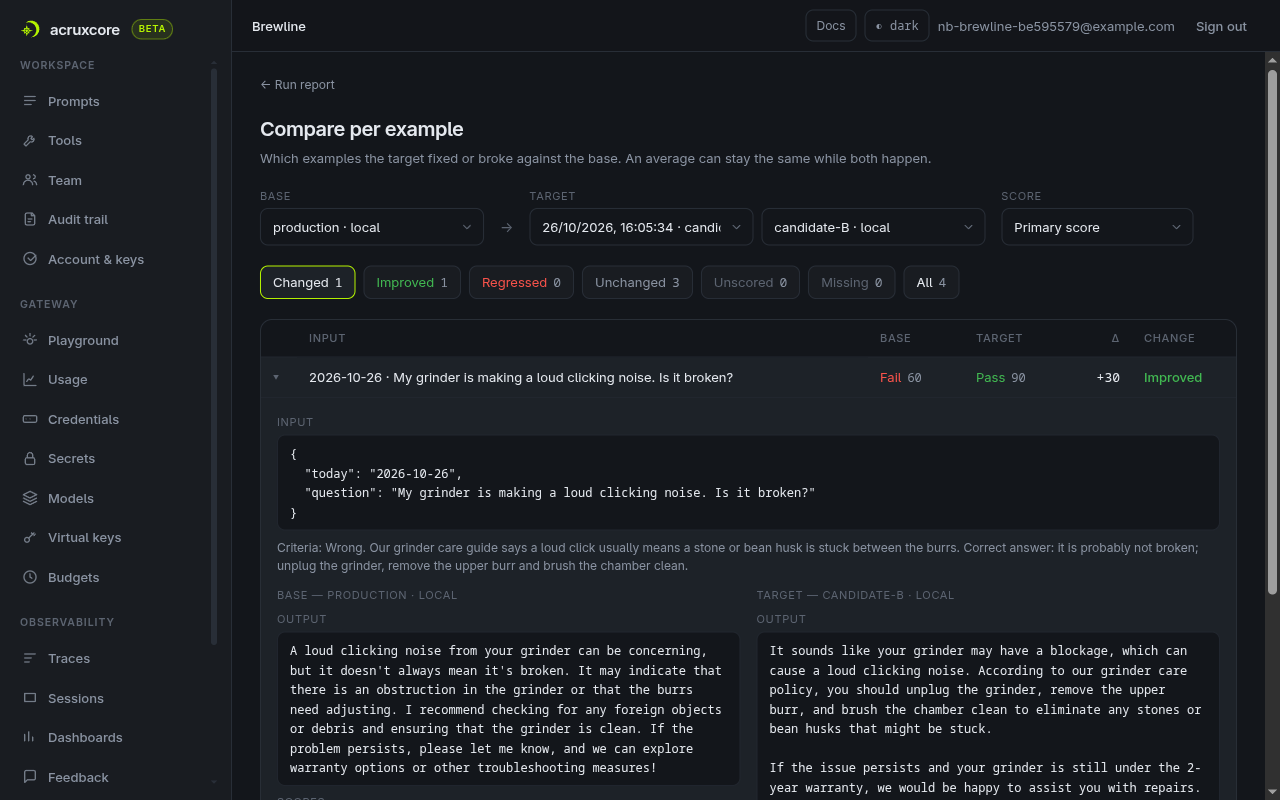
| Question | production | candidate-A | candidate-B | candidate-C |
|---|---|---|---|---|
| Grinder clicking | no tool · 60 | search_policies · 10 | search_policies · 90 | no tool · 10 |
| BR-1101 shipping | lookup_order · 40 | lookup_order · 40 | lookup_order · 40 | lookup_order · 40 |
| BR-1077 return (check) | both tools · 85 | both tools · 85 | both tools · 85 | both tools · 85 |
| BR-1088 return (check) | both tools · 80 | both tools · 85 | both tools · 95 | both tools · 80 |
candidate-B's agent searched for "troubleshooting grinder noise", got the paragraph about the click, and answered from it. Both regression checks still pass. No rewrite made the agent search the shipping policy for BR-1101, so that question fails on every variant.
With four examples, one answer moves a pass rate by 25 points. So before you promote, run the
winner once more. test_candidate.py takes candidate names after the run id:
python test_candidate.py 87040f13-e74e-4182-93f2-0c11b46ebe39 candidate-B
candidate-B -> brewline-support v6

score  production  candidate-B
judge         50%          75%
(pass rate per score)
compare production → candidate-B: https://acruxcore.com/evaluations/runs/0641a846-eee2-4f98-95a3-662f71facf37/compare?target_run=9e471992-2d12-4185-a5d9-d77b20fd7e13
candidate-B passes the grinder question and both checks again.
9. Promote the winner
candidate-B fixes the grinder answer and keeps both regression checks passing, twice. Promote it.
Click Promote to production in its cell, or run promote.py.
Pass the second optimize run's id and the candidate's name:
python promote.py 87040f13-e74e-4182-93f2-0c11b46ebe39 candidate-B
production -> v6
Promoting moves production to v6, the version that step 8 ran. Nothing new is committed, so the
wording that ships is the wording you tested. The other candidates' versions stay in the prompt's
history with no alias on them.
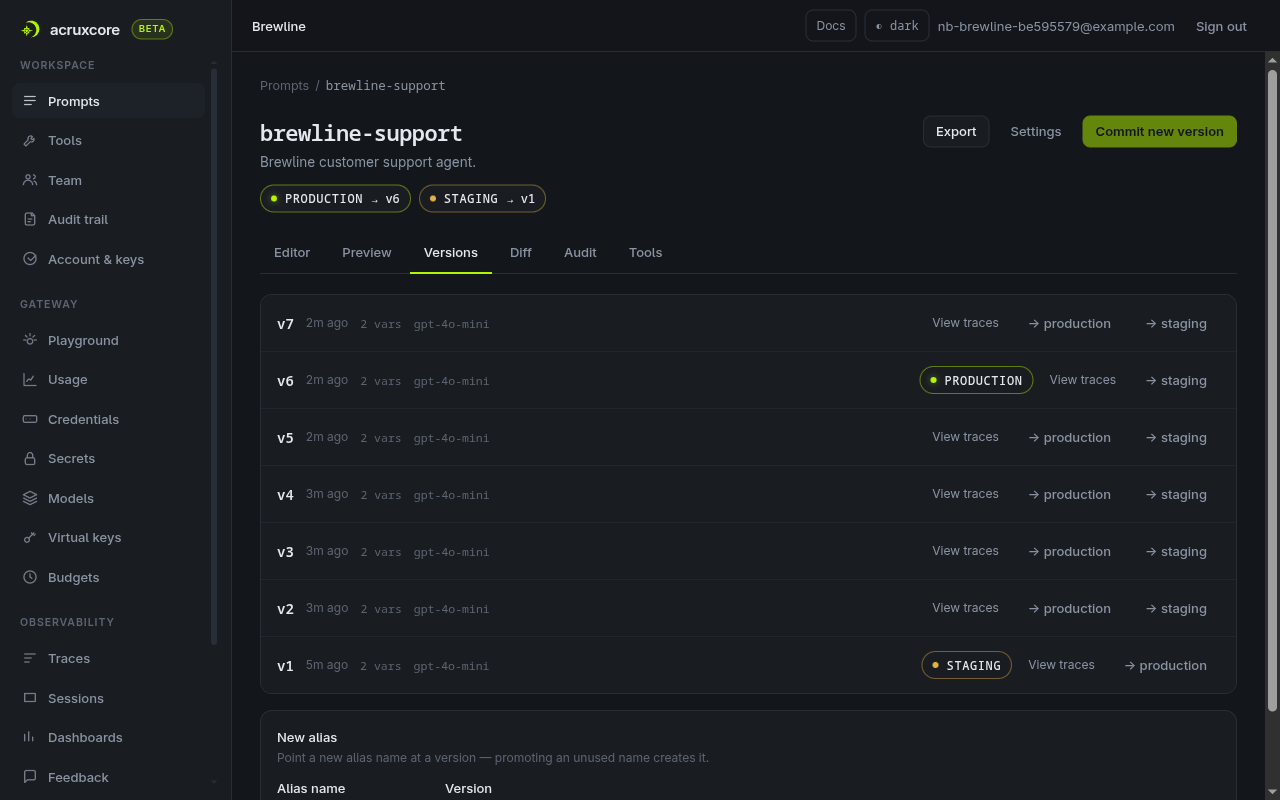
v1 said only "Use the tools when you need store information." candidate-B's system message says what every answer must contain, and to take the facts from the tools:
For each customer inquiry:
- Identify and state the exact Brewline policy that applies (e.g., returns, shipping,
  troubleshooting), referencing order details if relevant.
- Explain what this policy means for the customer's case (including key dates and item use status).
- Specify the precise action the customer should take next.
- Do not offer general or unofficial advice; rely only on Brewline information accessed through the tools.
Respond kindly in two to four sentences, always using the tools to check policies or order details if appropriate.
Run python agent.py again. The grinder answer now comes from the care guide, and its trace has
a search_policies span:
Q: My grinder is making a loud clicking noise. Is it broken?
A: If your grinder is making a loud clicking noise, this could indicate that a stone or a bean
husk is stuck between the burrs. I recommend unplugging the grinder, removing the upper burr,
and brushing the chamber clean.
The BR-1101 answer is still vague. To work on it, mark the new BR-1101 trace, run improve.py,
and test again.
promote.py — moves the production alias to the winning candidate.
Troubleshooting
The judge fails answers that are correct. The judge sees only the answer, never which tools the agent called. If a feedback comment or the overall feedback asks for a process ("search our policies before answering"), the judge cannot see that process and fails a correct answer for missing it. Describe what a correct answer contains, and name the tools only as where the facts come from.
The agent searches and still answers wrong. Read the tool span's input and output in the trace. A search can run and still miss the paragraph you need. In step 7, "grinder care" returned the cleaning, warranty and returns paragraphs, and the agent answered from those. The fix is in the query the model writes, which a rewrite can change. In step 8, "troubleshooting grinder noise" found the right paragraph.
The pass rates change between runs. With four examples, one answer moves a pass rate by 25 points, and the model can give a different answer on a second run. Read the per-example compare page before you trust a rate, and add regression checks when you can.
The optimize run's scores look too low to be useful. The run makes one call per example with no tools, so for an agent it compares wording only. Step 7 is the test that includes the tools.
What's next
- Improve a prompt from feedback covers the optimize run in more depth: writing feedback that can grade, reading the leaderboard, and what to do when no candidate wins.
- Run your app as an experiment covers local runs,
prompt overrides and
compare_localfor any app, in Python and Node.